
- Posts: 18
DJI F550 / DEVO10 / Naza-M Lite
- Bullfrog
-
Topic Author
- Offline
Less
More
02 Mar 2014 08:46 #21069
by Bullfrog
DJI F550 / DEVO10 / Naza-M Lite was created by Bullfrog
Here is a config file for DJI F550 Hexacopter. Configuration: DJI F550 / Devo10 with FW 4.0.1 / Naza-M Lite + GPS. I think it will run with Naza-M V2 as well.
Supports all flight modes and fail-save/comming-home. Also switchable scales for ELEV/AILE.
Maybe the values for Flight-Mode, Orienting-Control and Fail-Save need some readjustment caused in variations of the different RX-Modules.
Details in attached document.
Supports all flight modes and fail-save/comming-home. Also switchable scales for ELEV/AILE.
Maybe the values for Flight-Mode, Orienting-Control and Fail-Save need some readjustment caused in variations of the different RX-Modules.
Details in attached document.
- mahandel
-
- Offline

Less
More
- Posts: 9
23 Mar 2014 01:20 #21742
by mahandel
[Devo-10 @ DJI Flamewheel F550 with GoPro3+]
Replied by mahandel on topic DJI F550 / DEVO10 / Naza-M Lite
hi! i am completely new to deviation and even having a tx at all!
i just got an F550 / naza v2 with a devo 10 and used your settings above...
it works like a charm!!!!!!! many many thanks to you and all the others developing the deviation FW and models
i just got an F550 / naza v2 with a devo 10 and used your settings above...
it works like a charm!!!!!!! many many thanks to you and all the others developing the deviation FW and models
[Devo-10 @ DJI Flamewheel F550 with GoPro3+]
- Bullfrog
-
- Offline
Less
More
- Posts: 18
29 Mar 2014 07:27 #21930
by Bullfrog
Replied by Bullfrog on topic DJI F550 / DEVO10 / Naza-M Lite
So the file also works with Naza V2, thank you for this information.
The file works with all models form DJI Flamewheel series: F330/450/550, only different settings in Naza Configuration necessary. Info´s added to the Setup file.
The file works with all models form DJI Flamewheel series: F330/450/550, only different settings in Naza Configuration necessary. Info´s added to the Setup file.
- drahdiwaberl
-
- Offline

Less
More
- Posts: 1
05 Apr 2014 08:04 - 05 Apr 2014 08:08 #22143
by drahdiwaberl
Replied by drahdiwaberl on topic DJI F550 / DEVO10 / Naza-M Lite
would be interesting to know which receiver/protocol is used with this.
thanks.
(ok, it's in the pdf.. for others: it's an RX1002, so walkera protocol)
thanks.
(ok, it's in the pdf.. for others: it's an RX1002, so walkera protocol)
Last edit: 05 Apr 2014 08:08 by drahdiwaberl.
- tokenter
-
- Offline

Less
More
- Posts: 1
07 Apr 2014 22:53 #22220
by tokenter
Replied by tokenter on topic DJI F550 / DEVO10 / Naza-M Lite
Thank you Bullfrog.
Do i have to redo the esc transmitter calibration after changing model config?
Do i have to redo the esc transmitter calibration after changing model config?
- Hot_Wheels
-
- Offline

Less
More
- Posts: 28
08 Apr 2014 00:31 #22225
by Hot_Wheels
Replied by Hot_Wheels on topic DJI F550 / DEVO10 / Naza-M Lite
Will this set up work on devo 8?
- mahandel
-
- Offline
Less
More
- Posts: 9
19 Apr 2014 10:01 #22567
by mahandel
[Devo-10 @ DJI Flamewheel F550 with GoPro3+]
Replied by mahandel on topic DJI F550 / DEVO10 / Naza-M Lite
OH NO!!!! I messed it up 
everything was fine (using your config) until yesterday:
I installed the gimbal (zenmuse H3 2D at F550) and it immediately moved to a position pointing to the ground.
Then I tried to configure AUX4 or AUX5 to move the gimbal but as a complete newbee I was not able to configure it
Then I realized that in the NAZA M-V2 configuration tool the switches are wrong: GPS/atti. mode is no longer working and Home Lock neither!!!
I tried it with a copy of your config (like it worked before!) but no success!
PLEASE HELP ME anyone! It's easter holidays and I finaly have time and the GoPro... and now I cannot fly
my setup:
F550 with Naza M-V2, Zenmuse H3 2D with GoPro
Devo-10 with RX1002
everything was fine (using your config) until yesterday:
I installed the gimbal (zenmuse H3 2D at F550) and it immediately moved to a position pointing to the ground.
Then I tried to configure AUX4 or AUX5 to move the gimbal but as a complete newbee I was not able to configure it
Then I realized that in the NAZA M-V2 configuration tool the switches are wrong: GPS/atti. mode is no longer working and Home Lock neither!!!
I tried it with a copy of your config (like it worked before!) but no success!
PLEASE HELP ME anyone! It's easter holidays and I finaly have time and the GoPro... and now I cannot fly
my setup:
F550 with Naza M-V2, Zenmuse H3 2D with GoPro
Devo-10 with RX1002
[Devo-10 @ DJI Flamewheel F550 with GoPro3+]
- Bullfrog
-
- Offline
Less
More
- Posts: 18
19 Apr 2014 14:12 #22570
by Bullfrog
Replied by Bullfrog on topic DJI F550 / DEVO10 / Naza-M Lite
Check the wiring between RX and NAZA:
RX AUX1 (CH6) > Naza Connector U (Flight Control Mode)
RX AUX2 (CH7) > Naza Connector X2 (Orientation Control)
RX AUX1 (CH6) > Naza Connector U (Flight Control Mode)
RX AUX2 (CH7) > Naza Connector X2 (Orientation Control)
- mahandel
-
- Offline
Less
More
- Posts: 9
19 Apr 2014 16:04 - 19 Apr 2014 16:06 #22573
by mahandel
[Devo-10 @ DJI Flamewheel F550 with GoPro3+]
Replied by mahandel on topic DJI F550 / DEVO10 / Naza-M Lite
ok - I checked the wiring and in fact - it was a little different 
...but unfortunately it didn't work after the change either.
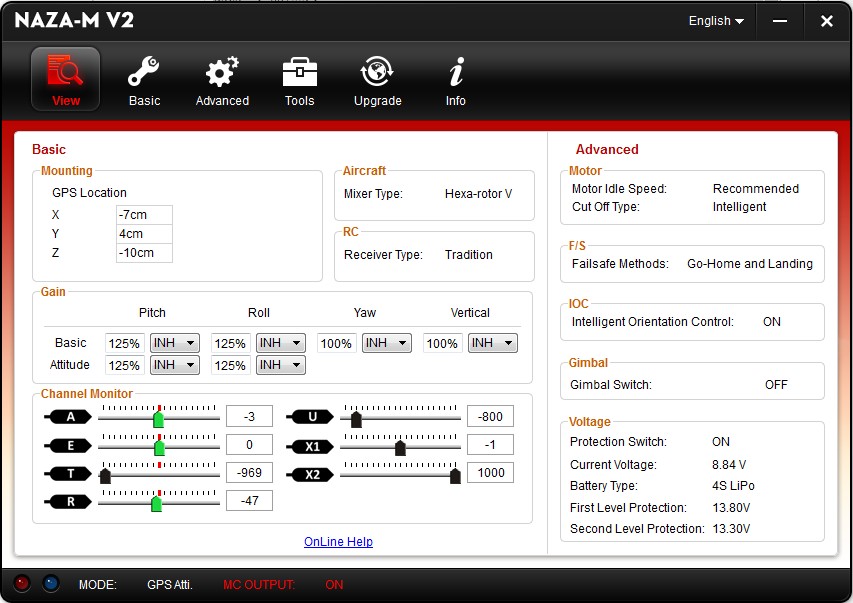
now I have the following wiring:
Naza -> RX1002:
A -> A
E -> E
T -> T
R -> R
G (Gear is empty)
U -> AUX1
X2 -> AUX2
X1 -> AUX3 (is this channel 8??)
X3 -> (connected to Naza PMU)
and it works with the GPS/atti mode and IOC again
The gimbal is pointing forward - at least I can fly and use the GoPro!
now I assigned Channel 8 (see above - connected to Naza X1) to AUX4: Simple - 1to1... hoping that I can control the gimbal with AUX4.
But this does not work so far
do you have any idea how to assign AUX4 to the gimbla control?
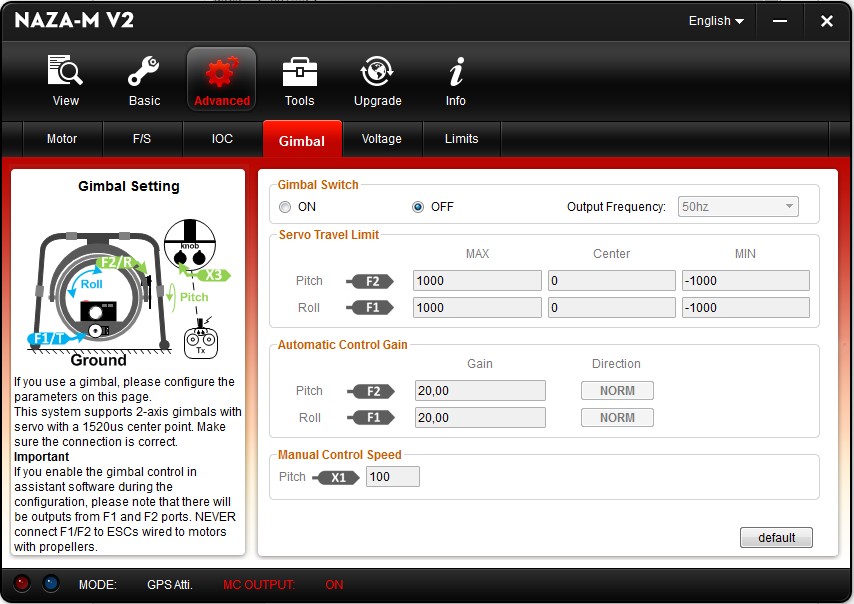
btw: in the Naza tool I did NOT check the Gimbal Switch ON!! (someone told me this is not necessary for the zenmuse gimbal?)
Do I have to change the settings in the Naza tool? or is it possible to use the tilt function without?
attached my model2.ini ...
...but unfortunately it didn't work after the change either.
now I have the following wiring:
Naza -> RX1002:
A -> A
E -> E
T -> T
R -> R
G (Gear is empty)
U -> AUX1
X2 -> AUX2
X1 -> AUX3 (is this channel 8??)
X3 -> (connected to Naza PMU)
and it works with the GPS/atti mode and IOC again
The gimbal is pointing forward - at least I can fly and use the GoPro!
now I assigned Channel 8 (see above - connected to Naza X1) to AUX4: Simple - 1to1... hoping that I can control the gimbal with AUX4.
But this does not work so far
do you have any idea how to assign AUX4 to the gimbla control?
btw: in the Naza tool I did NOT check the Gimbal Switch ON!! (someone told me this is not necessary for the zenmuse gimbal?)
Do I have to change the settings in the Naza tool? or is it possible to use the tilt function without?
attached my model2.ini ...
[Devo-10 @ DJI Flamewheel F550 with GoPro3+]
Last edit: 19 Apr 2014 16:06 by mahandel.
- Bullfrog
-
- Offline
Less
More
- Posts: 18
19 Apr 2014 16:55 - 19 Apr 2014 16:57 #22576
by Bullfrog
Replied by Bullfrog on topic DJI F550 / DEVO10 / Naza-M Lite
Attached a new config file:
- Max. channels set to 10
- TX AUX4 assigned to CH8 (RX AUX3)
- TX AUX5 assinged to CH9 (RX AUX4)
Wiring: RX AUX3 (CH8) > Naza Connector X1 (Gimbal/Gain Control)
Mixer of AUX4/5 is set to simple 1-to-1, I cannot check if it works properly because of no gimble but give it a try.
Channel monitor on my TX give me erratic values when turning AUX4/5, not sure if it is a malfuncion of my TX or a bug in Dev. 4.0.1.
- Max. channels set to 10
- TX AUX4 assigned to CH8 (RX AUX3)
- TX AUX5 assinged to CH9 (RX AUX4)
Wiring: RX AUX3 (CH8) > Naza Connector X1 (Gimbal/Gain Control)
Mixer of AUX4/5 is set to simple 1-to-1, I cannot check if it works properly because of no gimble but give it a try.
Channel monitor on my TX give me erratic values when turning AUX4/5, not sure if it is a malfuncion of my TX or a bug in Dev. 4.0.1.
Last edit: 19 Apr 2014 16:57 by Bullfrog.
- mahandel
-
- Offline
Less
More
- Posts: 9
19 Apr 2014 19:28 #22577
by mahandel
[Devo-10 @ DJI Flamewheel F550 with GoPro3+]
Replied by mahandel on topic DJI F550 / DEVO10 / Naza-M Lite
hi again - thank you, but it does not work 
I experimented with your model.ini and different kinds of settings but could not get AUX4 or AUX5 to be working.
If I set Channel 8 to any of the sticks, I can move the camera (X1) with the stick (but at the same time the F550 would turn around or fly into the given direction ) - so it is wired correctely!
But as soon as I choose AUX, no signal seems to be coming from the Devo.
I tried simple, complex, 1to1... no reaction on the monitor!!
Maybe there is a generic misunderstanding in using the 2 AUX knobs??
Can someone please help?
I experimented with your model.ini and different kinds of settings but could not get AUX4 or AUX5 to be working.
If I set Channel 8 to any of the sticks, I can move the camera (X1) with the stick (but at the same time the F550 would turn around or fly into the given direction
) - so it is wired correctely!But as soon as I choose AUX, no signal seems to be coming from the Devo.
I tried simple, complex, 1to1... no reaction on the monitor!!
Maybe there is a generic misunderstanding in using the 2 AUX knobs??
Can someone please help?
[Devo-10 @ DJI Flamewheel F550 with GoPro3+]
- mahandel
-
- Offline
Less
More
- Posts: 9
19 Apr 2014 20:26 #22581
by mahandel
[Devo-10 @ DJI Flamewheel F550 with GoPro3+]
Replied by mahandel on topic DJI F550 / DEVO10 / Naza-M Lite
YYYYEEEEHHHHAAAA!!!! got it!!
after setting TRIM and recalibrating, it works!!
AUX5 (on channel is now moooooving my gimbal!
(seems the last time(s) I did recalibrate the STICKS I did NOT turn the knobs )
)
I'll attach my FINAL model.ini for all who want to use it!
@Bullfrog: thank you for your help!
after setting TRIM and recalibrating, it works!!
AUX5 (on channel
is now moooooving my gimbal!(seems the last time(s) I did recalibrate the STICKS I did NOT turn the knobs
)I'll attach my FINAL model.ini for all who want to use it!
@Bullfrog: thank you for your help!
[Devo-10 @ DJI Flamewheel F550 with GoPro3+]
- oldgamefreak
-
- Offline

Less
More
- Posts: 8
16 May 2014 14:40 #23282
by oldgamefreak
Replied by oldgamefreak on topic DJI F550 / DEVO10 / Naza-M Lite
WooHoo thanks for this guys!!! Getting my first NAZA V1 550 next week. looking forward to being able to use this 
- Bullfrog
-
- Offline
Less
More
- Posts: 18
18 May 2014 20:21 #23321
by Bullfrog
Replied by Bullfrog on topic DJI F550 / DEVO10 / Naza-M Lite
Hello
Here are my latest files for DJI F-Series.
TX AUX4/5 assigned to RX for Gain/Gimbal control, values will be shown in display now.
Added a "General" section in Info file and did some minor fixes.
Here are my latest files for DJI F-Series.
TX AUX4/5 assigned to RX for Gain/Gimbal control, values will be shown in display now.
Added a "General" section in Info file and did some minor fixes.
- RRaider
-
- Offline

Less
More
- Posts: 2
20 May 2014 18:22 #23410
by RRaider
Replied by RRaider on topic DJI F550 / DEVO10 / Naza-M Lite
Will this work with an 8S and an RX802 receiver? I have an f450 kit on the way and want to make sure I have everything I need to get it in the air.
Thanks
Thanks
- oldgamefreak
-
- Offline
Less
More
- Posts: 8
22 May 2014 23:03 #23509
by oldgamefreak
Replied by oldgamefreak on topic DJI F550 / DEVO10 / Naza-M Lite
Thank you all for this. Getting my 550 today or tomorrow. Do any of you have a HEX model icon? I don't want to look at a getto helicopter while i'm flying my cool 550
- Dann6968
-
- Offline

Less
More
- Posts: 1
17 Jun 2014 18:13 #24126
by Dann6968
Replied by Dann6968 on topic DJI F550 / DEVO10 / Naza-M Lite
This has been super helpful. Thanks so much.
Only question I have is how can I reverse the fmod switch. Currently it's manual-0, ATT-1, and GPS-2. I would like it the other way around. Had a couple crashes from accidentally switching it into manual mode when I meant to go into reverse.
Thanks again.
Only question I have is how can I reverse the fmod switch. Currently it's manual-0, ATT-1, and GPS-2. I would like it the other way around. Had a couple crashes from accidentally switching it into manual mode when I meant to go into reverse.
Thanks again.
- mahandel
-
- Offline
Less
More
- Posts: 9
18 Jun 2014 11:32 #24134
by mahandel
[Devo-10 @ DJI Flamewheel F550 with GoPro3+]
Replied by mahandel on topic DJI F550 / DEVO10 / Naza-M Lite
don't know how to reverse it, but to avoid crashing in manual mode I simply set the switch to "atti" instead of "manual" in Naza config
ATT-0, ATT-1, GPS-2 (rather losing a feature than a copter)
ATT-0, ATT-1, GPS-2 (rather losing a feature than a copter)
[Devo-10 @ DJI Flamewheel F550 with GoPro3+]
- Bullfrog
-
- Offline
Less
More
- Posts: 18
18 Jun 2014 18:29 #24147
by Bullfrog
Replied by Bullfrog on topic DJI F550 / DEVO10 / Naza-M Lite
Hi Dann6968
This file is with FMOD Reverse.
I´ve no time to test it but give it a try.
This file is with FMOD Reverse.
I´ve no time to test it but give it a try.
- Caroga
-
- Offline

Less
More
- Posts: 1
24 Mar 2015 12:23 #30177
by Caroga
Replied by Caroga on topic DJI F550 / DEVO10 / Naza-M Lite
Hi,
Thank you very much for your time and effort for making this as easy as possible for others.
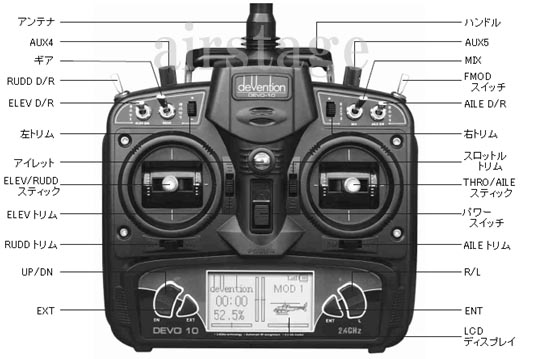
I've implemented your config and it works like a charm. I didn't knew all the switches so I looked it up and thought maybe someone else could benefit from what I've found:
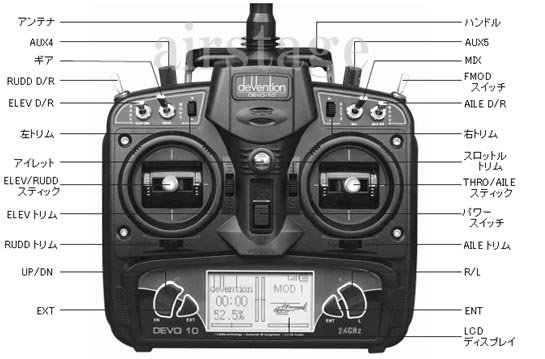
I didn't knew what the RUDD D/R was. Found it!
I am confused about the TX Power Off / Signal lost setting. I've tried it a few times but it doesn't seem to work. I just disabled my transmitter mid flight, not that good of an idea honestly. Any thoughts on what I may be doing wrong ?
I was flying GPS mode.
Kind regards!
Thank you very much for your time and effort for making this as easy as possible for others.
I've implemented your config and it works like a charm. I didn't knew all the switches so I looked it up and thought maybe someone else could benefit from what I've found:
I didn't knew what the RUDD D/R was. Found it!
I am confused about the TX Power Off / Signal lost setting. I've tried it a few times but it doesn't seem to work. I just disabled my transmitter mid flight, not that good of an idea honestly. Any thoughts on what I may be doing wrong ?
I was flying GPS mode.
Kind regards!
Time to create page: 1.702 seconds
-
Home

-
Forum
-
Model Configs, Templates, Skins
-
Model Configs
- DJI F550 / DEVO10 / Naza-M Lite