
- Posts: 3
Help with DEVO 12 multi-module & other questions
- DougT
-
Topic Author
- Offline
Less
More
19 Nov 2016 05:01 #56032
by DougT
Help with DEVO 12 multi-module & other questions was created by DougT
Hello, first post on this site.
A few weeks ago I purchased a used DEVO 12 that has Deviation 5.0 already on it. I'd like to install a Banggood 4-in-1 multi RF module (product ID# 1096707) so I can fly all my current craft and most any future ones. I've spent many hours scouring this site, as well as other, and haven't been able to find any definitive answers. There is lots of information of the 6, 7, 8 & 10 but not much on the 12. Maybe it's the cost or because if's a beast of a Tx. Help please.
#1. Is there any clear guide on how to install this module in the 12? From my reading it looks like this new module plugs into where the stock CYRF module went, connect the antenna and then 3 small wires are soldered to it and then go somewhere else. Where do these wires connect to and from where. A clear picture or two is all I'd need.
#2. Since my Tx already has Deviation 5.0 on it, what would I need to do to get the multi-module up and running? Computer programming, flashing, downloading, bootloading, etc. are not my thing. I've read about removing the semi-colon from the "ini" files but I'm not 100% confident on how to do that.
#3. Since my tx is a regular DEVO 12 (non telemetry) would this new multi-module support telemetry? If so, what would I do to enable it? Is it as simple as enabling in on the model setup screen on the Tx?
Thanks.
Doug
A few weeks ago I purchased a used DEVO 12 that has Deviation 5.0 already on it. I'd like to install a Banggood 4-in-1 multi RF module (product ID# 1096707) so I can fly all my current craft and most any future ones. I've spent many hours scouring this site, as well as other, and haven't been able to find any definitive answers. There is lots of information of the 6, 7, 8 & 10 but not much on the 12. Maybe it's the cost or because if's a beast of a Tx. Help please.
#1. Is there any clear guide on how to install this module in the 12? From my reading it looks like this new module plugs into where the stock CYRF module went, connect the antenna and then 3 small wires are soldered to it and then go somewhere else. Where do these wires connect to and from where. A clear picture or two is all I'd need.
#2. Since my Tx already has Deviation 5.0 on it, what would I need to do to get the multi-module up and running? Computer programming, flashing, downloading, bootloading, etc. are not my thing. I've read about removing the semi-colon from the "ini" files but I'm not 100% confident on how to do that.
#3. Since my tx is a regular DEVO 12 (non telemetry) would this new multi-module support telemetry? If so, what would I do to enable it? Is it as simple as enabling in on the model setup screen on the Tx?
Thanks.
Doug
- ajtank
-
- Offline

Less
More
- Posts: 278
19 Nov 2016 05:31 - 19 Nov 2016 05:32 #56034
by ajtank
Replied by ajtank on topic Help with DEVO 12 multi-module & other questions
Last edit: 19 Nov 2016 05:32 by ajtank.
- DougT
-
- Offline
Less
More
- Posts: 3
24 Nov 2016 18:44 #56259
by DougT
Replied by DougT on topic Help with DEVO 12 multi-module & other questions
Wow. Nobody has any info on where the 3 wires connect to? Is the DEVO 12 a dinosaur or what? Maybe I'll sell it.
.
.
- Arnold
-
- Offline

Less
More
- Posts: 304
24 Nov 2016 19:36 - 24 Nov 2016 19:41 #56260
by Arnold
How much?
Too many hobbies & too many Devos!
Who knows where the time goes?
Replied by Arnold on topic Help with DEVO 12 multi-module & other questions
DougT wrote: ... Maybe I'll sell it.
.
How much?
Too many hobbies & too many Devos!
Who knows where the time goes?
Last edit: 24 Nov 2016 19:41 by Arnold.
- DougT
-
- Offline
Less
More
- Posts: 3
06 Dec 2016 06:01 #56572
by DougT
Replied by DougT on topic Help with DEVO 12 multi-module & other questions
The link provided doesn't do anything for me. No info on where the 3 wires are solder to, just a couple locations with letters/numbers marked. What are they aor.
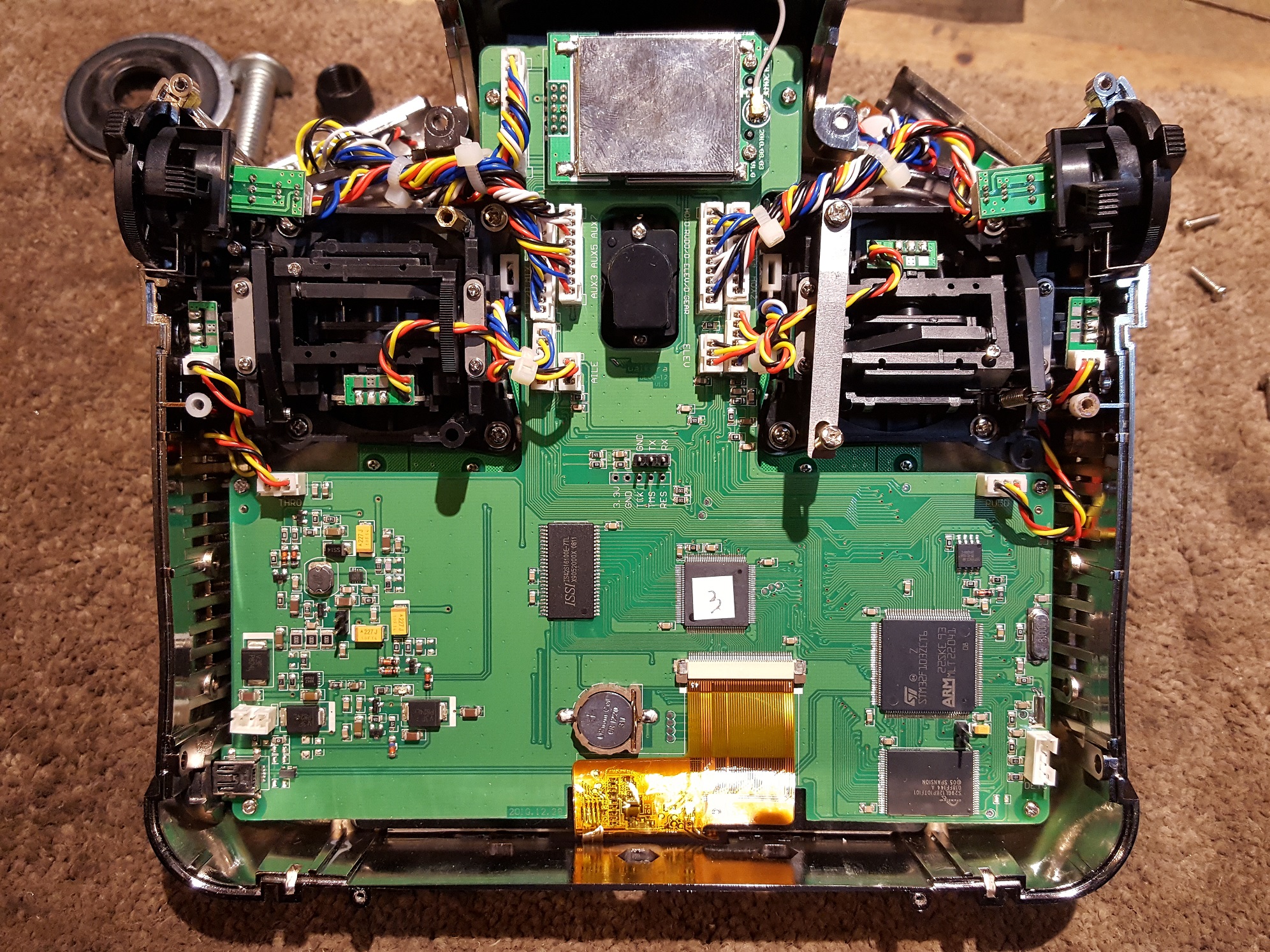
I took the back off my Devo 12 tonight and here's a picture of the board. I really want to use this Tx for all my models but this is frustrating.
I took the back off my Devo 12 tonight and here's a picture of the board. I really want to use this Tx for all my models but this is frustrating.
- M8A4X
-
- Offline
- M8A4X

Less
More
- Posts: 103
06 Dec 2016 07:39 - 06 Dec 2016 07:40 #56573
by M8A4X
Replied by M8A4X on topic Help with DEVO 12 multi-module & other questions
Hey there,
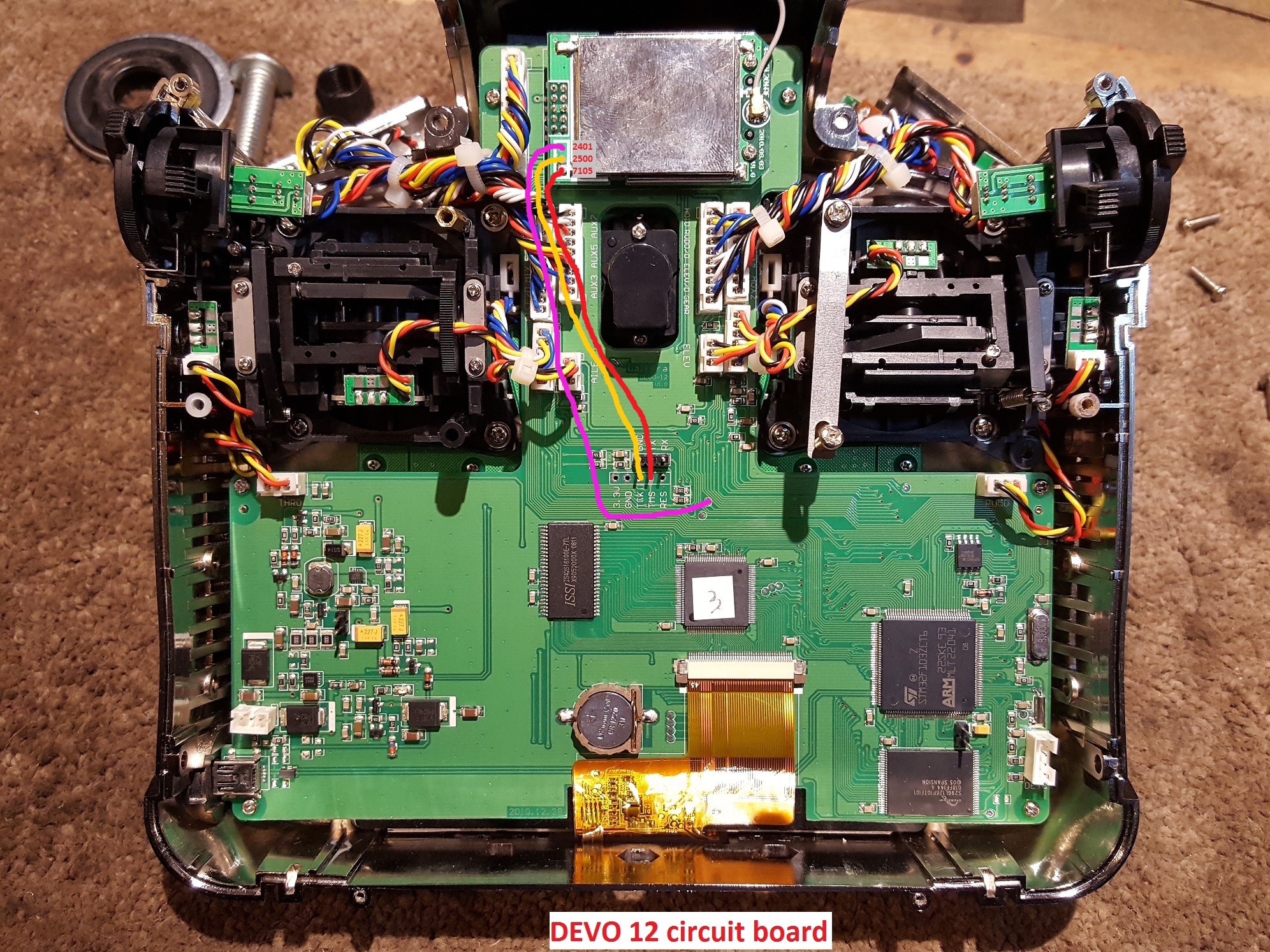
connect the wire from "CC2500" to "TCK" (equals A14 on the MCU), "A7105" to "TMS" (equals A13) and "NRF24l01" to "B3" (shown in the devo 12 picture in the link above, marked in red, ignore "A1" in red). CYRF6936 is automatically connected correct via the module pin header.
Then modify your "hardware.ini" as shown in the link below the picture of devo 12 in the before postet link. Use notepad++ for this, the standard windows editor wont work.
Important: when you uncomment the lines in hardware.ini (advice: keep an untouched copy of it) by removing the ;; in front of the code lines replace them with blank spaces and also place one blank space behind "B3", otherwhise the transmitter will not boot. Don't worry if this happens, you can always access the hardware.ini via USB mode of deviation (press ENT while switching transmitter on).
Cheers
connect the wire from "CC2500" to "TCK" (equals A14 on the MCU), "A7105" to "TMS" (equals A13) and "NRF24l01" to "B3" (shown in the devo 12 picture in the link above, marked in red, ignore "A1" in red). CYRF6936 is automatically connected correct via the module pin header.
Then modify your "hardware.ini" as shown in the link below the picture of devo 12 in the before postet link. Use notepad++ for this, the standard windows editor wont work.
Important: when you uncomment the lines in hardware.ini (advice: keep an untouched copy of it) by removing the ;; in front of the code lines replace them with blank spaces and also place one blank space behind "B3", otherwhise the transmitter will not boot. Don't worry if this happens, you can always access the hardware.ini via USB mode of deviation (press ENT while switching transmitter on).
Cheers
Last edit: 06 Dec 2016 07:40 by M8A4X. Reason: Typo
- DougT
-
- Offline
Less
More
- Posts: 3
07 Dec 2016 05:10 - 07 Dec 2016 05:11 #56615
by DougT
Replied by DougT on topic Help with DEVO 12 multi-module & other questions
Thank you a bunch M8A4X.
That solves a lot, now just to do the actual soldering and software updates. Here's what I have for wiring: module plugs in place of the old one and the 3 new wires. See attached.
That solves a lot, now just to do the actual soldering and software updates. Here's what I have for wiring: module plugs in place of the old one and the 3 new wires. See attached.
Last edit: 07 Dec 2016 05:11 by DougT.
- M8A4X
-
- Offline
- M8A4X
Less
More
- Posts: 103
07 Dec 2016 10:32 #56618
by M8A4X
Replied by M8A4X on topic Help with DEVO 12 multi-module & other questions
Hi,
yes, your picture shows the correct wiring.
Keep in mind to change the code lines afterwards in the "hardware.ini" like written in my last post. These correspond to the wiring you are doing.
yes, your picture shows the correct wiring.
Keep in mind to change the code lines afterwards in the "hardware.ini" like written in my last post. These correspond to the wiring you are doing.
- Wene001
-
- Offline

Less
More
- Posts: 277
08 Dec 2016 22:57 #56690
by Wene001
Replied by Wene001 on topic Help with DEVO 12 multi-module & other questions
Use Notepad++ or an other linux compatible text editor to modify hardware.ini and other files on your Devo
Windows notepad is messing up the file.
Windows notepad is messing up the file.
- Dip
-
- Offline

Less
More
- Posts: 3
23 Jun 2019 16:18 #74592
by Dip
Replied by Dip on topic Help with DEVO 12 multi-module & other questions
M8A4X, if I buy the module and Devo 12s..I only need to solder 3 wires for the module to work ?
- M8A4X
-
- Offline
- M8A4X
Less
More
- Posts: 103
23 Jun 2019 17:59 #74593
by M8A4X
Replied by M8A4X on topic Help with DEVO 12 multi-module & other questions
Right, only three wires need to be soldered.
For the modules to be selectable in the transmitter menu, the mentioned changes in the "hardware.ini" file need to be done also.
For the modules to be selectable in the transmitter menu, the mentioned changes in the "hardware.ini" file need to be done also.
- Dip
-
- Offline
Less
More
- Posts: 3
24 Jun 2019 03:15 #74594
by Dip
Replied by Dip on topic Help with DEVO 12 multi-module & other questions
M8A4X,
so I have to insert the module by removing the original CYRF6936, soldering wires and then install deviation ?
where can I find your hardware.ni files..
-thanks
so I have to insert the module by removing the original CYRF6936, soldering wires and then install deviation ?
where can I find your hardware.ni files..
-thanks
- M8A4X
-
- Offline
- M8A4X
Less
More
- Posts: 103
24 Jun 2019 06:39 #74597
by M8A4X
Replied by M8A4X on topic Help with DEVO 12 multi-module & other questions
Correct, simply swap the modules and do the soldering of the three wires.
After flashing deviation firmware to your devo the hardware.ini file is already present on your transmitter as it is part of the deviation firmware.
You then need to connect the devo in USB mode, copy the file from the transmitter to your pc, edit it like posted before (exactly, if you follow the wiring as DougT has shown in his picture) and copy it back to the transmitter.
Please pay attention to use "Notepad++" for editing, the windows notepad does not work correctly.
After flashing deviation firmware to your devo the hardware.ini file is already present on your transmitter as it is part of the deviation firmware.
You then need to connect the devo in USB mode, copy the file from the transmitter to your pc, edit it like posted before (exactly, if you follow the wiring as DougT has shown in his picture) and copy it back to the transmitter.
Please pay attention to use "Notepad++" for editing, the windows notepad does not work correctly.
- Dip
-
- Offline
Less
More
- Posts: 3
24 Jun 2019 10:50 #74598
by Dip
Replied by Dip on topic Help with DEVO 12 multi-module & other questions
M8A4X thx for the info.
the hardware ini file should look like this following doughT wiring shown ?
[modules]
; there is no need to enable the cyrf6936 module unless
; it is wired to an alternate port. It is Enabled automatically otherwise
enable-cyrf6936 = B12
has_pa-cyrf6936 = 1
enable-a7105 = A13
has_pa-a7105 = 1
enable-cc2500 = A14
has_pa-cc2500 = 1
enable-nrf24l01 = B3
has_pa-nrf24l01 = 1
; enable-multimod = A13
the hardware ini file should look like this following doughT wiring shown ?
[modules]
; there is no need to enable the cyrf6936 module unless
; it is wired to an alternate port. It is Enabled automatically otherwise
enable-cyrf6936 = B12
has_pa-cyrf6936 = 1
enable-a7105 = A13
has_pa-a7105 = 1
enable-cc2500 = A14
has_pa-cc2500 = 1
enable-nrf24l01 = B3
has_pa-nrf24l01 = 1
; enable-multimod = A13
- M8A4X
-
- Offline
- M8A4X
Less
More
- Posts: 103
24 Jun 2019 12:36 - 24 Jun 2019 13:09 #74599
by M8A4X
Replied by M8A4X on topic Help with DEVO 12 multi-module & other questions
Nearly correct, but leave the ; in front of lines:
; enable-cyrf6936 = B12 and
; has_pa-cyrf6936 = 1
This is because you are exchanging the original module to the 4in1 which uses the same enable pin as the original does.
Following DougT´s wiring the hardware.ini should look like so:
[modules]
; there is no need to enable the cyrf6936 module unless
; it is wired to an alternate port. It is Enabled automatically otherwise
; enable-cyrf6936 = B12
; has_pa-cyrf6936 = 1
enable-a7105 = A13
has_pa-a7105 = 1
enable-cc2500 = A14
has_pa-cc2500 = 1
enable-nrf24l01 = B3
has_pa-nrf24l01 = 1
; enable-multimod = A13
Just for your information as you did it correct anyway, leave the ; in front of line ; enable-multimod = A13.
This would only be needed to be changed if you would use a multi module but leave the original module in the transmitter.
; enable-cyrf6936 = B12 and
; has_pa-cyrf6936 = 1
This is because you are exchanging the original module to the 4in1 which uses the same enable pin as the original does.
Following DougT´s wiring the hardware.ini should look like so:
[modules]
; there is no need to enable the cyrf6936 module unless
; it is wired to an alternate port. It is Enabled automatically otherwise
; enable-cyrf6936 = B12
; has_pa-cyrf6936 = 1
enable-a7105 = A13
has_pa-a7105 = 1
enable-cc2500 = A14
has_pa-cc2500 = 1
enable-nrf24l01 = B3
has_pa-nrf24l01 = 1
; enable-multimod = A13
Just for your information as you did it correct anyway, leave the ; in front of line ; enable-multimod = A13.
This would only be needed to be changed if you would use a multi module but leave the original module in the transmitter.
Last edit: 24 Jun 2019 13:09 by M8A4X.
Time to create page: 0.108 seconds
-
Home

-
Forum
-
General
-
General Discussions
- Help with DEVO 12 multi-module & other questions