
- Posts: 50
New color skin
- henkerhaus
-
Topic Author
- Offline
Less
More
09 Dec 2013 09:40 - 09 Dec 2013 09:46 #16437
by henkerhaus
Replied by henkerhaus on topic New color skin
I have updated my skin to work with the latest nightly build.
(deviation-devo8-v3.0.0-25435b8.dfu dated 2013-12-08),
which adds the new "centered" trim indicator graphics (Which I really like. Thanks).
I have also updated the button icon graphics / colors to match FDR's changes...
Green for navigation, Amber for Functions. (Good idea)
(exit, nextpage, options, and prevpage)
The "channel reorder" button graphic has been updated to match the new icon.
(I agree, it does look better)
plusico.bmp was renamed to lay_add.bmp
options.bmp was duplicated and renamed to lay_cfg.bmp (Color was brightened a little)
Added the new mnulog.bmp file.
The antenna icon colors were updated for improved visibility.
The toggle1 throttle hold icon was tweaked a little to give it a 3D effect
(See the screen shots below)
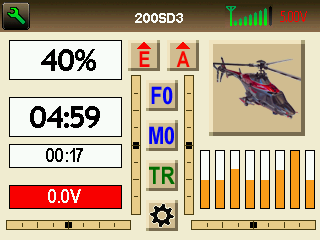
Main Screen
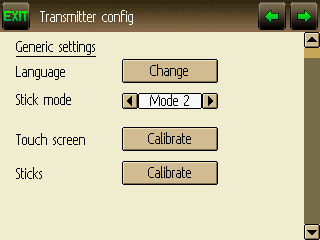
Transmitter Config Screen
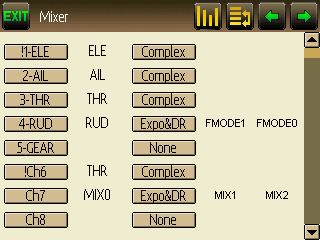
Mixer Screen
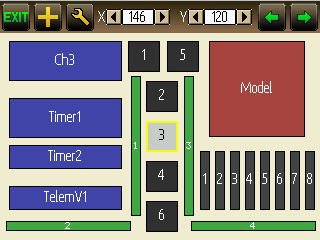
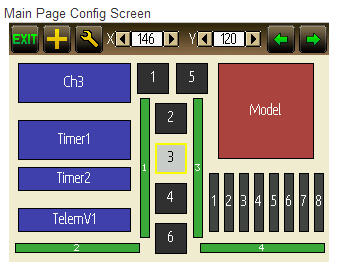
Main Page Config Screen
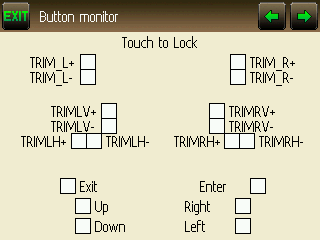
Button Monitor (Can someone explain the purpose / usage / intent of this screen)
Here is the updated filesystem.
(deviation-devo8-v3.0.0-25435b8.dfu dated 2013-12-08),
which adds the new "centered" trim indicator graphics (Which I really like. Thanks).
I have also updated the button icon graphics / colors to match FDR's changes...
Green for navigation, Amber for Functions. (Good idea)
(exit, nextpage, options, and prevpage)
The "channel reorder" button graphic has been updated to match the new icon.
(I agree, it does look better)
plusico.bmp was renamed to lay_add.bmp
options.bmp was duplicated and renamed to lay_cfg.bmp (Color was brightened a little)
Added the new mnulog.bmp file.
The antenna icon colors were updated for improved visibility.
The toggle1 throttle hold icon was tweaked a little to give it a 3D effect
(See the screen shots below)
Main Screen
Transmitter Config Screen
Mixer Screen
Main Page Config Screen
Button Monitor (Can someone explain the purpose / usage / intent of this screen)
Here is the updated filesystem.
Last edit: 09 Dec 2013 09:46 by henkerhaus. Reason: Missed a screenshot
- BarnOwl
-
- Offline

Less
More
- Posts: 1
09 Dec 2013 10:57 - 09 Dec 2013 11:05 #16439
by BarnOwl
Replied by BarnOwl on topic Great skin!
Great theme, good colors and visibility outdoors is very good.
Thanks a lot for your effort! As I am using this as my daily layout (I just installed the old version yesterday)
I presume I can just copy the lot over the old ones?
I am using a Devo 6, where to put the USB/splash icons? They do not function in the media folder.
Thanks a lot for your effort! As I am using this as my daily layout (I just installed the old version yesterday)
I presume I can just copy the lot over the old ones?
I am using a Devo 6, where to put the USB/splash icons? They do not function in the media folder.
Last edit: 09 Dec 2013 11:05 by BarnOwl.
- RandMental
-
- Offline

Less
More
- Posts: 521
09 Dec 2013 13:20 - 09 Dec 2013 13:21 #16443
by RandMental
Replied by RandMental on topic Great skin!
I love this main page, very similar to one I use, but even better
Last edit: 09 Dec 2013 13:21 by RandMental.
- henkerhaus
-
- Offline
Less
More
- Posts: 50
10 Dec 2013 05:58 #16464
by henkerhaus
Replied by henkerhaus on topic Great skin!
The only splash icon that works is the one named splash.bmp.
If you want to use the DEVO 6 splash screen, you'll just need to rename the one named splash.bmp to something like splash8.bmp, and then rename splash6.bmp to splash.bmp. It should then display normally.
Also, note that it only displays for a few seconds, so if you don't "OK" the initial warning screens quickly enough, you might still miss it.
You can configure how long it displays in the tx.ini file by changing the value for the parameter "splash_delay". I think the default was 30, and I changed it to 50, so that it displays a little longer. Hope that helps.
If you want to use the DEVO 6 splash screen, you'll just need to rename the one named splash.bmp to something like splash8.bmp, and then rename splash6.bmp to splash.bmp. It should then display normally.
Also, note that it only displays for a few seconds, so if you don't "OK" the initial warning screens quickly enough, you might still miss it.
You can configure how long it displays in the tx.ini file by changing the value for the parameter "splash_delay". I think the default was 30, and I changed it to 50, so that it displays a little longer. Hope that helps.
- henkerhaus
-
- Offline
Less
More
- Posts: 50
31 Dec 2013 10:58 #17558
by henkerhaus
@PB
Just realized that there ARE two additional screens that can't be edited via .bmp files, that it WOULD be nice if I could, in order to match the rest of this skin's color scheme.
Replied by henkerhaus on topic New color skin
PhracturedBlue wrote: It looks nice. Thanks for doing a full theme.
Did you find anything you wanted to be able to customize (themewise) and couldn't?
I'll have to think about the graph-line thickness, I'm not sure how easily that can be done. But any colors you wanted to change that were fixed (besides the USB screen)?
@PB
Just realized that there ARE two additional screens that can't be edited via .bmp files, that it WOULD be nice if I could, in order to match the rest of this skin's color scheme.
- RandMental
-
- Offline
Less
More
- Posts: 521
31 Dec 2013 11:24 #17559
by RandMental
Replied by RandMental on topic New color skin
We also need new splash screens using the new Deviation font and logo style.
- henkerhaus
-
- Offline
Less
More
- Posts: 50
02 Jan 2014 03:26 - 02 Jan 2014 04:34 #17705
by henkerhaus
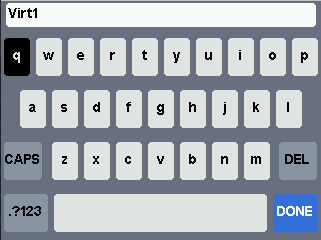
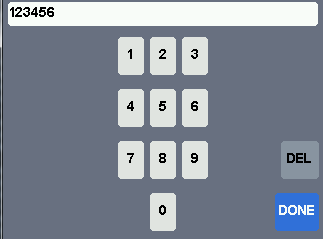
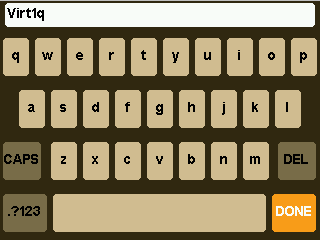
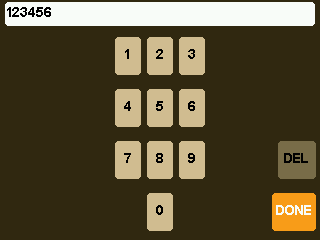
My Bad. I just realized that the keyboard and numeric keypad ARE configurable, through the config.ini file, not as a .bmp file. Here is the color list for my skin, and sample images.
@PB
I also just discovered a bug in the keyboard/keypad...
(shown in the original screen shots above... the Upper Left key always starts in the inverted color state. Clicking on it once fixes it, for as long as the keyboard screen is left open, but if you close and reopen it, it reverts back to being inverted again. I'll file an issue report.
[keyboard]
font=14bold
bg_color=312812
bg_key1=d2be91
fg_key1=000000
bg_key2=7f6f4f
fg_key2=000000
bg_key3=ff9f1f
fg_key3=FFFFFF
Replied by henkerhaus on topic New color skin
henkerhaus wrote:
PhracturedBlue wrote: It looks nice. Thanks for doing a full theme.
Did you find anything you wanted to be able to customize (themewise) and couldn't?
I'll have to think about the graph-line thickness, I'm not sure how easily that can be done. But any colors you wanted to change that were fixed (besides the USB screen)?
@PB
Just realized that there ARE two additional screens that can't be edited via .bmp files, that it WOULD be nice if I could, in order to match the rest of this skin's color scheme.
My Bad. I just realized that the keyboard and numeric keypad ARE configurable, through the config.ini file, not as a .bmp file. Here is the color list for my skin, and sample images.
@PB
I also just discovered a bug in the keyboard/keypad...
(shown in the original screen shots above... the Upper Left key always starts in the inverted color state. Clicking on it once fixes it, for as long as the keyboard screen is left open, but if you close and reopen it, it reverts back to being inverted again. I'll file an issue report.
[keyboard]
font=14bold
bg_color=312812
bg_key1=d2be91
fg_key1=000000
bg_key2=7f6f4f
fg_key2=000000
bg_key3=ff9f1f
fg_key3=FFFFFF
Last edit: 02 Jan 2014 04:34 by henkerhaus. Reason: Added Keyboard Color Definition
- cropduster
-
- Offline

Less
More
- Posts: 30
13 May 2014 18:51 #23201
by cropduster
Replied by cropduster on topic New color skin
Could someone create a new library for Devo 12s with the background and spalsh screen from Henkerhaus? I am not sure if it makes sense for me to get into all the lib creation stuff.
Thanks in advance,
Michael
Thanks in advance,
Michael
- cropduster
-
- Offline
Less
More
- Posts: 30
14 May 2014 06:29 #23221
by cropduster
Replied by cropduster on topic New color skin
No need, I found a thread here in the forums with a cool tool that does the trick!
- unclecrash
-
- Offline

Less
More
- Posts: 69
10 Jul 2014 07:32 #24516
by unclecrash
Replied by unclecrash on topic New color skin
Im still stuck  I have pretty much figured out how to get the files in and out of the TX. can anyone put whats needed into a library file and Im sure I can get it into the TX I tryed a few differnt combinations but cant get it to work. So Im stuck with the the stock skin for now
  Not giving up will work on it tomorrow.
I have pretty much figured out how to get the files in and out of the TX. can anyone put whats needed into a library file and Im sure I can get it into the TX I tryed a few differnt combinations but cant get it to work. So Im stuck with the the stock skin for now Not giving up will work on it tomorrow. - mellowvision
-
- Offline

Less
More
- Posts: 29
17 Nov 2015 07:54 #40146
by mellowvision
Replied by mellowvision on topic New color skin
I just wanted to say I liked the theme. I've been looking into creating one too, so this discussion was useful. thanks!
Time to create page: 1.317 seconds
-
Home

-
Forum
-
Model Configs, Templates, Skins
-
Custom Skins
- New color skin