
- Posts: 4
- Forum
- News, Announcements and Feedback
- Feedback & Questions
- Devo 7 THSTK message & Beep Problem (with a video)
Devo 7 THSTK message & Beep Problem (with a video)
- Satch
-
Topic Author
- Offline
Less
More
22 Sep 2013 17:37 #13988
by Satch
Devo 7 THSTK message & Beep Problem (with a video) was created by Satch
Hi all.
I have searched numerous forums and youtube but still cannot find the answer i am looking for and wonder if anybody is able to help.
I am a complete novice, but i still do not think what i am trying to do is that complicated, simply bind my Devo 7 with my Walkera QR X350 (brand new)
Anyway, when i turn on the controller, all i get is the message 'THSTK'
I have put the throttle down to zero, and also the stick on the right down to zero, but still the message appears, and simply cannot get past this message. the menu buttons will not respond, and the same message appears with the beep when i toggle through the modes 0 1 & 2.
I am about ready to throw in the towel and send it back for a refund, but id much rather keep it and get it up and running. I have put a video on Youtube and the link is below, please have a watch and see if there is anything obvious i am doing wrong.
Thanks on advance.
I have searched numerous forums and youtube but still cannot find the answer i am looking for and wonder if anybody is able to help.
I am a complete novice, but i still do not think what i am trying to do is that complicated, simply bind my Devo 7 with my Walkera QR X350 (brand new)
Anyway, when i turn on the controller, all i get is the message 'THSTK'
I have put the throttle down to zero, and also the stick on the right down to zero, but still the message appears, and simply cannot get past this message. the menu buttons will not respond, and the same message appears with the beep when i toggle through the modes 0 1 & 2.
I am about ready to throw in the towel and send it back for a refund, but id much rather keep it and get it up and running. I have put a video on Youtube and the link is below, please have a watch and see if there is anything obvious i am doing wrong.
Thanks on advance.
- Essen1
-
- Offline

Less
More
- Posts: 64
22 Sep 2013 18:31 #13989
by Essen1
Replied by Essen1 on topic Devo 7 THSTK message & Beep Problem (with a video)
Satch,
try and move the switch I marked in the red box to the up position and see if that works.
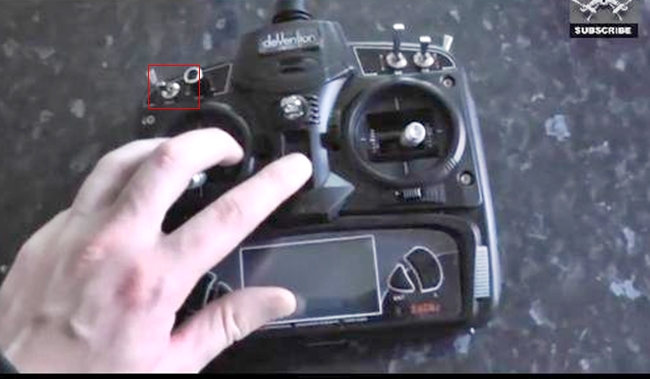
try and move the switch I marked in the red box to the up position and see if that works.
- FDR
-
- Offline

22 Sep 2013 20:40 #13992
by FDR
Replied by FDR on topic Devo 7 THSTK message & Beep Problem (with a video)
Ensure the FMODE switch is in 0 position.
If nothing else helps, try to lower the elevator to the lowest position, because the tx might be in mode 1...
If nothing else helps, try to lower the elevator to the lowest position, because the tx might be in mode 1...
- Satch
-
- Offline
Less
More
- Posts: 4
22 Sep 2013 21:54 #13995
by Satch
Replied by Satch on topic Devo 7 THSTK message & Beep Problem (with a video)
Hi thanks for the replies, tried both of those suggestions with no luck. Ive tried quite a lot of different combinations with no luck in fact, really got me scratching my head. I suspect the seller of the kit will have no idea how to get around this so it looks lie the whole thing is going back. Very dissapointed.
- Essen1
-
- Offline
Less
More
- Posts: 64
22 Sep 2013 22:07 #13996
by Essen1
Replied by Essen1 on topic Devo 7 THSTK message & Beep Problem (with a video)
Maybe a counterfeit? Walkera warned against them on their Website.
www.walkera.com/en/article.php?id=113&cat_id=18
www.walkera.com/en/article.php?id=113&cat_id=18
- rbe2012
-
- Offline
- So much to do, so little time...

Less
More
- Posts: 1433
23 Sep 2013 07:43 #14007
by rbe2012
Replied by rbe2012 on topic Devo 7 THSTK message & Beep Problem (with a video)
Satch,
open your model config (of the selected model) in the usb mode and delete the safety section:You will get rid of this message and be able to use your tx (when the model is saved the section is included again, but should be correct).
open your model config (of the selected model) in the usb mode and delete the safety section:
[safety]
Auto=min- rbe2012
-
- Offline
- So much to do, so little time...
Less
More
- Posts: 1433
23 Sep 2013 07:45 #14008
by rbe2012
They seem to have removed the warning - I have seen it before but can#t find it actually.
Replied by rbe2012 on topic Devo 7 THSTK message & Beep Problem (with a video)
Essen1 wrote: Maybe a counterfeit? Walkera warned against them on their Website.
www.walkera.com/en/article.php?id=113&cat_id=18
They seem to have removed the warning - I have seen it before but can#t find it actually.
- FDR
-
- Offline
23 Sep 2013 07:48 #14009
by FDR
It is the stock DEVO 7 fw...
Replied by FDR on topic Devo 7 THSTK message & Beep Problem (with a video)
That's a DEVO 7, which can't run deviation.rbe2012 wrote: Satch,
open your model config (of the selected model) in the usb mode and delete the safety section:You will get rid of this message and be able to use your tx (when the model is saved the section is included again, but should be correct).[safety] Auto=min
It is the stock DEVO 7 fw...
- vlad_vy
-
- Offline

Less
More
- Posts: 3333
23 Sep 2013 08:03 #14011
by vlad_vy
Replied by vlad_vy on topic Devo 7 THSTK message & Beep Problem (with a video)
Is throttle trim (and others) at zero position?
- Satch
-
- Offline
Less
More
- Posts: 4
23 Sep 2013 08:17 #14012
by Satch
Replied by Satch on topic Devo 7 THSTK message & Beep Problem (with a video)
Thanks for the extra replies guys. Throttle trim & others are definately at the zero position.
Im not trained enough to tell if its a counterfit or not, but the guys feedback on ebay is 100% with 2434 good feedbacks (besthobbysite4uk), so i'm guessing its all legit.
rbe2012 - not sure how to do this, if it involves using the menu option on my devo 7 then we can forget it, this message will just not budge at all. I have worn down 8 fully charged brand new batteries just trying to get the message off.
Sad face.
If worse comes to worse, i guess ill have to bite the bullet and buy a new devo 7 remote, could well be cheaper than sending the whole kit bac to china. havent checked prices yet, just considering my options.
Thanks for all your help anyways guys, if you think of anything else just post it here i will keep checking.
Im not trained enough to tell if its a counterfit or not, but the guys feedback on ebay is 100% with 2434 good feedbacks (besthobbysite4uk), so i'm guessing its all legit.
rbe2012 - not sure how to do this, if it involves using the menu option on my devo 7 then we can forget it, this message will just not budge at all. I have worn down 8 fully charged brand new batteries just trying to get the message off.
Sad face.
If worse comes to worse, i guess ill have to bite the bullet and buy a new devo 7 remote, could well be cheaper than sending the whole kit bac to china. havent checked prices yet, just considering my options.
Thanks for all your help anyways guys, if you think of anything else just post it here i will keep checking.
- Essen1
-
- Offline
Less
More
- Posts: 64
23 Sep 2013 14:42 #14018
by Essen1
rbe2012,
You're right. It was still there yesterday when I posted the link. The original posting was under "News" on Walkera's site but it's gone now.
Replied by Essen1 on topic Devo 7 THSTK message & Beep Problem (with a video)
rbe2012 wrote:
Essen1 wrote: Maybe a counterfeit? Walkera warned against them on their Website.
www.walkera.com/en/article.php?id=113&cat_id=18
They seem to have removed the warning - I have seen it before but can#t find it actually.
rbe2012,
You're right. It was still there yesterday when I posted the link. The original posting was under "News" on Walkera's site but it's gone now.
- rbe2012
-
- Offline
- So much to do, so little time...
Less
More
- Posts: 1433
23 Sep 2013 20:30 #14021
by rbe2012
FDR was right - I was on the wrong track since you use a Devo7 (not 7e with deviation).
But you should be able to download the configs with the dfuse-tool and FDR has written a web tool to create such a config (look in the "Links") - maybe this could be a way for you.
Replied by rbe2012 on topic Devo 7 THSTK message & Beep Problem (with a video)
Satch wrote: rbe2012 - not sure how to do this, if it involves using the menu option on my devo 7 then we can forget it, this message will just not budge at all. I have worn down 8 fully charged brand new batteries just trying to get the message off.
FDR was right - I was on the wrong track since you use a Devo7 (not 7e with deviation).
But you should be able to download the configs with the dfuse-tool and FDR has written a web tool to create such a config (look in the "Links") - maybe this could be a way for you.
- FDR
-
- Offline
24 Sep 2013 04:12 #14027
by FDR
Replied by FDR on topic Devo 7 THSTK message & Beep Problem (with a video)
My model configurator is for DEVO 8 only, but a german guy wrote one for the DEVO 7:
www.ts-soft.de/Devo7/
www.ts-soft.de/Devo7/
- Satch
-
- Offline
Less
More
- Posts: 4
24 Sep 2013 08:38 #14031
by Satch
Replied by Satch on topic Devo 7 THSTK message & Beep Problem (with a video)
Thanks ill give that a try, ill have to get the UP-02 though.
- Gnjac0rp
-
- Offline

Less
More
- Posts: 1
30 Mar 2019 22:02 #73626
by Gnjac0rp
Replied by Gnjac0rp on topic Devo 7 THSTK message & Beep Problem (with a video)
Has been awhile since this thread was used but I just had the same issue, figured a solution which might be someone else's fix.
Start the pad up > Get the THST K issue and no buttons work nor thrust; try the other stick worked every time for me to get past the error (Its maybe yours is set for a different region which is why the other stick is needed) > started showing as 50% thrust > settings > Mode change from 1 to 2 and that worked for me to clear the error and the trust.
Sailed straight through pairing after this and not a problem with flight (what I could given the area and time).
Hope this has been understandable since I'll be honest I am a newcomer to the hobby, and I hope it may help someone in future!
Start the pad up > Get the THST K issue and no buttons work nor thrust; try the other stick worked every time for me to get past the error (Its maybe yours is set for a different region which is why the other stick is needed) > started showing as 50% thrust > settings > Mode change from 1 to 2 and that worked for me to clear the error and the trust.
Sailed straight through pairing after this and not a problem with flight (what I could given the area and time).
Hope this has been understandable since I'll be honest I am a newcomer to the hobby, and I hope it may help someone in future!
- Forum
- News, Announcements and Feedback
- Feedback & Questions
- Devo 7 THSTK message & Beep Problem (with a video)
Time to create page: 0.103 seconds
-
Home

-
Forum
-
News, Announcements and Feedback
-
Feedback & Questions
- Devo 7 THSTK message & Beep Problem (with a video)