
- Posts: 23
Devo F12E Incorrect Screen Resolution
- mustgetsomesleep
-
Topic Author
- Offline
Less
More
02 Apr 2016 18:36 - 02 Apr 2016 18:38 #45664
by mustgetsomesleep
Devo F12E Incorrect Screen Resolution was created by mustgetsomesleep
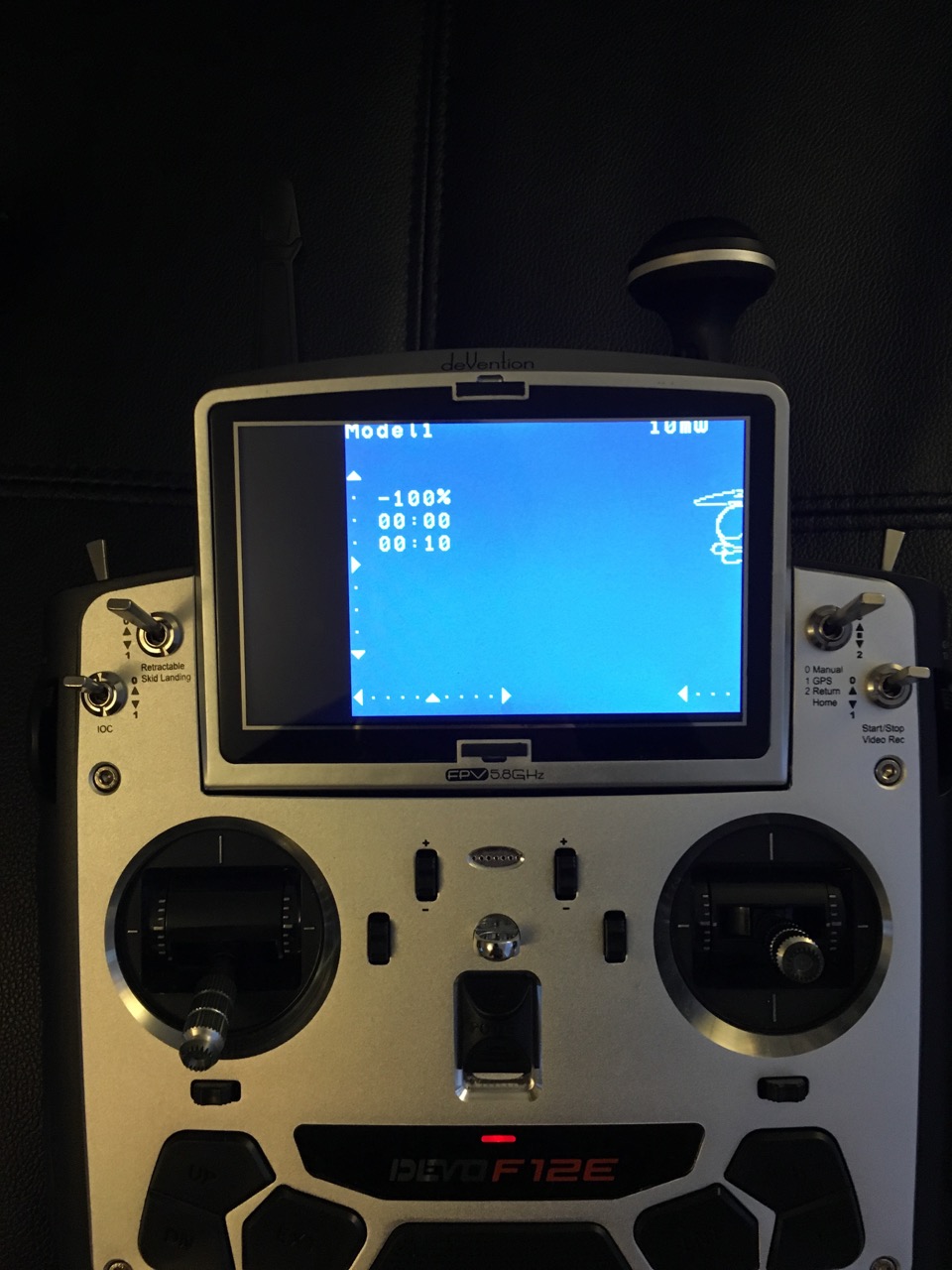
First i must say thank you all for the hard work been put in by all the deviation community , sorry for having to start a new post ! but i have looked and looked on the forum ? but i am unable to find my basic problem . Once i update my Devo F12E to the Deviation firmware the screen resolution changes so i only have around 3/4 of full view . I have tried changing the resolutions in the layout inf files but this makes no difference ! is this normal guys ?
Last edit: 02 Apr 2016 18:38 by mustgetsomesleep.
- PhracturedBlue
-
- Offline

Less
More
- Posts: 4403
02 Apr 2016 20:47 #45671
by PhracturedBlue
Replied by PhracturedBlue on topic Devo F12E Incorrect Screen Resolution
that is definitely not normal. Maybe they changed their chipset on newer versions or possibbly a bug has snuck in (I haven't tried the F12E for quite some time) What version of the stock Walkera firmware are you using? I can't look into it right now, but I'll check that (a) it still works for me, and (b) they haven't changed the hardware. That would help me locate the issue.
- mustgetsomesleep
-
- Offline
Less
More
- Posts: 23
02 Apr 2016 23:09 - 03 Apr 2016 19:42 #45677
by mustgetsomesleep
Replied by mustgetsomesleep on topic Devo F12E Incorrect Screen Resolution
Thank you PharacuredBlue i was hoping you could help . I have only had this Devo F12E since last month ! i imported it direct from overseas . This was a long awaited upgrade from my Devo 10 . I have tried several times to flash the Deviation firmware ! but always it results in this odd resolution . My Hardware is normal Ver 1.2 and I have reverted to the original Walkera 1.5a firmware !! this works perfect with regards to the resolution ??? i am more than happy to open the TX if this helps , thank you
Last edit: 03 Apr 2016 19:42 by mustgetsomesleep.
- PhracturedBlue
-
- Offline
Less
More
- Posts: 4403
07 Apr 2016 05:45 #45995
by PhracturedBlue
Replied by PhracturedBlue on topic Devo F12E Incorrect Screen Resolution
Can you try this build:
www.deviationtx.com/downloads-new/catego...lue-f12e-alt-display
Note that the installation procedure has changed. If you are using the DeviationUploader switch to the 'DFU' tab, and upload just the .dfu file.
Then reboot the Tx into USB mode (it will probably do this automatically the 1st time) and copy the devo.fs file included in the zip to the transmitter (overwrite the existing devo.fs file)
Do not use try to use DeviationUploader to install the .zip file directly.
www.deviationtx.com/downloads-new/catego...lue-f12e-alt-display
Note that the installation procedure has changed. If you are using the DeviationUploader switch to the 'DFU' tab, and upload just the .dfu file.
Then reboot the Tx into USB mode (it will probably do this automatically the 1st time) and copy the devo.fs file included in the zip to the transmitter (overwrite the existing devo.fs file)
Do not use try to use DeviationUploader to install the .zip file directly.
- mustgetsomesleep
-
- Offline
Less
More
- Posts: 23
07 Apr 2016 12:28 #46018
by mustgetsomesleep
 That worked a treat , thank you PhracturedBlue ! can i ask was it hardware related like you suggested or was it a bug . And thank you again for making the process even simpler
Replied by mustgetsomesleep on topic Devo F12E Incorrect Screen Resolution
That worked a treat , thank you PhracturedBlue ! can i ask was it hardware related like you suggested or was it a bug . And thank you again for making the process even simpler - PhracturedBlue
-
- Offline
Less
More
- Posts: 4403
07 Apr 2016 12:41 #46024
by PhracturedBlue
Replied by PhracturedBlue on topic Devo F12E Incorrect Screen Resolution
It seems hardware related. I have a v1.3a transmitter, and the old code works fine for me there.
In the F12e drivers I wrote last year, I have 2 sets of LCD initialization code 'code1' and 'code2'. Curently we are using 'code2' in the release builds. The test code I provided to you is 'code1' (which also seems to work fine on my Tx). I think 'Code1' is the same as what is in the Walkera 1.5 firmware. I have no idea where 'code2' came from (I did write this code over a year ago). The thing is, I also don't know why I have 2 sets of code in the 1st place, so I need to go back through the code history and try to figure out if there is a reason for 'code2' to exist before I make the change permanent. If worse comes to worse, I could potentially offer both codes and let you choose as a configuration option, but I really don't want to go there.
In the F12e drivers I wrote last year, I have 2 sets of LCD initialization code 'code1' and 'code2'. Curently we are using 'code2' in the release builds. The test code I provided to you is 'code1' (which also seems to work fine on my Tx). I think 'Code1' is the same as what is in the Walkera 1.5 firmware. I have no idea where 'code2' came from (I did write this code over a year ago). The thing is, I also don't know why I have 2 sets of code in the 1st place, so I need to go back through the code history and try to figure out if there is a reason for 'code2' to exist before I make the change permanent. If worse comes to worse, I could potentially offer both codes and let you choose as a configuration option, but I really don't want to go there.
- mustgetsomesleep
-
- Offline
Less
More
- Posts: 23
07 Apr 2016 15:17 - 07 Apr 2016 17:54 #46034
by mustgetsomesleep
 Sorry PhracturedBlue but i was a little hasty with my assumption that this fixed the screen issue . It is not quite 100% correct , the screen appears to be off centre to the left and up leaving a small 5mm gap on the right hand side and about 2mm up from the bottom . As you can see from the pictures this removes the first line of txt on the far left of the screen and slightly obscures the top txt . I have reverted back to test all the standard firmwares and they all work apart from the original 1.3a this is also windowed ! it also now seems the original firmware has the same gaps on the bottom and the right . The strange thing is powering up in program mode the image is ok on the right as can be seen in my original picture . . Sorry i thought you had it there ! i should have had a better look this morning .
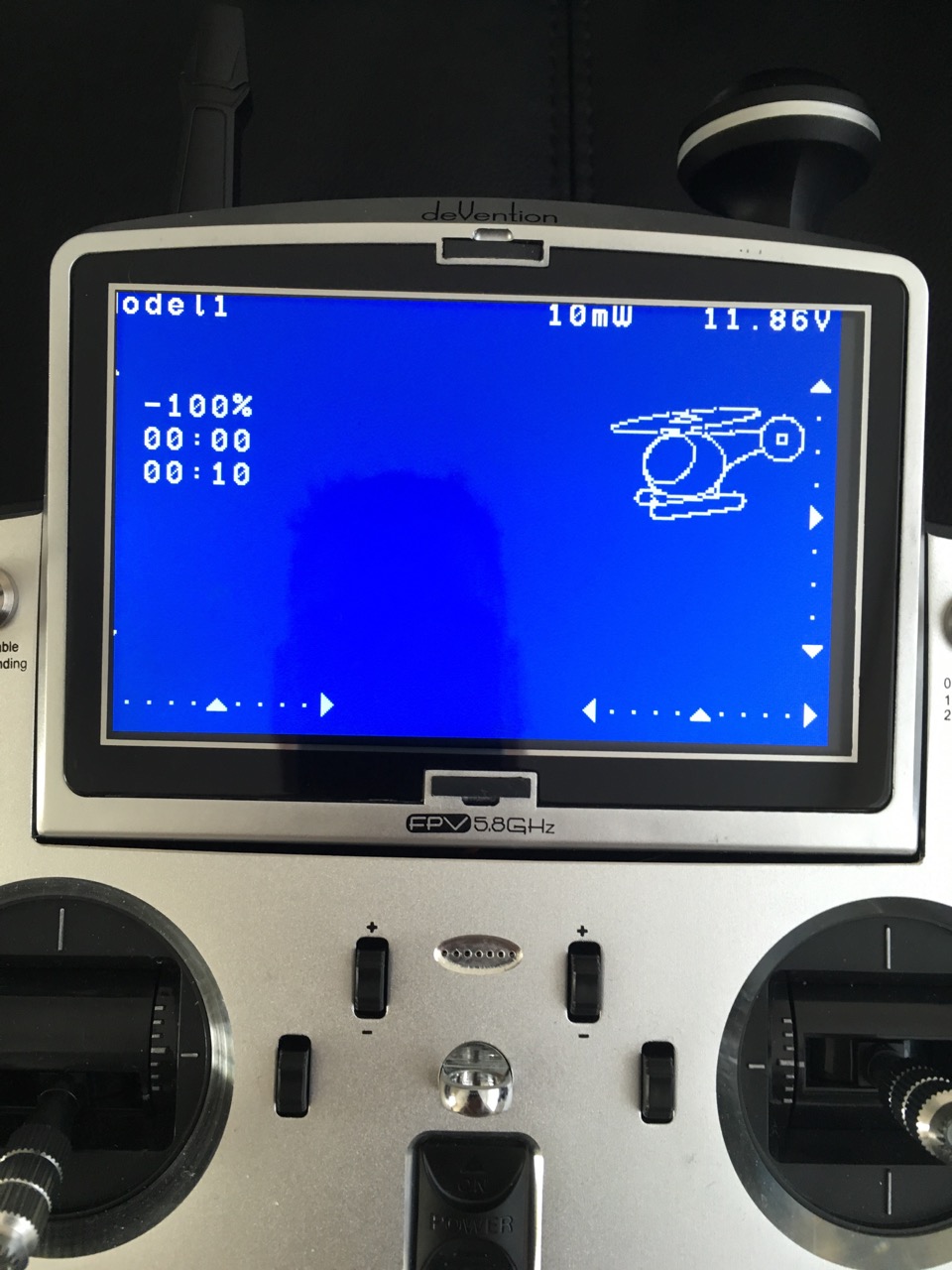
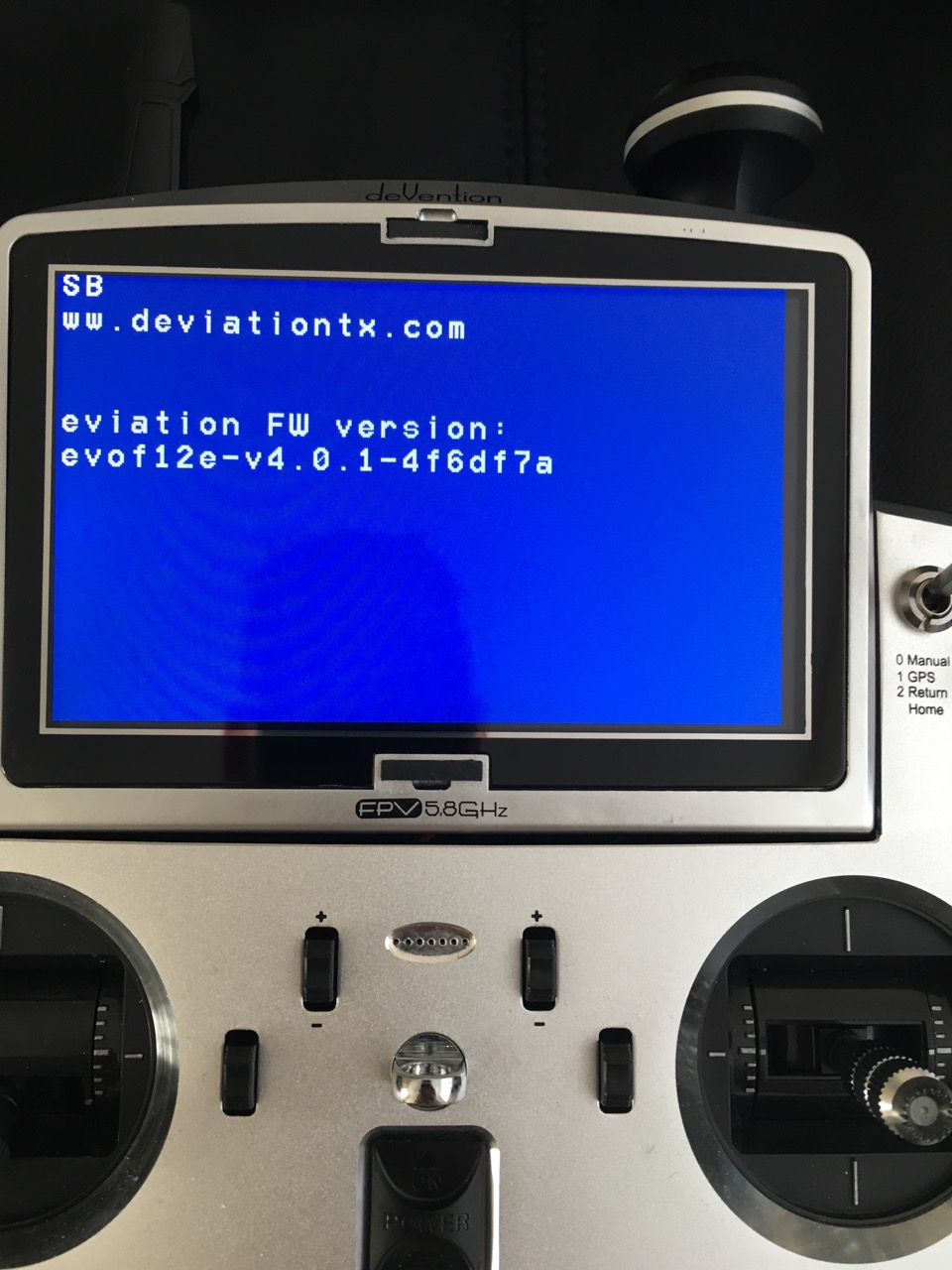
Replied by mustgetsomesleep on topic Devo F12E Incorrect Screen Resolution
Sorry PhracturedBlue but i was a little hasty with my assumption that this fixed the screen issue . It is not quite 100% correct , the screen appears to be off centre to the left and up leaving a small 5mm gap on the right hand side and about 2mm up from the bottom . As you can see from the pictures this removes the first line of txt on the far left of the screen and slightly obscures the top txt . I have reverted back to test all the standard firmwares and they all work apart from the original 1.3a this is also windowed ! it also now seems the original firmware has the same gaps on the bottom and the right . The strange thing is powering up in program mode the image is ok on the right as can be seen in my original picture . . Sorry i thought you had it there ! i should have had a better look this morning .
Last edit: 07 Apr 2016 17:54 by mustgetsomesleep. Reason: More information added
- PhracturedBlue
-
- Offline
Less
More
- Posts: 4403
08 Apr 2016 04:32 #46094
by PhracturedBlue
Replied by PhracturedBlue on topic Devo F12E Incorrect Screen Resolution
This is likely to take a lot of trial and error to fix since I can't duplicate the problem myself.
Can you try this firmware:
www.deviationtx.com/downloads-new/catego...turedblue-f12e-test1
It won't fix the problem, but it should display a debug screen. Take a picture of that screen and send it to me.
You can press the 'EXT' button to continue booting after you've captured the screen
Can you try this firmware:
www.deviationtx.com/downloads-new/catego...turedblue-f12e-test1
It won't fix the problem, but it should display a debug screen. Take a picture of that screen and send it to me.
You can press the 'EXT' button to continue booting after you've captured the screen
- mustgetsomesleep
-
- Offline
Less
More
- Posts: 23
08 Apr 2016 09:11 #46100
by mustgetsomesleep
Replied by mustgetsomesleep on topic Devo F12E Incorrect Screen Resolution
Hope this is what you are after , thank you for the help on this one
- PhracturedBlue
-
- Offline
Less
More
- Posts: 4403
08 Apr 2016 13:21 #46109
by PhracturedBlue
Replied by PhracturedBlue on topic Devo F12E Incorrect Screen Resolution
What about this one:
www.deviationtx.com/downloads-new/catego...turedblue-f12e-test2
www.deviationtx.com/downloads-new/catego...turedblue-f12e-test2
- mustgetsomesleep
-
- Offline
Less
More
- Posts: 23
08 Apr 2016 13:45 #46110
by mustgetsomesleep
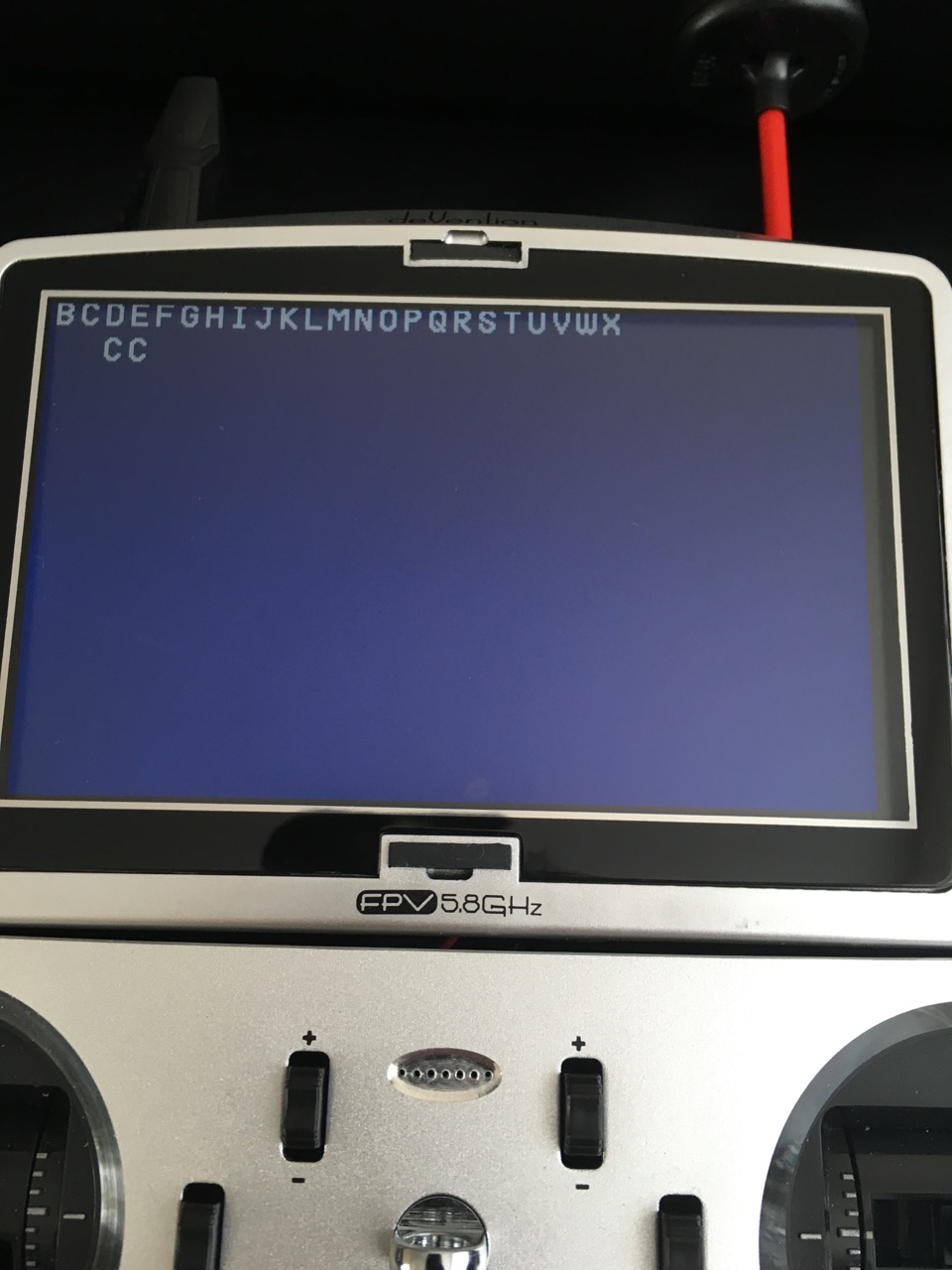
Replied by mustgetsomesleep on topic Devo F12E Incorrect Screen Resolution
PhracturedBlue wrote: What about this one:
www.deviationtx.com/downloads-new/catego...turedblue-f12e-test2
- PhracturedBlue
-
- Offline
Less
More
- Posts: 4403
08 Apr 2016 14:02 #46111
by PhracturedBlue
Replied by PhracturedBlue on topic Devo F12E Incorrect Screen Resolution
Hmm...that wasn't what I hoped for. I need to do some more reading to see what I can come up with
- mustgetsomesleep
-
- Offline
Less
More
- Posts: 23
08 Apr 2016 14:14 #46112
by mustgetsomesleep
Replied by mustgetsomesleep on topic Devo F12E Incorrect Screen Resolution
Thank you for all the help with this
- PhracturedBlue
-
- Offline
Less
More
- Posts: 4403
09 Apr 2016 01:34 - 09 Apr 2016 01:35 #46148
by PhracturedBlue
Replied by PhracturedBlue on topic Devo F12E Incorrect Screen Resolution
Okay, change of direction.
Try this:
www.deviationtx.com/downloads-new/catego...dump-bootloader-f12e
It does not contain a devo.fs file. Upload it to your Tx, You should see 'Done' and then your Tx should connect to your PC via USB (you won't get the 'USB' message, just 'Done')
Now, copy the devo.fs from your transmitter, zip it up and attach it to a message here. I am hopeful it will help me identify the difference between your Tx and mine.
Note that this isn't a real firmware. You can't use it for anything other than creating the devo.fs file I need.
Try this:
www.deviationtx.com/downloads-new/catego...dump-bootloader-f12e
It does not contain a devo.fs file. Upload it to your Tx, You should see 'Done' and then your Tx should connect to your PC via USB (you won't get the 'USB' message, just 'Done')
Now, copy the devo.fs from your transmitter, zip it up and attach it to a message here. I am hopeful it will help me identify the difference between your Tx and mine.
Note that this isn't a real firmware. You can't use it for anything other than creating the devo.fs file I need.
Last edit: 09 Apr 2016 01:35 by PhracturedBlue.
- mustgetsomesleep
-
- Offline
Less
More
- Posts: 23
09 Apr 2016 10:42 #46166
by mustgetsomesleep
Replied by mustgetsomesleep on topic Devo F12E Incorrect Screen Resolution
Hope this is what you Need PhracturedBlue
- PhracturedBlue
-
- Offline
Less
More
- Posts: 4403
09 Apr 2016 14:49 #46174
by PhracturedBlue
Replied by PhracturedBlue on topic Devo F12E Incorrect Screen Resolution
That was helpful I think. Let's try this:
www.deviationtx.com/downloads-new/catego...turedblue-f12e-test3
www.deviationtx.com/downloads-new/catego...turedblue-f12e-test3
- mustgetsomesleep
-
- Offline
Less
More
- Posts: 23
09 Apr 2016 16:07 #46184
by mustgetsomesleep
Replied by mustgetsomesleep on topic Devo F12E Incorrect Screen Resolution
Sorry
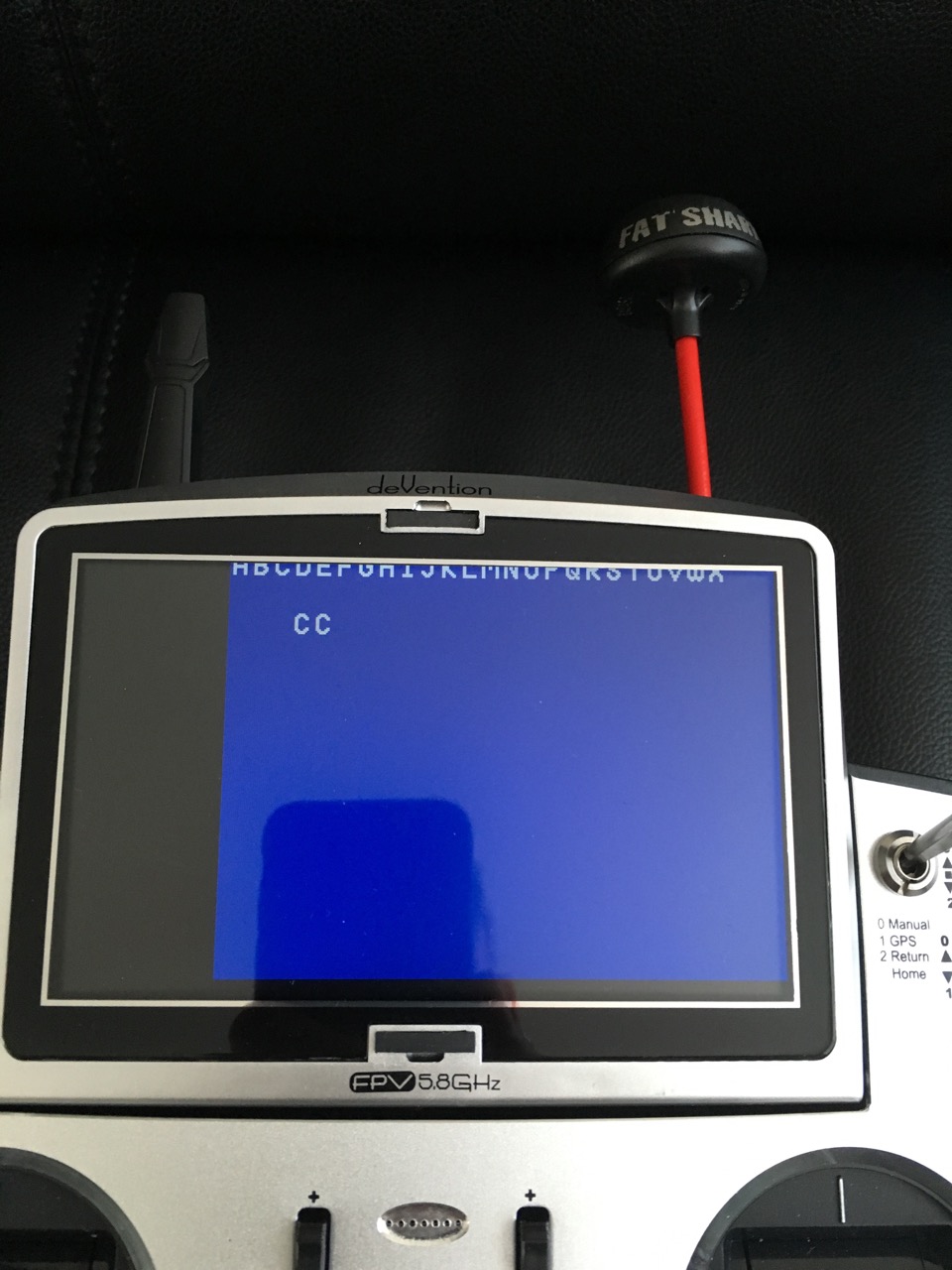
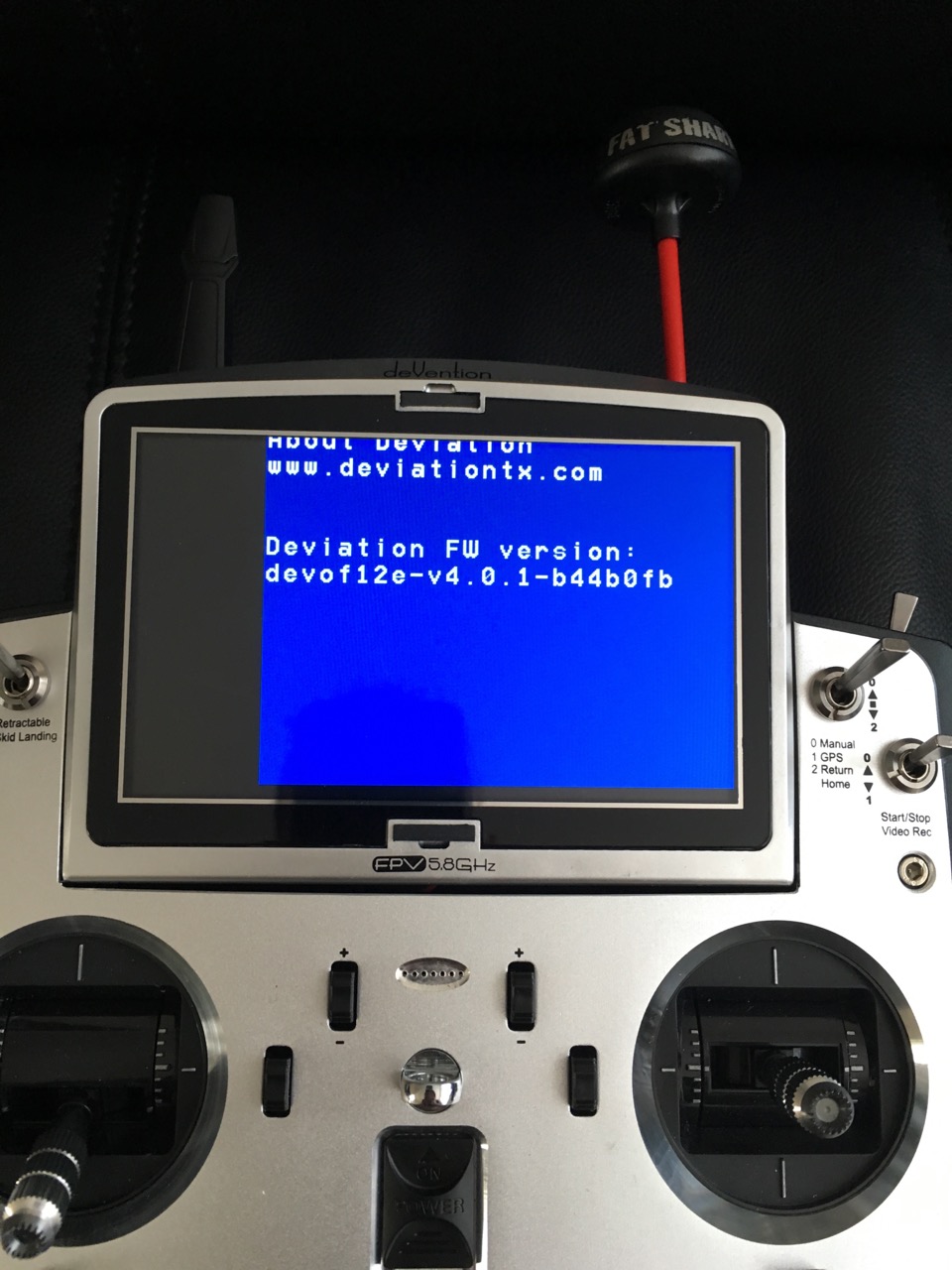
- PhracturedBlue
-
- Offline
Less
More
- Posts: 4403
09 Apr 2016 16:18 #46186
by PhracturedBlue
Replied by PhracturedBlue on topic Devo F12E Incorrect Screen Resolution
hmm. does the programming screen look normal (When you boot pressing 'EXT')? I am trying to emulate how that works.
- mustgetsomesleep
-
- Offline
Less
More
- Posts: 23
09 Apr 2016 16:22 - 09 Apr 2016 16:25 #46187
by mustgetsomesleep
Replied by mustgetsomesleep on topic Devo F12E Incorrect Screen Resolution
It now looks just like the original nightly build screen ! the same as i originally posted but a pixel line or two higher looking at the txt
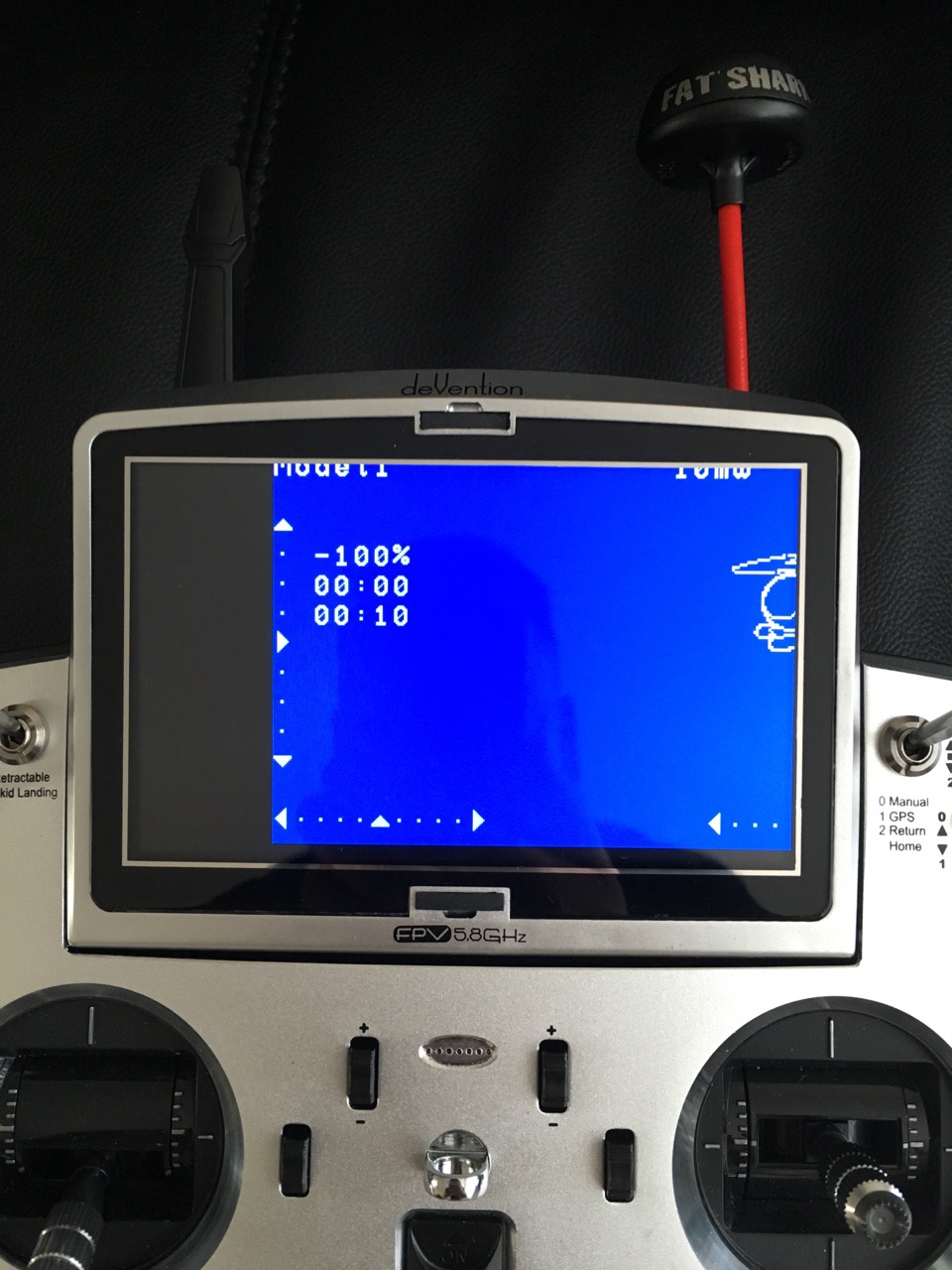
Last edit: 09 Apr 2016 16:25 by mustgetsomesleep.
- PhracturedBlue
-
- Offline
Less
More
- Posts: 4403
09 Apr 2016 17:11 #46191
by PhracturedBlue
Replied by PhracturedBlue on topic Devo F12E Incorrect Screen Resolution
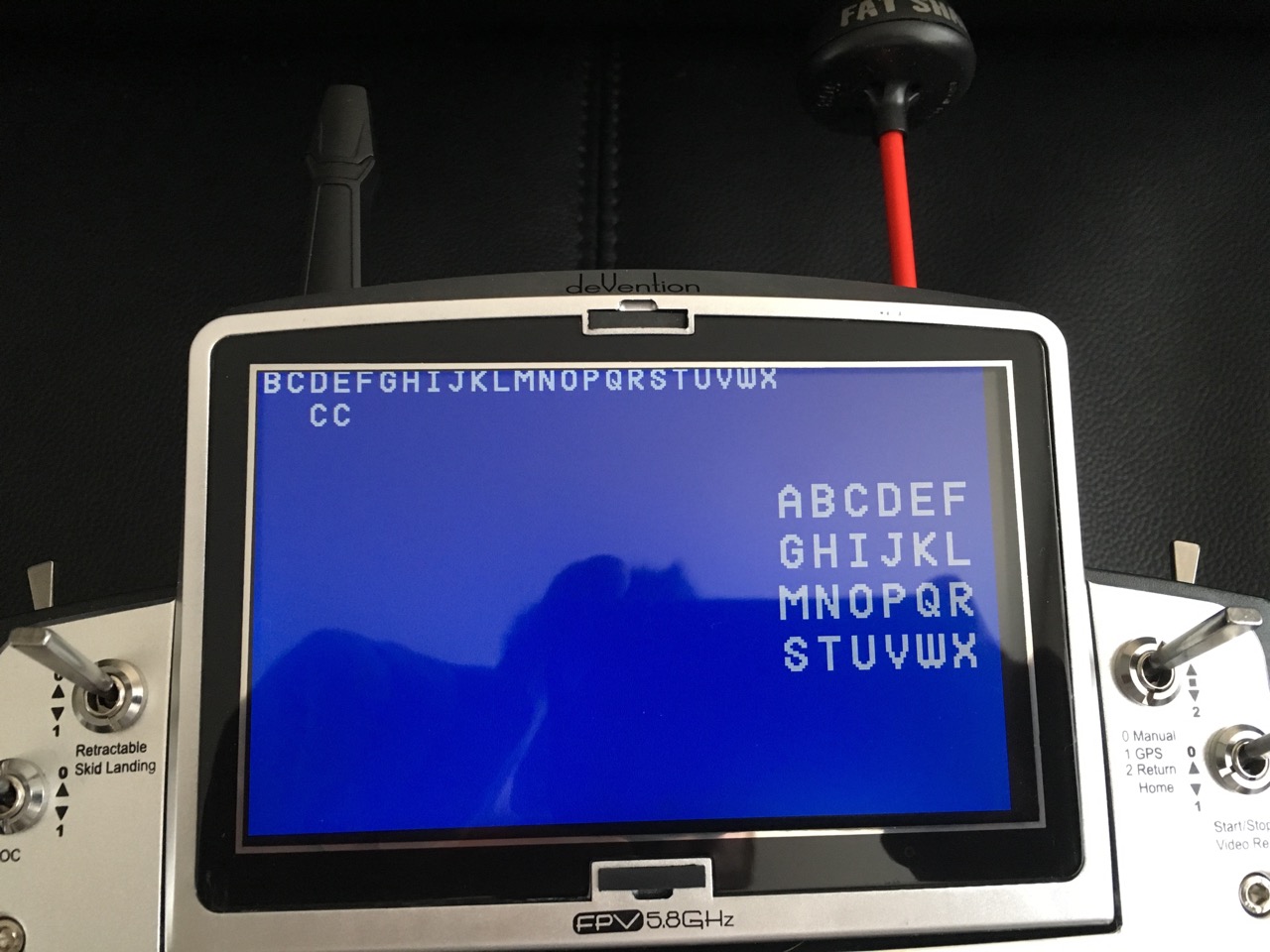
Back to the basics. Try test 4:
www.deviationtx.com/downloads-new/catego...turedblue-f12e-test4
This should show the alphabet in big letters.
www.deviationtx.com/downloads-new/catego...turedblue-f12e-test4
This should show the alphabet in big letters.
Time to create page: 1.083 seconds
-
Home

-
Forum
-
News, Announcements and Feedback
-
Feedback & Questions
- Devo F12E Incorrect Screen Resolution