
- Posts: 18
devo f12e missing channels
- JanneHoo
-
Topic Author
- Offline
Less
More
20 Aug 2017 19:10 #63879
by JanneHoo
devo f12e missing channels was created by JanneHoo
Hello,
Installed newest nightly build to my f12e with deviation uploader. All seemed to go well but the transimitter now doesn't recognize ail-ele-thr-rud or the 2 side switches (That one uses for gimbal).
And I made one model and after turning transmitter off all the models are gone. Is this normal? I have deviation on devo 10 that im super happy with, but this seems to be terrible.
Installed newest nightly build to my f12e with deviation uploader. All seemed to go well but the transimitter now doesn't recognize ail-ele-thr-rud or the 2 side switches (That one uses for gimbal).
And I made one model and after turning transmitter off all the models are gone. Is this normal? I have deviation on devo 10 that im super happy with, but this seems to be terrible.
- vlad_vy
-
- Offline

Less
More
- Posts: 3333
23 Aug 2017 06:19 #63914
by vlad_vy
Replied by vlad_vy on topic devo f12e missing channels
Do you perform sticks and AUX pots calibration?
For Devo F12E I suggest to use flash memory mod for reliable work.
www.deviationtx.com/forum/builds/6861-ul...-builds?limitstart=0
For Devo F12E I suggest to use flash memory mod for reliable work.
www.deviationtx.com/forum/builds/6861-ul...-builds?limitstart=0
- JanneHoo
-
- Offline
Less
More
- Posts: 18
23 Aug 2017 07:44 #63919
by JanneHoo
Replied by JanneHoo on topic devo f12e missing channels
Yes i did stick calibration. My solderingskills are not on level where I would try to mod memory chips on controller 
- M8A4X
-
- Offline
- M8A4X

Less
More
- Posts: 103
25 Aug 2017 02:23 #63971
by M8A4X
Replied by M8A4X on topic devo f12e missing channels
Hi JanneHoo!
Do you see any changes of Inputs when you look in -->Transmitter menu-->Channel monitor-->change page by pressing "R"?
There you find listed all the inputs of the Devo F12E. Inputs of switches should change from -100 direct to 100 when toggled and the side sliders (shown as AUX4 to 7), which were former gimbal controls, should change their value from -100 to 100 in fine steps.
If these are recognized, you have to assign them in the -->Model menu-->Mixer in order to be transmitted to the receiver.
Best regards
Max
Do you see any changes of Inputs when you look in -->Transmitter menu-->Channel monitor-->change page by pressing "R"?
There you find listed all the inputs of the Devo F12E. Inputs of switches should change from -100 direct to 100 when toggled and the side sliders (shown as AUX4 to 7), which were former gimbal controls, should change their value from -100 to 100 in fine steps.
If these are recognized, you have to assign them in the -->Model menu-->Mixer in order to be transmitted to the receiver.
Best regards
Max
- JanneHoo
-
- Offline
Less
More
- Posts: 18
27 Aug 2017 16:17 - 27 Aug 2017 16:35 #63993
by JanneHoo
Replied by JanneHoo on topic devo f12e missing channels
Attached is picture of Channel inputs, as you can see their value is 0 and doesn't change if you move the sticks.. I did set up mixers to match my devo 10 that I use now , but when I power off tx all the set ups made are gone. So there is something seriously wrong now, should this work normally on devo 12?
Also, can't get dfuse to recognize transmitter so I used deviation uploader, and now it also doesn't recognize the transmitter. So I can't upload stock firmware to use transmitter or upload deviation again.
Also, can't get dfuse to recognize transmitter so I used deviation uploader, and now it also doesn't recognize the transmitter. So I can't upload stock firmware to use transmitter or upload deviation again.
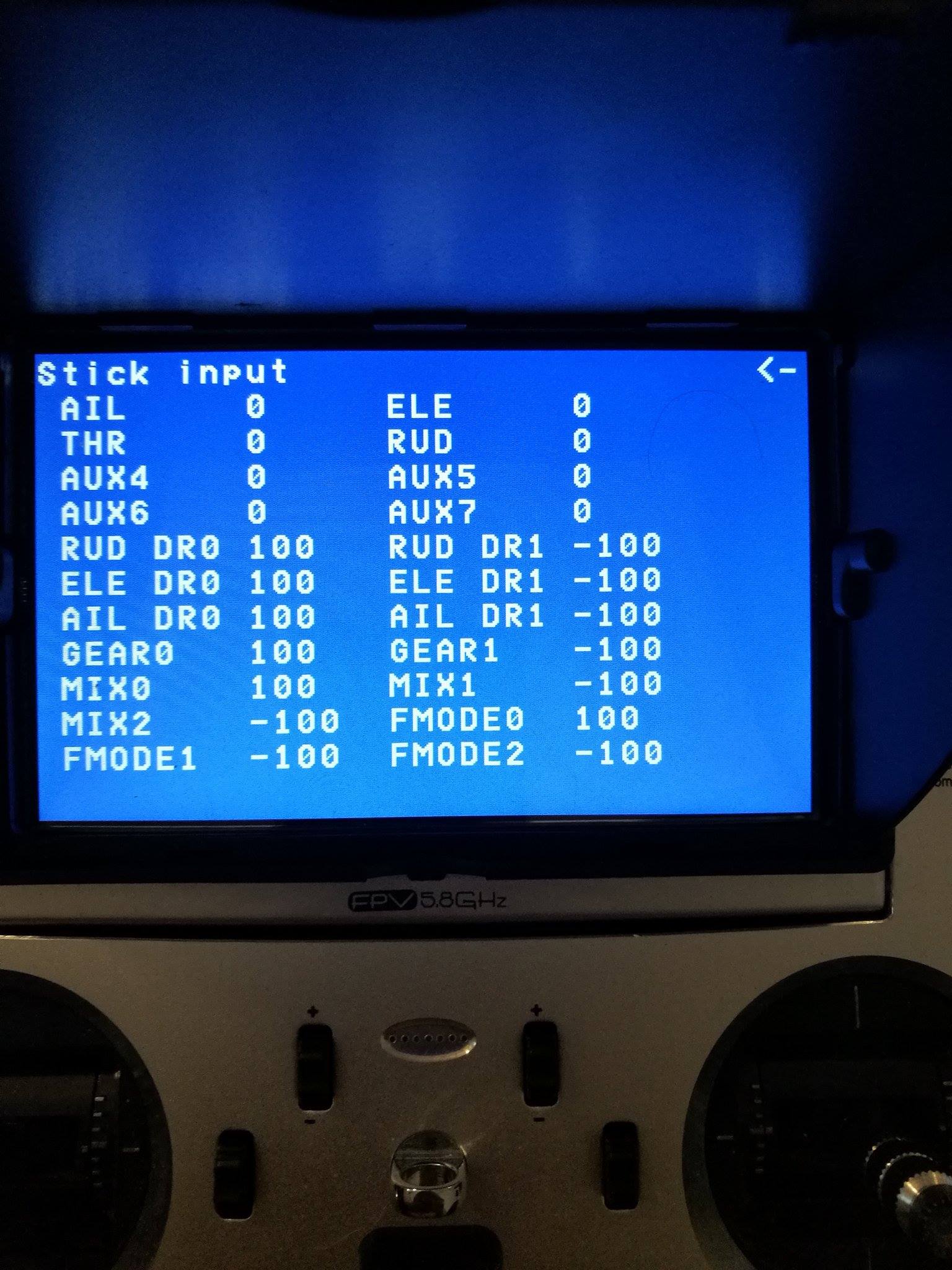
Last edit: 27 Aug 2017 16:35 by JanneHoo.
- JanneHoo
-
- Offline
Less
More
- Posts: 18
27 Aug 2017 16:50 #63994
by JanneHoo
Replied by JanneHoo on topic devo f12e missing channels
Actually now since I did stick calibration couple times I managed to get them work, but the problem is that when I turn down the transmitter all the setups are gone. So I have to perform stick calibration every time I turn on the transmitter, and same goes for setting all the mixers. What could cause this?
- M8A4X
-
- Offline
- M8A4X
Less
More
- Posts: 103
27 Aug 2017 19:15 #63996
by M8A4X
Replied by M8A4X on topic devo f12e missing channels
The fact that the inputs stay at zero all the time until you get a calibration working is strange, normally the values would flicker arround somewhere.
Have you ever opened the tx? Done anything inside it?
When you switch the tx on, are all the navigation buttons working? If you press and hold EXT while switching on the tx, does is enter "Program Update" (=DFU Mode)?
Try a different USB port at your PC, maybe a different USB cable for re-flashing deviation onto your tx.
Have you ever opened the tx? Done anything inside it?
When you switch the tx on, are all the navigation buttons working? If you press and hold EXT while switching on the tx, does is enter "Program Update" (=DFU Mode)?
Try a different USB port at your PC, maybe a different USB cable for re-flashing deviation onto your tx.
- vlad_vy
-
- Offline
Less
More
- Posts: 3333
28 Aug 2017 03:40 #64001
by vlad_vy
Replied by vlad_vy on topic devo f12e missing channels
You need use Dfuse v2.31 to recognize Devo F12E.
- JanneHoo
-
- Offline
Less
More
- Posts: 18
29 Aug 2017 17:58 - 29 Aug 2017 18:05 #64016
by JanneHoo
Replied by JanneHoo on topic devo f12e missing channels
I am using dfuse 2.31 = doesn't recognize transmitter. Transmitter is unopened and was working normally. It goes to program update mode. As mentioned i've uploaded deviation there with deviation uploader, since the dfuse refuses to work. Have tried 2 different computers, multiple cables and usb-ports. And my devo 10 works on all of these so doubt that this would be the problem.
I tried to do the upload as described in the user manual, but still just to make sure. Am I only supposed to select the zip file on the install /upgrade page and click install/upgrade? Or do I need also to something on dfu page?
Edit: I did the installation once more, and it seems that when I turn the power off tx is not saving anything (compared to devo 10). So its unusable currently.
I tried to do the upload as described in the user manual, but still just to make sure. Am I only supposed to select the zip file on the install /upgrade page and click install/upgrade? Or do I need also to something on dfu page?
Edit: I did the installation once more, and it seems that when I turn the power off tx is not saving anything (compared to devo 10). So its unusable currently.
Last edit: 29 Aug 2017 18:05 by JanneHoo.
- M8A4X
-
- Offline
- M8A4X
Less
More
- Posts: 103
30 Aug 2017 01:45 #64027
by M8A4X
Replied by M8A4X on topic devo f12e missing channels
Guessing you are on MS Windows, what happens in the device manager when you plug in the Devo in DFU mode (Program Upadte... on Devo screen)?
Is there any new entry in USB devices?
Something like "STM 32"?
Is there any new entry in USB devices?
Something like "STM 32"?
- JanneHoo
-
- Offline
Less
More
- Posts: 18
30 Aug 2017 17:20 #64037
by JanneHoo
Replied by JanneHoo on topic devo f12e missing channels
Yep there is STM32 DFU
- M8A4X
-
- Offline
- M8A4X
Less
More
- Posts: 103
31 Aug 2017 16:31 #64074
by M8A4X
Replied by M8A4X on topic devo f12e missing channels
Have you checked the "format", "install library" and "replace hardware.ini" option in the upload tool?
After installation, did you do anything further with the USB drive, which is shown in windows file manager?
After installation, did you do anything further with the USB drive, which is shown in windows file manager?
- JanneHoo
-
- Offline
Less
More
- Posts: 18
31 Aug 2017 16:37 #64075
by JanneHoo
Replied by JanneHoo on topic devo f12e missing channels
No, I didn't do anything with it. I also tried after using the install /upgrade page to do from DFU-page and sent the dfu to tx.
- M8A4X
-
- Offline
- M8A4X
Less
More
- Posts: 103
31 Aug 2017 16:46 #64076
by M8A4X
Replied by M8A4X on topic devo f12e missing channels
Just found a step which I think I also did with my F12E in another thread
Post #63399 from darthnugget, step 6.
You install the fw with the upload tool, powercycle, activate USB mode in deviation, connect to PC, open the TX USB drive, delete (not format!!!) the existing devo.fs file and replace it by the one which is included in the nightly.zip archive.
Then disconnect, exit USB mode and powercycle the TX.
Post #63399 from darthnugget, step 6.
You install the fw with the upload tool, powercycle, activate USB mode in deviation, connect to PC, open the TX USB drive, delete (not format!!!) the existing devo.fs file and replace it by the one which is included in the nightly.zip archive.
Then disconnect, exit USB mode and powercycle the TX.
- JanneHoo
-
- Offline
Less
More
- Posts: 18
31 Aug 2017 17:26 #64078
by JanneHoo
Replied by JanneHoo on topic devo f12e missing channels
yes, now it looks totally different! i thought on the manual it said that that phase has to be done when using dfsu update tool so skipped it. thanks for your help!
i thought on the manual it said that that phase has to be done when using dfsu update tool so skipped it. thanks for your help! - M8A4X
-
- Offline
- M8A4X
Less
More
- Posts: 103
01 Sep 2017 01:56 #64087
by M8A4X
Replied by M8A4X on topic devo f12e missing channels
Perfect, glad to hear that!
Time to create page: 0.915 seconds
-
Home

-
Forum
-
News, Announcements and Feedback
-
Feedback & Questions
- devo f12e missing channels