
- Posts: 14
MCPX V2 binding problems
- jens
-
Topic Author
- Offline
Less
More
30 Oct 2014 06:27 #26214
by jens
MCPX V2 binding problems was created by jens
Hello,
i have i MCPX V2 but i am not able to bind the hell with deviation...
After press "bind" something happens, and i am able to control the blades pitch/nick/roll but the motors don't start (tail motor and main motor)...
The blue Led in the MCPX is blinking...
i tried both protocols DSM2 and DSMX.
Whats wrong?
Jens
i have i MCPX V2 but i am not able to bind the hell with deviation...
After press "bind" something happens, and i am able to control the blades pitch/nick/roll but the motors don't start (tail motor and main motor)...
The blue Led in the MCPX is blinking...
i tried both protocols DSM2 and DSMX.
Whats wrong?
Jens
- FDR
-
- Offline

30 Oct 2014 09:08 #26216
by FDR
Replied by FDR on topic MCPX V2 binding problems
Try to increase the scale values of the throttle channel to say 125%...
- jens
-
- Offline
Less
More
- Posts: 14
30 Oct 2014 09:47 #26217
by jens
Replied by jens on topic MCPX V2 binding problems
I tried, but it dosnt work.
May be i did something wrong during binding?
Whats the correct way?
Connect the accu to the hell, wait for 5 seconds (blue LED ist flashing),
Press "bind" on the deviation software....
May be i did something wrong during binding?
Whats the correct way?
Connect the accu to the hell, wait for 5 seconds (blue LED ist flashing),
Press "bind" on the deviation software....
- vlad_vy
-
- Offline

Less
More
- Posts: 3333
30 Oct 2014 12:42 #26219
by vlad_vy
Replied by vlad_vy on topic MCPX V2 binding problems
Immediately after pressing 'Bind' buton move the rudder stick to full right. Continue to hold the rudder control stick to full right until the blue LED on the 3-in-1 control unit is solid.
- jens
-
- Offline
Less
More
- Posts: 14
31 Oct 2014 06:02 - 31 Oct 2014 06:04 #26234
by jens
i tried this several times... with no success.
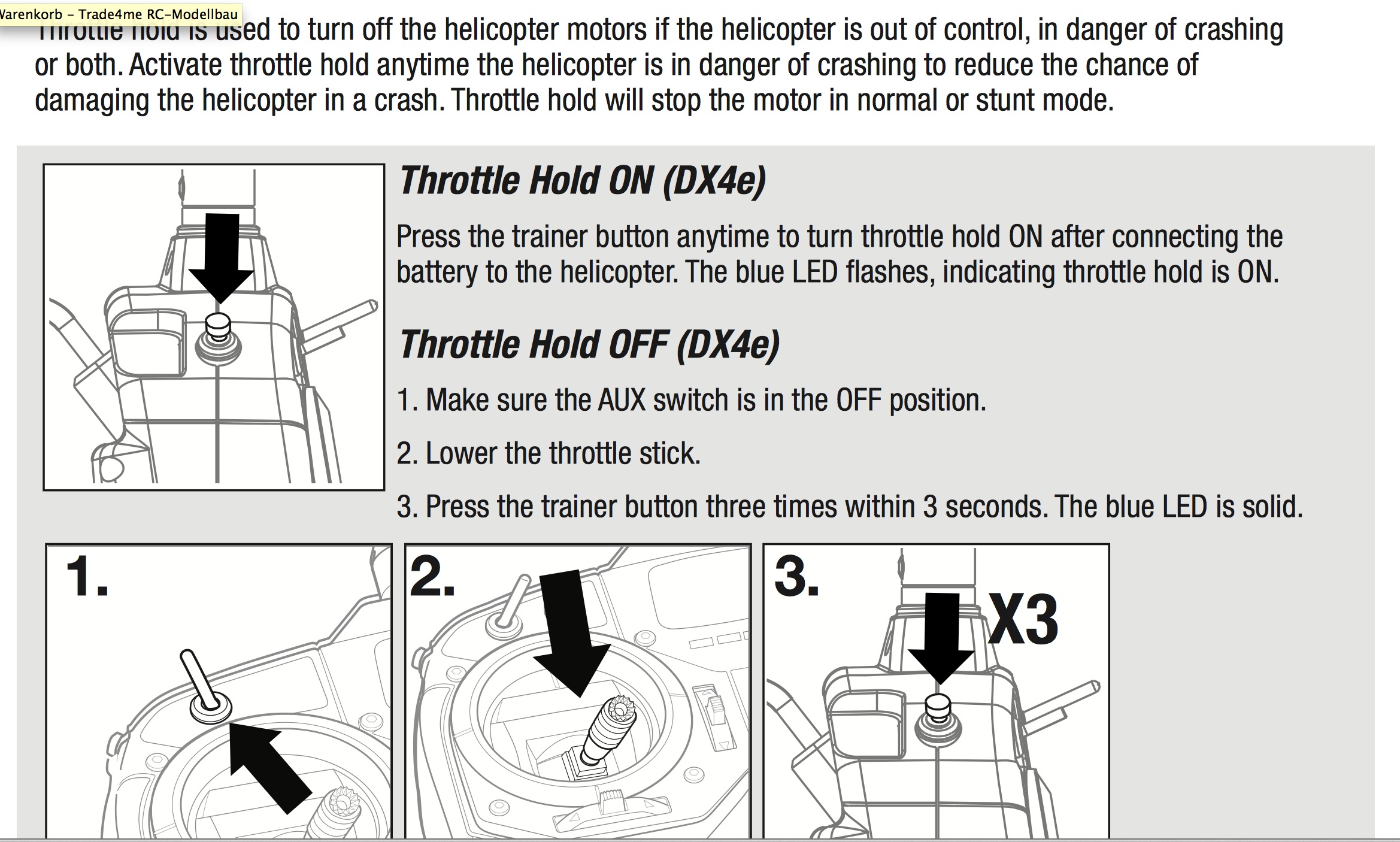
It seems to me, that the MCPX is in "throttle hold" (in the manual described as "throttle hold/motor off) mode.
For explanation: On my DX4e if i push the trainer/bind button one time, its throttle hold. Then the motor goes "off".
On my DX4e Transmitter then i have to push the trainer/bind button quickly 3 times. After that motor is on.
(See picture of manual)
Another question: I it possible to use one of the button right/left from the screen as an additionally switch for using as a channel?
Thanks for help
Jens
Replied by jens on topic MCPX V2 binding problems
vlad_vy wrote: Immediately after pressing 'Bind' buton move the rudder stick to full right. Continue to hold the rudder control stick to full right until the blue LED on the 3-in-1 control unit is solid.
i tried this several times... with no success.
It seems to me, that the MCPX is in "throttle hold" (in the manual described as "throttle hold/motor off) mode.
For explanation: On my DX4e if i push the trainer/bind button one time, its throttle hold. Then the motor goes "off".
On my DX4e Transmitter then i have to push the trainer/bind button quickly 3 times. After that motor is on.
(See picture of manual)
Another question: I it possible to use one of the button right/left from the screen as an additionally switch for using as a channel?
Thanks for help
Jens
Last edit: 31 Oct 2014 06:04 by jens.
- jens
-
- Offline
Less
More
- Posts: 14
31 Oct 2014 16:48 #26239
by jens
Replied by jens on topic MCPX V2 binding problems
finally i got it....
Rudder Stick to right does it, after unbinding the mcpx
many thx vlad_vy
Rudder Stick to right does it, after unbinding the mcpx
many thx vlad_vy
- jens
-
- Offline
Less
More
- Posts: 14
22 Apr 2019 17:59 #74090
by jens
Replied by jens on topic MCPX V2 binding problems
.... hm how to unbind? I didnt know it anymore...
Today i have the same Problem again i cant bind my mcpx. I cant find the page anymore, where is described to umbind from an dx4e (non Computer Remote)
Today i have the same Problem again i cant bind my mcpx. I cant find the page anymore, where is described to umbind from an dx4e (non Computer Remote)
- Fer
-
- Offline

Less
More
- Posts: 203
22 Apr 2019 19:33 #74092
by Fer
Its been very long ago since i last flew my mcpx v2, but if i remember correctly, there isn't actually a "unbind" mode. I think it gets in bind mode, everytime you plug in the battery before you have turned on the tx. So plug the battery in the heli, then turn on the tx, go to bind menu, hit bind, and hold the left stick to full right for binding with DEVO (DX4e needs stick to full left) for as long as it binds. It should work.
Replied by Fer on topic MCPX V2 binding problems
jens wrote: .... hm how to unbind? I didnt know it anymore...
Today i have the same Problem again i cant bind my mcpx. I cant find the page anymore, where is described to umbind from an dx4e (non Computer Remote)
Its been very long ago since i last flew my mcpx v2, but if i remember correctly, there isn't actually a "unbind" mode. I think it gets in bind mode, everytime you plug in the battery before you have turned on the tx. So plug the battery in the heli, then turn on the tx, go to bind menu, hit bind, and hold the left stick to full right for binding with DEVO (DX4e needs stick to full left) for as long as it binds. It should work.
- jens
-
- Offline
Less
More
- Posts: 14
23 Apr 2019 06:58 - 23 Apr 2019 06:58 #74105
by jens
Replied by jens on topic MCPX V2 binding problems
Yeah! Thank you! That's it! LEFT Stick!Not the right one. I idiot always took the wrong stick. The DX4e does not care. It also works with right. I have not used my MCPX for so long, just like you. Just didnt know it anymore.
Thx so much.
BTW, what kind of Hell do you fly?
Thx so much.
BTW, what kind of Hell do you fly?
Last edit: 23 Apr 2019 06:58 by jens.
- Fer
-
- Offline
Less
More
- Posts: 203
23 Apr 2019 12:41 - 23 Apr 2019 12:42 #74113
by Fer
Replied by Fer on topic MCPX V2 binding problems
I have several small to medium hellis. V911-2, an 130X Redbull, a couple of mcpxs. I used to have a couple of 130X too, but sold them for spare parts. The ones i enjoy flying at the moment are XK K110, XK K120 and Tarot 450 FBL.
Last edit: 23 Apr 2019 12:42 by Fer.
Time to create page: 0.290 seconds
-
Home

-
Forum
-
General
-
General Discussions
- MCPX V2 binding problems