
Model File Utility (Updated)
- greenfly
-
Topic Author
- Offline
Less
More
23 Jun 2015 20:46 - 14 Aug 2015 05:00 #34562
by greenfly
Model File Utility (Updated) was created by greenfly
I wrote this little utility to manage the model files on my Devo 7E running DeviationTX. The program
works by searching for a removable drive that looks like a Deviation install. When it finds one
it will look at all the models and list them in the main window. From there you can manage your
model files using the buttons on the right.
Right now, it will
Just download, unzip and run the executable.
Sorry, Windows only... and you will need the .Net Framework 4.0 installed.
See this post for the cross-platform version.
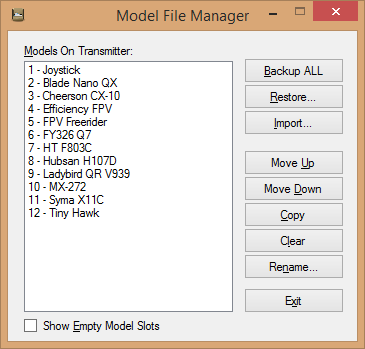
works by searching for a removable drive that looks like a Deviation install. When it finds one
it will look at all the models and list them in the main window. From there you can manage your
model files using the buttons on the right.
Right now, it will
- Backup your models folder
- Restore one or all of your models
- Import/Convert an external model file into your models folder
- Move models up and down in the list
- Copy models
- Clear a model slot
- Rename a model
Just download, unzip and run the executable.
See this post for the cross-platform version.
Last edit: 14 Aug 2015 05:00 by greenfly. Reason: New Cross-Platform Version
- Durete
-
- Offline

Less
More
- Posts: 610
- RedSleds
-
- Offline

Less
More
- Posts: 226
23 Jun 2015 22:12 #34571
by RedSleds
DEVO 10 - Multi-module with nRF24L01 +PA +LNA, A7105 +PA, & CC2500 +PA +LNA transceivers.
Nightly Build: v4.0.1-548bbf5 (6/9/2015)
Replied by RedSleds on topic Model File Utility
Sweet! I could have used this a few days ago, and saved myself a headache, or two. Thanks!
DEVO 10 - Multi-module with nRF24L01 +PA +LNA, A7105 +PA, & CC2500 +PA +LNA transceivers.
Nightly Build: v4.0.1-548bbf5 (6/9/2015)
- dc59
-
- Offline

Less
More
- Posts: 799
24 Jun 2015 00:08 #34576
by dc59
Replied by dc59 on topic Model File Utility
Good Job !!!
Excellent.
Excellent.
- Cereal_Killer
-
- Offline

24 Jun 2015 00:40 #34577
by Cereal_Killer
Taranis X9E | DEVO 10 | Devo U7E | Taranis Q7
What I do in real life: rivergoequestrian.com/
Replied by Cereal_Killer on topic Model File Utility
Wow, very cool, I really like the move up / down option ,I often spend 10 minutes before going out to the field reordering my model files to get the one's I'm about to fly up at the top and next to each other (and I have A TON), usually a long and boring job, with your utility it takes (very literally) 20 seconds!
Taranis X9E | DEVO 10 | Devo U7E | Taranis Q7
What I do in real life: rivergoequestrian.com/
- greenfly
-
- Offline
24 Jun 2015 01:21 #34578
by greenfly
Replied by greenfly on topic Model File Utility
Thanks everyone!
I've always liked the idea of model files. They make it easy to backup, read, etc without any special tools. With that flexibility though comes the risk of making a mistake... and makes some tasks a drudgery... especially if you like to play with your model settings or like to keep things nice and organized.
Or have a LOT of birds!
I've always liked the idea of model files. They make it easy to backup, read, etc without any special tools. With that flexibility though comes the risk of making a mistake... and makes some tasks a drudgery... especially if you like to play with your model settings or like to keep things nice and organized.
Or have a LOT of birds!
- gordonzo
-
- Offline

Less
More
- Posts: 43
24 Jun 2015 03:38 #34579
by gordonzo
Different fly for different guy.
Replied by gordonzo on topic Model File Utility
Very nice! Thank you.
Works with the Devo 10 as well.
g
Works with the Devo 10 as well.
g
Different fly for different guy.
- Moeder
-
- Offline

Less
More
- Posts: 796
24 Jun 2015 16:02 #34599
by Moeder
Replied by Moeder on topic Model File Utility
Nice tool. Now if we could just integrate this into the platform independent java dfu uploader and add a model editor/creator, we would have the perfect Deviation Manager
- greenfly
-
- Offline
24 Jun 2015 18:56 - 24 Jun 2015 19:38 #34604
by greenfly
I just wanted to mention that you can assign an exe to open the modelX.ini file by editing the file...
Just change the "ModelEditor" key value setting to the path of your editing exe. For instance, I default mine to Notepad++...
Note that 1) you have to use double slashes and 2)For Win7 you may need to use 8.3 filenames.
Then all you have to do is double-click the model name.
Replied by greenfly on topic Model File Utility
Moeder wrote: ...add a model editor/creator...
I just wanted to mention that you can assign an exe to open the modelX.ini file by editing the file...
ModelFileManager.exe.configJust change the "ModelEditor" key value setting to the path of your editing exe. For instance, I default mine to Notepad++...
<add key="ModelEditor" value="C:\\Program Files (x86)\\Notepad++\\notepad++.exe"/>Note that 1) you have to use double slashes and 2)For Win7 you may need to use 8.3 filenames.
Then all you have to do is double-click the model name.
Last edit: 24 Jun 2015 19:38 by greenfly. Reason: Addition
- robbe
-
- Offline

Less
More
- Posts: 10
25 Jun 2015 14:05 - 25 Jun 2015 14:19 #34651
by robbe
Replied by robbe on topic Model File Utility
Pretty nice! Thanks!
Just a question: could it be that the program can not handle more than 30 model files?
I get an error and have 50 model files on my Devo 10 (yes, most of them are empty )
)
EDIT:
Did another test with only 30 model files and no error!
So it works pretty fine with the standard settings.
EDIT2:
Handling with more than 30 files ok, but with "empty" files error.
I copied a default config to all "empty" files and everything went smooth
Just a question: could it be that the program can not handle more than 30 model files?
I get an error and have 50 model files on my Devo 10 (yes, most of them are empty
)EDIT:
Did another test with only 30 model files and no error!
So it works pretty fine with the standard settings.
EDIT2:
Handling with more than 30 files ok, but with "empty" files error.
I copied a default config to all "empty" files and everything went smooth
Last edit: 25 Jun 2015 14:19 by robbe.
- greenfly
-
- Offline
25 Jun 2015 14:44 #34653
by greenfly
Replied by greenfly on topic Model File Utility
Sorry about that. It expects for there to be a file for every model slot and that the model files are contiguous. So if you deleted any then that would cause a problem.
The program will support up to 256 models. One way to generate more model files is to "Move Down" a model down past the end of your list. The program will add an empty file to accommodate..
The program will support up to 256 models. One way to generate more model files is to "Move Down" a model down past the end of your list. The program will add an empty file to accommodate..
- robbe
-
- Offline
Less
More
- Posts: 10
25 Jun 2015 16:17 #34654
by robbe
Replied by robbe on topic Model File Utility
i have to say sorry  , because I put empty files in the models.
Good to now it supports up to 256 models, great!
, because I put empty files in the models.Good to now it supports up to 256 models, great!
- bugman72
-
- Offline

Less
More
- Posts: 35
03 Jul 2015 04:09 #35019
by bugman72
Replied by bugman72 on topic Model File Utility
This honestly has to be one of the greatest breakthroughs in Devo development! LOL! This is EXACTLY what I've been wanting. Thank you so much greenfly for creating this. It is now an invaluable tool for my Devo development.
- greenfly
-
- Offline
03 Jul 2015 15:53 #35057
by greenfly
Replied by greenfly on topic Model File Utility
Thanks bugman72!
I am very glad to hear that others are finding the app useful. Myself, I use it quite regularly. I guess I enjoy the endless tweaking and fine-tuning of my small fleet of quads.
I am very glad to hear that others are finding the app useful. Myself, I use it quite regularly. I guess I enjoy the endless tweaking and fine-tuning of my small fleet of quads.
- Richard96816
-
- Offline

Less
More
- Posts: 208
06 Jul 2015 05:11 #35148
by Richard96816
Replied by Richard96816 on topic Model File Utility
Very nice. Thanks!
- Alias_Hendrik
-
- Offline

Less
More
- Posts: 51
06 Jul 2015 10:21 #35153
by Alias_Hendrik
Replied by Alias_Hendrik on topic Model File Utility
Greenfly thanks for this! Really a big thanks! I just downloaded it and it is joy to manage my ini's and leftover test ini's. Not to mention the back-up function with date, super! And a double click opens Notepad ++. This is really valuable software! Thanks again
- greenfly
-
- Offline
28 Jul 2015 18:07 #36259
by greenfly
Replied by greenfly on topic Model File Utility (Updated)
Just an FYI.... I have updated the utility (in the first post) with a few more features. To use, you can simply replace the old files with new ones.
One new feature can use mwm's model file conversion routine from here . If you place a copy of the "straight.exe" and "default.ini" in the same directory as the Model File Manager, you can make these changes to the config to activate the model conversion during import.
One new feature can use mwm's model file conversion routine from here . If you place a copy of the "straight.exe" and "default.ini" in the same directory as the Model File Manager, you can make these changes to the config to activate the model conversion during import.
    <!-- =================================================================== -->
    <!-- Set this to the exe that will convert a model file during import -->
    <!--     Note: With no path it will assume it is in the app dir -->
    <!-- =================================================================== -->
    <add key="ModelConverter" value="straight.exe" />
    <!-- =================================================================== -->
    <!-- Set this to be the arguments for the above command where... -->
    <!--    {0} = model file being imported -->
    <!--    {1} = current model file being overwritten -->
    <!-- =================================================================== -->
<add key="ModelConverterArgs" value="{0} {1} -c default.ini" />- mwm
-
- Offline

30 Jul 2015 21:26 - 30 Jul 2015 21:36 #36375
by mwm
Do not ask me questions via PM. Ask in the forums, where I'll answer if I can.
My remotely piloted vehicle ("drone") is a yacht.
Replied by mwm on topic Model File Utility (Updated)
Any chance you could look at porting this to Mono? That way, you could do builds that would run on Linunx, the Mac and other U nix systems. The tools run on Windows and from inside of VB, and has tools to help transition from .NET. I looked at it, but I'd have to learn the tools it works with in order to use the tools I need to do the port, so it might be quicker for you if you have the bandwidth.
Whoops: Forgot to give you the link: www.mono-project.com/
Whoops: Forgot to give you the link: www.mono-project.com/
Do not ask me questions via PM. Ask in the forums, where I'll answer if I can.
My remotely piloted vehicle ("drone") is a yacht.
Last edit: 30 Jul 2015 21:36 by mwm. Reason: Add link.
- greenfly
-
- Offline
30 Jul 2015 22:18 #36380
by greenfly
Replied by greenfly on topic Model File Utility (Updated)
That's an excellent suggestion.
I have actually been looking into ways to make it cross-platform. The shortest route for me would be Mono and since it looks like it has a future now, I will probably do that. I run Windows in my day job, but am a Linux junkie at home.
Thanks for the pointer... I needed someone to get me going on this.
I have actually been looking into ways to make it cross-platform. The shortest route for me would be Mono and since it looks like it has a future now, I will probably do that. I run Windows in my day job, but am a Linux junkie at home.
Thanks for the pointer... I needed someone to get me going on this.
- Richard96816
-
- Offline
Less
More
- Posts: 208
30 Jul 2015 23:47 #36382
by Richard96816
Replied by Richard96816 on topic Model File Utility (Updated)
Very cool.
Time to create page: 0.217 seconds
-
Home

-
Forum
-
General
-
General Discussions
- Model File Utility (Updated)