
- Posts: 13
[Report] Windows10 needs driver from STMicro
- Hayataro
-
Topic Author
- Offline
Less
More
13 Feb 2018 01:01 #67479
by Hayataro
using same ID in RCGroups.
[Report] Windows10 needs driver from STMicro was created by Hayataro
Guys,
I hava an iRangeX iR8M and want flash to new firmware. I followed the instruction described in this Web, but couldn't.
I tried both Walkera DfuSe and Deviation Uploader with corresponding windows driver whitch installed by Deviation USBDrv Installer.
In the Windows-device-manager, I cansee "STM32 DFU" but both DfuSe/DeviUplder did not worked, because they cannot find a TX.
Finally I installed a driver from STMicro and flashed using DfuSe.
www.st.com/ja/development-tools/stsw-stm32080.html
Install above tool and find "C:\Program Files (x86)\STMicroelectronics\Software\DfuSe v3.0.5\Bin\Driver".
If you use Win10-64bit, execute "dpinst_amd64.exe" and installl driver located in "Driver\Win8.1\x64".
I hava an iRangeX iR8M and want flash to new firmware. I followed the instruction described in this Web, but couldn't.
I tried both Walkera DfuSe and Deviation Uploader with corresponding windows driver whitch installed by Deviation USBDrv Installer.
In the Windows-device-manager, I cansee "STM32 DFU" but both DfuSe/DeviUplder did not worked, because they cannot find a TX.
Finally I installed a driver from STMicro and flashed using DfuSe.
www.st.com/ja/development-tools/stsw-stm32080.html
Install above tool and find "C:\Program Files (x86)\STMicroelectronics\Software\DfuSe v3.0.5\Bin\Driver".
If you use Win10-64bit, execute "dpinst_amd64.exe" and installl driver located in "Driver\Win8.1\x64".
using same ID in RCGroups.
- vlad_vy
-
- Offline

Less
More
- Posts: 3333
13 Feb 2018 03:42 #67481
by vlad_vy
Replied by vlad_vy on topic [Report] Windows10 needs driver from STMicro
Do not use STMicro DfuSe, you can damage transmitter. Use Walkera DfuSe Upgrade Tools v2.31. If you have problems with driver, install it manually from: "C:\Program Files (x86)\devention Upgrade Tools\Driver\
- Hayataro
-
- Offline
Less
More
- Posts: 13
13 Feb 2018 03:47 - 13 Feb 2018 03:51 #67482
by Hayataro
using same ID in RCGroups.
Replied by Hayataro on topic [Report] Windows10 needs driver from STMicro
I'm sorry I miss some mention. I used Walkera DfuSe with STMicro driver.
I tried Walkera-driver, but it cannot be done.
I checked both driver now... File size and date are different. STMicro is newer and bigger.
I tried Walkera-driver, but it cannot be done.
I checked both driver now... File size and date are different. STMicro is newer and bigger.
using same ID in RCGroups.
Last edit: 13 Feb 2018 03:51 by Hayataro.
- GabrielRB
-
- Offline

Less
More
- Posts: 11
04 Mar 2018 13:49 #67888
by GabrielRB
Replied by GabrielRB on topic [Report] Windows10 needs driver from STMicro
Hello,
I'm using W10 x64. I tried both Walkera DfuSe driver and Deviation USBDrv Installer. None worked.
Windows recognize the device but give a message: "last usb device you connected to this computer malfunctioned"
I tried also STM drivers and still receive same message. Bellow are device manager screen and driver screen:
*already tried different USB cables and USB ports
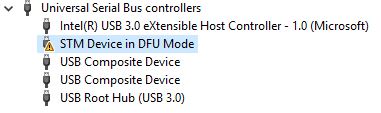
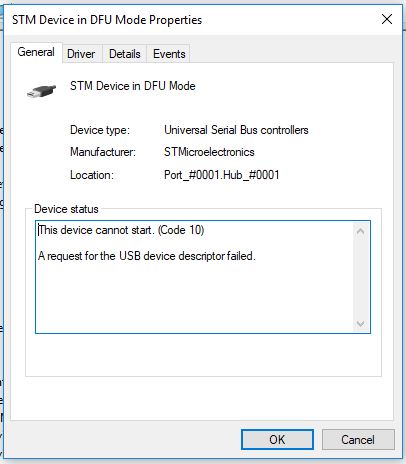
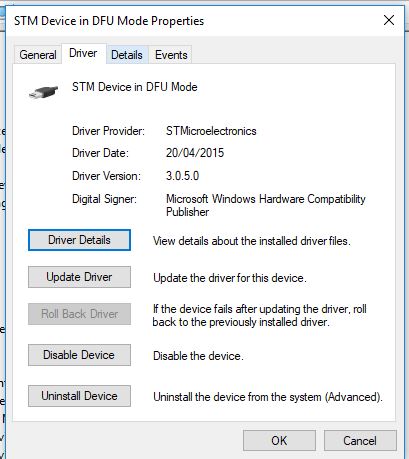
There is some thing wrong with Tx or it is a driver issue?
I'm using W10 x64. I tried both Walkera DfuSe driver and Deviation USBDrv Installer. None worked.
Windows recognize the device but give a message: "last usb device you connected to this computer malfunctioned"
I tried also STM drivers and still receive same message. Bellow are device manager screen and driver screen:
*already tried different USB cables and USB ports
There is some thing wrong with Tx or it is a driver issue?
- vlad_vy
-
- Offline
Less
More
- Posts: 3333
05 Mar 2018 06:14 #67906
by vlad_vy
Replied by vlad_vy on topic [Report] Windows10 needs driver from STMicro
Do you run driver install "As Administrator"?
- Fernandez
-
- Offline

Less
More
- Posts: 983
05 Mar 2018 08:54 #67908
by Fernandez
Replied by Fernandez on topic [Report] Windows10 needs driver from STMicro
I had also big issues getting all back to work win10 -64b, finally i managed, I can't explain anymore, but windows wanted to put the wrong drive and had manually to override.
- GabrielRB
-
- Offline
Less
More
- Posts: 11
05 Mar 2018 22:14 #67919
by GabrielRB
Yes.
What is strange to me is: the driver is install. As you can see, device manager recognize as "STM device"
So I believe the driver is correct....
Replied by GabrielRB on topic [Report] Windows10 needs driver from STMicro
vlad_vy wrote: Do you run driver install "As Administrator"?
Yes.
What is strange to me is: the driver is install. As you can see, device manager recognize as "STM device"
So I believe the driver is correct....
Time to create page: 0.478 seconds
-
Home

-
Forum
-
General
-
General Discussions
- [Report] Windows10 needs driver from STMicro