
- Posts: 253
Modified 4 Inside Layout for 7/10/8/12 v4 DSMx
- WheresWaldo
-
Topic Author
- Offline
Less
More
01 Jan 2014 14:38 - 01 Jan 2014 15:26 #17633
by WheresWaldo
Modified 4 Inside Layout for 7/10/8/12 v4 DSMx was created by WheresWaldo
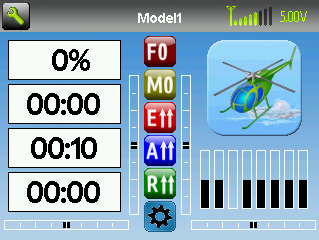
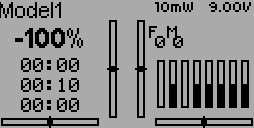
I took the current 4-Inside-X layout and dis some modifications to make a single file work on everything from the Devo7e - Devo12. The Devo12 screen still need a bit of work but the basics are there and intact. It will display all four trims, Throttle, 3 timers, 8 channels and 6 toggle switches.
Place this in the .../layout directory and you can load it in the Main page config. You can also just copy and paste the appropriate section directly into your model file if you would like.
This one is for DSMx as these protocols have throttle on channel 1.
Place this in the .../layout directory and you can load it in the Main page config. You can also just copy and paste the appropriate section directly into your model file if you would like.
This one is for DSMx as these protocols have throttle on channel 1.
Last edit: 01 Jan 2014 15:26 by WheresWaldo. Reason: Fixed Devo8 layout
- WheresWaldo
-
- Offline
Less
More
- Posts: 253
01 Jan 2014 15:28 #17643
by WheresWaldo
Replied by WheresWaldo on topic Modified 4 Inside Layout for 7/10/8/12 v4 DSMx
- magic_marty
-
- Offline

Less
More
- Posts: 706
01 Jan 2014 19:30 #17667
by magic_marty
Replied by magic_marty on topic Modified 4 Inside Layout for 7/10/8/12 v4 DSMx
sorry but could you please detail just how to get this installed on the tx? i try to download it but it wants to save it as a document file is that correct?
im a bit confused when it comes to editing files and such..
thanks a bunch..
im a bit confused when it comes to editing files and such..
thanks a bunch..
- WheresWaldo
-
- Offline
Less
More
- Posts: 253
01 Jan 2014 20:07 #17673
by WheresWaldo
Replied by WheresWaldo on topic Modified 4 Inside Layout for 7/10/8/12 v4 DSMx
Right click and save link as. Use the same name that the file already has. This will save the .ini file to your local machine. In USB mode copy this very same file to the \layout directory on your DEVO transmitter. On the Devo10/8/12 you can then load your model, go to Main page config, scroll to Load and select the layout. Once you exit back to the main screen it will be showing. If you then save your model it will save the screen layout with the model file.
- magic_marty
-
- Offline
Less
More
- Posts: 706
01 Jan 2014 20:13 #17677
by magic_marty
Replied by magic_marty on topic Modified 4 Inside Layout for 7/10/8/12 v4 DSMx
never mind i got it working it was not as hard as i thought it would be, and i love how it works thanks a bunch for sharing with us..
- kreidler
-
- Offline

Less
More
- Posts: 157
01 Jan 2014 20:14 #17678
by kreidler
Replied by kreidler on topic Modified 4 Inside Layout for 7/10/8/12 v4 DSMx
Thank you Waldo, great job.
To have the same R on the 128x64 the rudder toggle should use icon 3 and not 9.
To have the same R on the 128x64 the rudder toggle should use icon 3 and not 9.
- magic_marty
-
- Offline
Less
More
- Posts: 706
01 Jan 2014 20:14 - 01 Jan 2014 20:24 #17679
by magic_marty
Replied by magic_marty on topic Modified 4 Inside Layout for 7/10/8/12 v4 DSMx
oh wait probably did it the wrong way:( let me try it like u described and see
that's much better i was using notepad++ and copying it to each model separately i didn't no we could select templates from the config page
sorry for the confusion i have been out of the loop for a while and trying to get caught back up on everything..
thank you so much for your help and sharing..
that's much better i was using notepad++ and copying it to each model separately
i didn't no we could select templates from the config pagesorry for the confusion i have been out of the loop for a while and trying to get caught back up on everything..
thank you so much for your help and sharing..
Last edit: 01 Jan 2014 20:24 by magic_marty.
- WheresWaldo
-
- Offline
Less
More
- Posts: 253
01 Jan 2014 20:17 - 01 Jan 2014 20:20 #17680
by WheresWaldo
Replied by WheresWaldo on topic Modified 4 Inside Layout for 7/10/8/12 v4 DSMx
I use Rudder D/R as my Throttle Hold so that's why it likely uses that icon. It is very easy to reach and remember when in a panic, Should only be like that on the Devo7/10 since I have a Devo10.
@marty - don't forget that this particular files uses Channel 1 as the Throttle as that is the more common DSM channel arrangement, the other file in the other thread uses Channel 3 as Throttle since that is the Walkera way.
@marty - don't forget that this particular files uses Channel 1 as the Throttle as that is the more common DSM channel arrangement, the other file in the other thread uses Channel 3 as Throttle since that is the Walkera way.
Last edit: 01 Jan 2014 20:20 by WheresWaldo.
- kreidler
-
- Offline
Less
More
- Posts: 157
01 Jan 2014 20:22 #17681
by kreidler
Replied by kreidler on topic Modified 4 Inside Layout for 7/10/8/12 v4 DSMx
No, I mean to be consistent on all screens should use the same icons as far as possible as per your idea. You have the R on the Devo8 screen but the Th on the Devo10. My proposal was to make it the same. In which way I do not care .
. - magic_marty
-
- Offline
Less
More
- Posts: 706
01 Jan 2014 20:27 - 01 Jan 2014 20:32 #17682
by magic_marty
so if i use this template for devo i will have to change the ch number
ok i just found the other template for Devo and put it in so no worries..
Thanks all ..
Replied by magic_marty on topic Modified 4 Inside Layout for 7/10/8/12 v4 DSMx
WheresWaldo wrote: I use Rudder D/R as my Throttle Hold so that's why it likely uses that icon. It is very easy to reach and remember when in a panic, Should only be like that on the Devo7/10 since I have a Devo10.
@marty - don't forget that this particular files uses Channel 1 as the Throttle as that is the more common DSM channel arrangement, the other file in the other thread uses Channel 3 as Throttle since that is the Walkera way.
so if i use this template for devo i will have to change the ch number
ok i just found the other template for Devo and put it in so no worries..
Thanks all ..
Last edit: 01 Jan 2014 20:32 by magic_marty.
- WheresWaldo
-
- Offline
Less
More
- Posts: 253
01 Jan 2014 23:41 #17690
by WheresWaldo
I would consider changing the icons for Rudder DR but the only R that matches is the R with a down arrow, there is no R up arrow in the Devo7/10 Toggles. Personally I do not care much for the toggles as they are, I think they are too big and should have been more icon like, some also don't seem to make any sense to me and seem of little value. But I don't have a better way of doing them so I am not suggesting any changes.
Replied by WheresWaldo on topic Modified 4 Inside Layout for 7/10/8/12 v4 DSMx
kreidler wrote: No, I mean to be consistent on all screens should use the same icons as far as possible as per your idea. You have the R on the Devo8 screen but the Th on the Devo10. My proposal was to make it the same. In which way I do not care
I would consider changing the icons for Rudder DR but the only R that matches is the R with a down arrow, there is no R up arrow in the Devo7/10 Toggles. Personally I do not care much for the toggles as they are, I think they are too big and should have been more icon like, some also don't seem to make any sense to me and seem of little value. But I don't have a better way of doing them so I am not suggesting any changes.
Time to create page: 0.076 seconds
-
Home

-
Forum
-
Model Configs, Templates, Skins
-
Custom Layouts
- Modified 4 Inside Layout for 7/10/8/12 v4 DSMx