
- Posts: 57
EFLITE MSR ICON DEVO7E, HELP RGB565
- Lyndros
-
Topic Author
- Offline
Less
More
23 Jan 2013 20:23 - 25 Jan 2013 20:08 #5437
by Lyndros
EFLITE MSR ICON DEVO7E, HELP RGB565 was created by Lyndros
Hi all,
I have done a .bmp for DEVO7E in BMP. Gimp for windows does not include the option to export it to RGB565 and I can not find a decent converter.
Can anyone convert the file or can tell me an easy program to perform this conversion ?
Cheers,
Lyndros
I have done a .bmp for DEVO7E in BMP. Gimp for windows does not include the option to export it to RGB565 and I can not find a decent converter.
Can anyone convert the file or can tell me an easy program to perform this conversion ?
Cheers,
Lyndros
Last edit: 25 Jan 2013 20:08 by Lyndros. Reason: Add good export
- FDR
-
- Offline

23 Jan 2013 20:27 #5438
by FDR
Replied by FDR on topic EFLITE MSR ICON DEVO7E, HELP RGB565
Have you tried this way:
www.deviationtx.com/forum/model-icons/87...r-making-model-icons
www.deviationtx.com/forum/model-icons/87...r-making-model-icons
- Lyndros
-
- Offline
Less
More
- Posts: 57
23 Jan 2013 21:39 #5439
by Lyndros
Replied by Lyndros on topic EFLITE MSR ICON DEVO7E, HELP RGB565
Yes I have tried but this advanced option is not available in GIMP 2.8 for Windows. 
Any other idea?
Any other idea?
- rbe2012
-
- Offline
- So much to do, so little time...

Less
More
- Posts: 1433
24 Jan 2013 06:17 #5449
by rbe2012
Replied by rbe2012 on topic EFLITE MSR ICON DEVO7E, HELP RGB565
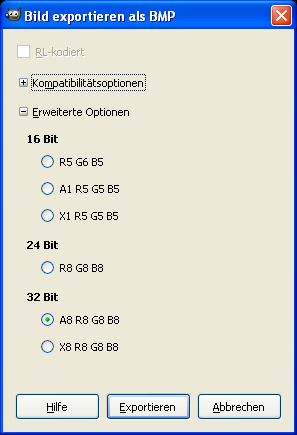
It is. You have to export the picture as Windows BMP and when you click on "save" (sorry, have no english version, but the button should be named alike). A little dialog appears with a radio button and two "+"-signs. By clicking on the lower there appear a few options - one of them is "R5 G6 B5", another is A1 R5 G5 B5" - the second for images with transparency.
- dc59
-
- Offline

Less
More
- Posts: 799
24 Jan 2013 08:56 - 24 Jan 2013 08:58 #5453
by dc59
This is what I done.
1. open your file by Windows 7 Paint
2. "Save as" -> BMP 24bit format
3. Open it with GIMP 2.8
4. Export -> Windows BMP format
now you can use advanced option .....
done
Replied by dc59 on topic EFLITE MSR ICON DEVO7E, HELP RGB565
Lyndros wrote: Yes I have tried but this advanced option is not available in GIMP 2.8 for Windows.
Any other idea?
This is what I done.
1. open your file by Windows 7 Paint
2. "Save as" -> BMP 24bit format
3. Open it with GIMP 2.8
4. Export -> Windows BMP format
now you can use advanced option .....
done
Last edit: 24 Jan 2013 08:58 by dc59.
- dc59
-
- Offline
Less
More
- Posts: 799
24 Jan 2013 08:59 - 24 Jan 2013 09:03 #5454
by dc59
Replied by dc59 on topic EFLITE MSR ICON DEVO7E, HELP RGB565
I can't upload modified file................
I don't know why ??????
I don't know why ??????
Last edit: 24 Jan 2013 09:03 by dc59.
- Lyndros
-
- Offline
Less
More
- Posts: 57
24 Jan 2013 22:48 #5483
by Lyndros
Replied by Lyndros on topic EFLITE MSR ICON DEVO7E, HELP RGB565
Hi dc59,
Thanks for your tip after exporting to 24 BIT Bmp, the advanced options appeared and I could export to RGB565.
I loaded in my transmitter and works like a charm.
Here you have the new working image already exported.
Btw,
What is this softare that you are using to edit the models ?
I have just started with the deviation firmware
Thanks
Thanks for your tip after exporting to 24 BIT Bmp, the advanced options appeared and I could export to RGB565.
I loaded in my transmitter and works like a charm.
Here you have the new working image already exported.
Btw,
What is this softare that you are using to edit the models ?
I have just started with the deviation firmware
Thanks
- dc59
-
- Offline
Less
More
- Posts: 799
25 Jan 2013 00:47 #5486
by dc59
Edit models? you mean model icon or config?
I use GIMP to edit model icon(I am really not good at this! )
)
About model config,I just use TX to edit all parameter.
Replied by dc59 on topic EFLITE MSR ICON DEVO7E, HELP RGB565
Lyndros wrote: Hi dc59,
Thanks for your tip after exporting to 24 BIT Bmp, the advanced options appeared and I could export to RGB565.
I loaded in my transmitter and works like a charm.
Here you have the new working image already exported.
Btw,
What is this softare that you are using to edit the models ?
I have just started with the deviation firmware
Thanks
Edit models? you mean model icon or config?
I use GIMP to edit model icon(I am really not good at this!
)About model config,I just use TX to edit all parameter.
- FDR
-
- Offline
25 Jan 2013 05:24 #5496
by FDR
Replied by FDR on topic EFLITE MSR ICON DEVO7E, HELP RGB565
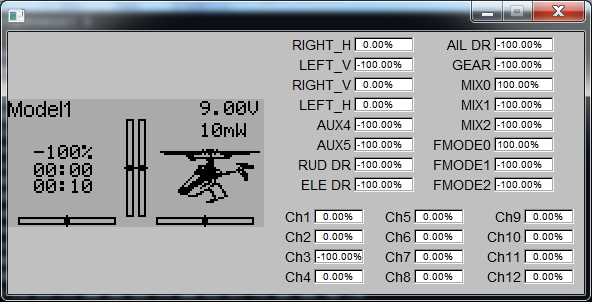
That is the emulator on the picture...
- Scream
-
- Offline

Less
More
- Posts: 73
25 Jan 2013 18:53 #5515
by Scream
Cheers!
-=S=-
Replied by Scream on topic EFLITE MSR ICON DEVO7E, HELP RGB565
SWEET!!
Thanks so much guys!
I don't know why, but I was not having any luck with icons even following the steps until this thread.
Now I "finally" have a MSR icon!
Cheers!!
-=S=-
Thanks so much guys!
I don't know why, but I was not having any luck with icons even following the steps until this thread.
Now I "finally" have a MSR icon!
Cheers!!
-=S=-
Cheers!
-=S=-
- Lyndros
-
- Offline
Less
More
- Posts: 57
25 Jan 2013 20:09 #5517
by Lyndros
Replied by Lyndros on topic EFLITE MSR ICON DEVO7E, HELP RGB565
No problem dude,
Hope you like it
PS: I will install the emulator to check
Hope you like it
PS: I will install the emulator to check
Time to create page: 0.101 seconds
-
Home

-
Forum
-
Model Configs, Templates, Skins
-
Model Icons
- EFLITE MSR ICON DEVO7E, HELP RGB565