
- Posts: 13
Devo 7E upgrading to 5.0
- Squirrel_D
-
Topic Author
- Offline
Less
More
02 Sep 2016 22:47 #53427
by Squirrel_D
Devo 7E upgrading to 5.0 was created by Squirrel_D
So I'm trying to upgrade to 5.0 from an old version of 4 something.. (It's probably been a year since I even looked at it).
I am using a different laptop running Windows 7. I downloaded pretty much everything. I tried to install the drivers using the DFU USBDrv Installer-1.1 but:
1) When I try to load the Walkera drivers all I get is a blank message box - no words, nothing, pretty much immediately after clicking the button.
2) I eventually got it to load the Deviation drivers.
So I ran the DeviationUpload-0.8.0.jar file.. I held in EXT and turned on the 7E. Plugged in the cable. Driver Software installation pops up, STM DFU (WinUSD) installed. Devo 7e shows up in the uploader tool... all going well so far...
I click the ... for the firmware and pick the deviation-emu_devo7e-v5.0.0.zip file that I downloaded.
Doing so populates the Filesystem text box.. ? Kind of strange. Anyway, I tried doing the upgrade with the install library, replace, etc.. (after I copied the files from my Tx into a separate directory for reference)
All I got was a msg box saying 'Files Copied'.
Ok, the manual for the 7e says all should be fine - I turn off the tx, turn it back on and notice that it still says 4.xxx
I tried this several times and no joy.
Eventually, I tried ticking the Format button - still, nothing besides, 'File copied'
Eventually I screwed around long enough and was able to get it to format - but the file system on the tx was something like 2 megs and there were a bunch of files on there (i forget the file extension - but none of the folders or normal .ini files..
I tried a bunch of things and now I'm just lost with a tx that does nothing.. I turn it on - nada. USB via windows shows no files. I can't get it to do anything but 'copy' files - and when I do it says they are 0 bytes.
I'm lost, I don't know what to do at this point.. Help?
I am using a different laptop running Windows 7. I downloaded pretty much everything. I tried to install the drivers using the DFU USBDrv Installer-1.1 but:
1) When I try to load the Walkera drivers all I get is a blank message box - no words, nothing, pretty much immediately after clicking the button.
2) I eventually got it to load the Deviation drivers.
So I ran the DeviationUpload-0.8.0.jar file.. I held in EXT and turned on the 7E. Plugged in the cable. Driver Software installation pops up, STM DFU (WinUSD) installed. Devo 7e shows up in the uploader tool... all going well so far...
I click the ... for the firmware and pick the deviation-emu_devo7e-v5.0.0.zip file that I downloaded.
Doing so populates the Filesystem text box.. ? Kind of strange. Anyway, I tried doing the upgrade with the install library, replace, etc.. (after I copied the files from my Tx into a separate directory for reference)
All I got was a msg box saying 'Files Copied'.
Ok, the manual for the 7e says all should be fine - I turn off the tx, turn it back on and notice that it still says 4.xxx
I tried this several times and no joy.
Eventually, I tried ticking the Format button - still, nothing besides, 'File copied'
Eventually I screwed around long enough and was able to get it to format - but the file system on the tx was something like 2 megs and there were a bunch of files on there (i forget the file extension - but none of the folders or normal .ini files..
I tried a bunch of things and now I'm just lost with a tx that does nothing.. I turn it on - nada. USB via windows shows no files. I can't get it to do anything but 'copy' files - and when I do it says they are 0 bytes.
I'm lost, I don't know what to do at this point.. Help?
- HappyHarry
-
- Offline

Less
More
- Posts: 1136
03 Sep 2016 00:30 - 03 Sep 2016 00:31 #53429
by HappyHarry
Replied by HappyHarry on topic Devo 7E upgrading to 5.0
you need to extract the zip file and flash the *.dfu file that's inside. maybe have a re-read of the manual to refresh your memory bud 
Last edit: 03 Sep 2016 00:31 by HappyHarry.
- Squirrel_D
-
- Offline
Less
More
- Posts: 13
03 Sep 2016 00:45 - 03 Sep 2016 00:48 #53431
by Squirrel_D
Replied by Squirrel_D on topic Devo 7E upgrading to 5.0
I was following the manual as I was doing it. The manual says, 2.4, #1, press the ... button and select the zip file since Deviation Uploaded will handle that.
www.deviationtx.com/user-manual/user-manual-7e-10
Am I looking at the wrong manual?
Also, I just looked, there is no .dfu in the 5.0 zip.
www.deviationtx.com/user-manual/user-manual-7e-10
Am I looking at the wrong manual?
Also, I just looked, there is no .dfu in the 5.0 zip.
Last edit: 03 Sep 2016 00:48 by Squirrel_D. Reason: Added bit about the .dfu file not being in the .zip
- HappyHarry
-
- Offline
Less
More
- Posts: 1136
03 Sep 2016 05:20 #53434
by HappyHarry
Replied by HappyHarry on topic Devo 7E upgrading to 5.0
you've downloaded the emulator build bud, you need the 7e version without 'emu' in it's name, and I didn't notice you were using the java uploader
- bianchifan
-
- Offline

Less
More
- Posts: 49
03 Sep 2016 08:36 - 03 Sep 2016 08:38 #53440
by bianchifan
Replied by bianchifan on topic Devo 7E upgrading to 5.0
Not shure about your writing but
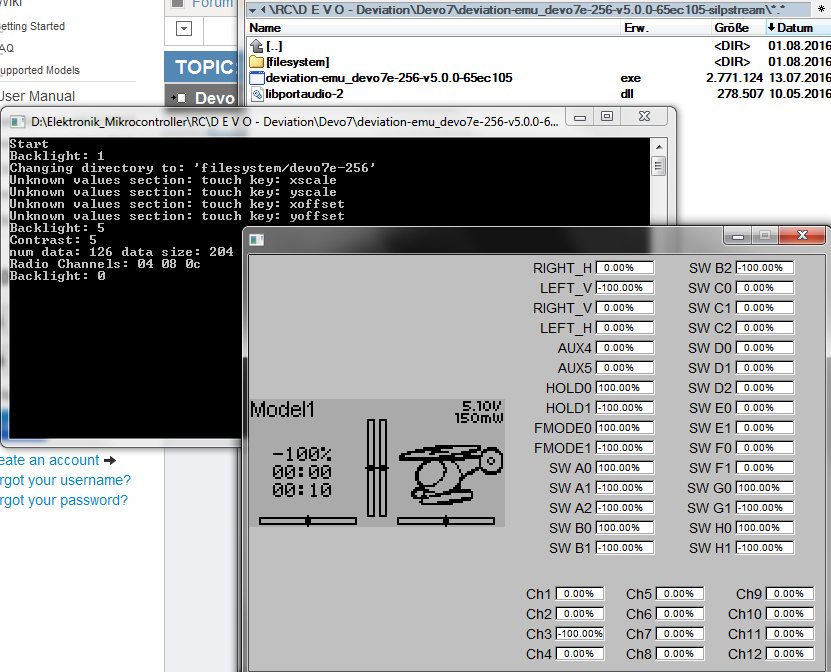

http://www.deviationDevo7e-256 libusb-driver !work
Meanwhile I checked the jar on Ubuntu , too, with DFU package installed..same result
I needed to remove all files and install the Walkera stuff..
is definitely wrong, it's a funny windows game to play with the deviation GUI without MCU flashig procedure.Squirrel_D wrote: ..and pick the deviation-emu_devo7e-v5.0.0.zip file...
Nevertheless your result looks straight same like mine, "Files copied" and Devo remains in DFU stateSquirrel_D wrote: All I got was a msg box saying 'Files Copied'.
http://www.deviationDevo7e-256 libusb-driver !work
Meanwhile I checked the jar on Ubuntu , too, with DFU package installed..same result
I needed to remove all files and install the Walkera stuff..
Last edit: 03 Sep 2016 08:38 by bianchifan.
- Squirrel_D
-
- Offline
Less
More
- Posts: 13
03 Sep 2016 12:24 #53445
by Squirrel_D
OMG. Thanks.
Yeah, I tried to use the Walker and one but the driver installer just pops up a blank message box.
Replied by Squirrel_D on topic Devo 7E upgrading to 5.0
HappyHarry wrote: you've downloaded the emulator build bud, you need the 7e version without 'emu' in it's name, and I didn't notice you were using the java uploader
OMG. Thanks.
Yeah, I tried to use the Walker and one but the driver installer just pops up a blank message box.
- mwm
-
- Offline

04 Sep 2016 06:45 #53458
by mwm
Just for the record, the EMU code on the 7E includes the GUI editor, so you can use it to edit GUI models. Can't do that on a 7E proper.
Do not ask me questions via PM. Ask in the forums, where I'll answer if I can.
My remotely piloted vehicle ("drone") is a yacht.
Replied by mwm on topic Devo 7E upgrading to 5.0
bianchifan wrote:
is definitely wrong, it's a funny windows game to play with the deviation GUI without MCU flashig procedure.Squirrel_D wrote: ..and pick the deviation-emu_devo7e-v5.0.0.zip file...
Just for the record, the EMU code on the 7E includes the GUI editor, so you can use it to edit GUI models. Can't do that on a 7E proper.
Do not ask me questions via PM. Ask in the forums, where I'll answer if I can.
My remotely piloted vehicle ("drone") is a yacht.
- Squirrel_D
-
- Offline
Less
More
- Posts: 13
04 Sep 2016 23:08 #53475
by Squirrel_D
Replied by Squirrel_D on topic Devo 7E upgrading to 5.0
Thanks all, once I downloaded the right file all worked perfectly. Now I'm trying to get my cx-10 W working and not having much luck. But that's a post for a different thread I guess!
Time to create page: 0.102 seconds
-
Home

-
Forum
-
General
-
General Discussions
- Devo 7E upgrading to 5.0