

- Posts: 4403
Devo 12
- PhracturedBlue
-
- Offline
Less
More
29 Sep 2012 01:53 #1865
by PhracturedBlue
1st you need to download the bootloader. You do this by creating a custom image using the dump_bootloader.c code
Once you have a copy of the bootloader, you need an SWD debugger (I use an STLink/v2) JTAG is not supported.
You now use the SWD debugger to reset the MCU FLASH. This will zero out all FLASH, but also reset the read-only bits and enable debugging
You can now use the SWD to re-upload the Bootloader.
At this point you can use the SWD interface to do debug, but the CPU runs at slow-speed (messing up timing) and the interrupt-driven network stuff makes a mess generally, so you probably want to turn that off. In the end it was next to useless for me, since at least the STLink/v2 is very limited, especially when paired with gdb.
I've found that I do virtually all of the programming via the emulator, and do all debug through the UART, and that it generally works well.
Also I recommend wiring up a switch to the battery lead. I've worn out the plug on my devo8 since I end up unplugging a lot to get out of a hang (the watchdog helps with this but does not eliminate it)
Replied by PhracturedBlue on topic Devo 12
It is possible but difficult, and not very useful.kohansey wrote: Is it possible to directly download and debug the code into the transmitter?
1st you need to download the bootloader. You do this by creating a custom image using the dump_bootloader.c code
Once you have a copy of the bootloader, you need an SWD debugger (I use an STLink/v2) JTAG is not supported.
You now use the SWD debugger to reset the MCU FLASH. This will zero out all FLASH, but also reset the read-only bits and enable debugging
You can now use the SWD to re-upload the Bootloader.
At this point you can use the SWD interface to do debug, but the CPU runs at slow-speed (messing up timing) and the interrupt-driven network stuff makes a mess generally, so you probably want to turn that off. In the end it was next to useless for me, since at least the STLink/v2 is very limited, especially when paired with gdb.
I've found that I do virtually all of the programming via the emulator, and do all debug through the UART, and that it generally works well.
Also I recommend wiring up a switch to the battery lead. I've worn out the plug on my devo8 since I end up unplugging a lot to get out of a hang (the watchdog helps with this but does not eliminate it)
- kohansey
-
Topic Author
- Offline
Less
More
- Posts: 31
04 Oct 2012 17:35 #1990
by kohansey
Replied by kohansey on topic Devo 12
You'll have to bare with me, juggling a full-time job, classes, and a family really slows down my productivity. I have about half the pins mapped out and will try to get something put together this weekend so you guys can post the connections in the articles section.
- CmdrKeen
-
- Offline

Less
More
- Posts: 7
29 Oct 2012 22:22 #2476
by CmdrKeen
Replied by CmdrKeen on topic Devo 12
Hello,
like some people before me i want to help with developing for the devo12s.
I am quite impressed with the work you all have done on the Deviation project. And it was about time to make a TX for more than one protocol.
If anyone had made progress with the devo12, please let us know.
I just disassembled my Devo to make high resolution scans of the front and the back of the main board. If the I/Os are already mapped, please let me know.
It seems to be a simple double layer board with easy traceable routes. I will make the scans tomorrow, and try to scale them down to a reasonable filesize.
..............
than i need some help with compiling a new dfu.
I always programmed with an IDE like Visual studio or eclipse. My knowledge of toolchains with command lines etc. is sparse. I never worked with mingw either.
PhracturedBlue, you mentioned it should be possible to generate a dfu for the devo 12, which i can upgrade with Dfuse to the TX.
Perhaps you can give me some startup-aid with the toolchain and a simple "hello world" on the serial port?
is it possible to programm in an IDE like Keil µVision just for writing code and checking the syntax? (or are the used compilers different?)
like some people before me i want to help with developing for the devo12s.
I am quite impressed with the work you all have done on the Deviation project. And it was about time to make a TX for more than one protocol.
If anyone had made progress with the devo12, please let us know.
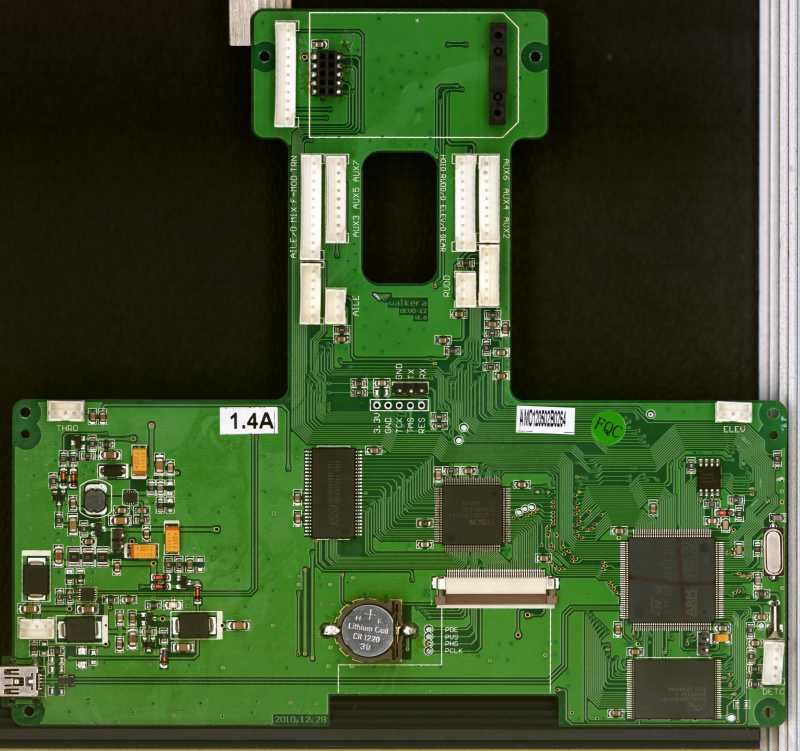
I just disassembled my Devo to make high resolution scans of the front and the back of the main board. If the I/Os are already mapped, please let me know.
It seems to be a simple double layer board with easy traceable routes. I will make the scans tomorrow, and try to scale them down to a reasonable filesize.
..............
than i need some help with compiling a new dfu.
I always programmed with an IDE like Visual studio or eclipse. My knowledge of toolchains with command lines etc. is sparse. I never worked with mingw either.
PhracturedBlue, you mentioned it should be possible to generate a dfu for the devo 12, which i can upgrade with Dfuse to the TX.
Perhaps you can give me some startup-aid with the toolchain and a simple "hello world" on the serial port?
is it possible to programm in an IDE like Keil µVision just for writing code and checking the syntax? (or are the used compilers different?)
- PhracturedBlue
-
- Offline
Less
More
- Posts: 4403
29 Oct 2012 23:39 #2477
by PhracturedBlue
Replied by PhracturedBlue on topic Devo 12
I don't think you can use Keil, but you can use Eclipse. I have some default settings that will allow you to preserve my syntax, since I can't merge code easily if you constantly reformat it.
I think sunvsuv is using Eclipse, so he may be able to tell you how to set it up.
But here is the style I recommend:
deviationtx.com/forum/7-development/73-gui?start=100#186
Building a hello world app should be pretty easy, though there may be a few hoops to jump through since the 12 uses a differetn MCU than the 6/8/10 does
It is untested, but a main.c consitsing of this is where I'd start:
The PWR_Init, CLOCK_Init, and UART_Init functions may need to be tweaked for the 12, but hopefully not too much.
you can probably compile the above for the Devo8 and use it on a Devo12 (assuming it uses the same UART port) as long as you use the Walkera DFusE tool (since it will modify the checksum when it uploads the file).
Providing good scans of the board that are size-matched (so they can be printed on a double-sided piece of paper) would be very helpful. I don't think kohansey made much progress past what is documented in this thread.
I think sunvsuv is using Eclipse, so he may be able to tell you how to set it up.
But here is the style I recommend:
deviationtx.com/forum/7-development/73-gui?start=100#186
The style I use is pretty close to 1TBS. I was able to get close in Eclipse, by
* making a new style with K&R as the base
* changing indentation to 'spaces only'
* selecting for braces: function -> next line
* selecting for braces: blocks -> next line on wrap
Building a hello world app should be pretty easy, though there may be a few hoops to jump through since the 12 uses a differetn MCU than the 6/8/10 does
It is untested, but a main.c consitsing of this is where I'd start:
#include "common.h"

int main() {
    PWR_Init();
    CLOCK_Init();
    UART_Initialize();
    printf("Hello World\n");
    while(1) {
        if(PWR_CheckPowerSwitch()) {
            PWR_Shutdown();
        }
    }
    return 1;
}
The PWR_Init, CLOCK_Init, and UART_Init functions may need to be tweaked for the 12, but hopefully not too much.
you can probably compile the above for the Devo8 and use it on a Devo12 (assuming it uses the same UART port) as long as you use the Walkera DFusE tool (since it will modify the checksum when it uploads the file).
Providing good scans of the board that are size-matched (so they can be printed on a double-sided piece of paper) would be very helpful. I don't think kohansey made much progress past what is documented in this thread.
- suvsuv
-
- Offline

Less
More
- Posts: 268
30 Oct 2012 05:08 - 30 Oct 2012 13:52 #2480
by suvsuv
Replied by suvsuv on topic Devo 12
Yes, I am using the Eclipse to write and debug codes. Here are the general steps:
1. Follow guidance in the README/README-OSX to setup cross-compile environment for your OS. I tried the setup for both WINDOWS and MAC OS, there is an issue on builing fltk under Lion Mountain. So eventually, I am doing my debugging in a Windows virtual machine under Mac OS.
2. Once the cross-compiling environment is setting up, type “make" or "make TARGET=emu_devo8 WINDOWS=1" to verify whether it works correctly, if not ,go back to step #1 . Otherwise, make sure to add proper PATH to your OS'
3. Download a Eclipse and install CDT plugin, Google is your best mentor: eclipsebook.in/advanced-eclipse/extendin...ipse/installing-cdt/
deneb.homedns.org/things/?p=113
4. Import the project into the Eclipse: File -> New -> Project -> C/C++ -> Makefile project with Existing Code , hit Next button and then click Browse button to select the deviation Makefile
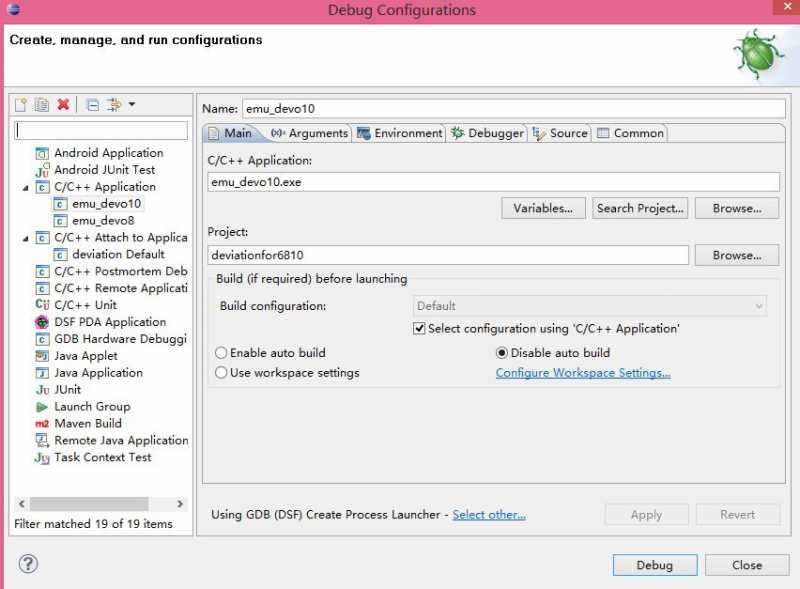
5. In the Eclipse IDE, create a Debug Configuration under C/C++ Application entry, it should look like below picture.
Frankly speaking, setting up the IDE environment with the Eclipse is not as easy as using the Visual Studio
1. Follow guidance in the README/README-OSX to setup cross-compile environment for your OS. I tried the setup for both WINDOWS and MAC OS, there is an issue on builing fltk under Lion Mountain. So eventually, I am doing my debugging in a Windows virtual machine under Mac OS.
2. Once the cross-compiling environment is setting up, type “make" or "make TARGET=emu_devo8 WINDOWS=1" to verify whether it works correctly, if not ,go back to step #1
. Otherwise, make sure to add proper PATH to your OS'3. Download a Eclipse and install CDT plugin, Google is your best mentor: eclipsebook.in/advanced-eclipse/extendin...ipse/installing-cdt/
deneb.homedns.org/things/?p=113
4. Import the project into the Eclipse: File -> New -> Project -> C/C++ -> Makefile project with Existing Code , hit Next button and then click Browse button to select the deviation Makefile
5. In the Eclipse IDE, create a Debug Configuration under C/C++ Application entry, it should look like below picture.
Frankly speaking, setting up the IDE environment with the Eclipse is not as easy as using the Visual Studio
Last edit: 30 Oct 2012 13:52 by suvsuv.
- CmdrKeen
-
- Offline
Less
More
- Posts: 7
30 Oct 2012 15:27 - 30 Oct 2012 15:47 #2499
by CmdrKeen
Replied by CmdrKeen on topic Devo 12
devo 12s front
edit: it resized the picture on upload and i cant attach the zip file ... any size restrictions?
i try to upload the file on an other way.
edit: the other way: www.sendspace.com/file/as2uoh
edit: it resized the picture on upload and i cant attach the zip file ... any size restrictions?
i try to upload the file on an other way.
edit: the other way: www.sendspace.com/file/as2uoh
Last edit: 30 Oct 2012 15:47 by CmdrKeen.
- CmdrKeen
-
- Offline
Less
More
- Posts: 7
- FDR
-
- Offline

- RandMental
-
- Offline

Less
More
- Posts: 521
01 Nov 2012 19:11 - 01 Nov 2012 19:12 #2586
by RandMental
Replied by RandMental on topic Devo 12
Hi suvsuv
Could you please post a few more pointers to get Eclipse (Juno)C/C++, the Yagarto tool Chain and this project correctly setup?
The project builds correctly under MinGW/Misys and Yagarto, yet with my limited experience with Eclipe I get lost in all the necessary settings.
I followed the steps below, but at point 5 below I am not sure which directory to select. I tried both the main and \SRC, and having selected MinGW toolset (which eclipse found), but when selecting Project-> Build nothing happens except a Java Null pointer error. So I guess there are more setting to configure.
Any help appreciated, none of the multiple Eclipse help sites got me closer to a working setup.
Could you please post a few more pointers to get Eclipse (Juno)C/C++, the Yagarto tool Chain and this project correctly setup?
The project builds correctly under MinGW/Misys and Yagarto, yet with my limited experience with Eclipe I get lost in all the necessary settings.
I followed the steps below, but at point 5 below I am not sure which directory to select. I tried both the main and \SRC, and having selected MinGW toolset (which eclipse found), but when selecting Project-> Build nothing happens except a Java Null pointer error. So I guess there are more setting to configure.
Any help appreciated, none of the multiple Eclipse help sites got me closer to a working setup.
Last edit: 01 Nov 2012 19:12 by RandMental. Reason: spelling
- suvsuv
-
- Offline
Less
More
- Posts: 268
03 Nov 2012 15:09 #2627
by suvsuv
Replied by suvsuv on topic Devo 12
Sorry , I am too busy to reply this thread.
Basically, it is very hard to have it build within the Eclipse as the makefile contains Shell commands that the Eclipse can't recognize. So I have the targets built in MingW's command line
However, I am using the Eclipse for writing codes and debug the emu_devo10/8.exe. The Eclipse 's CDT plugin can still improve C++ coding and debugging productivity a lot more than using VIM or other editors
Basically, it is very hard to have it build within the Eclipse as the makefile contains Shell commands that the Eclipse can't recognize. So I have the targets built in MingW's command line
However, I am using the Eclipse for writing codes and debug the emu_devo10/8.exe. The Eclipse 's CDT plugin can still improve C++ coding and debugging productivity a lot more than using VIM or other editors
- RandMental
-
- Offline
Less
More
- Posts: 521
- xCometz
-
- Offline

Less
More
- Posts: 18
05 Nov 2012 12:16 #2692
by xCometz
Replied by xCometz on topic Devo 12
Hi All,
I use windows system with mingw, yagarto toolchain and eclipse with Mercurial, and I can do all (compile, Hg-command, defuse tool calling) within Eclipse per mouse click.
I hope this quick eclipse instruction can help.
What you need:
1. Running toolchain on Mingw Shell (you can compile without toolchain error)
2. Phyton
3. Java Runtime
4. Eclipse with CDT
5. Mercurial v2.0 above ( mercurial.selenic.com/wiki/Download )
6. MercurialEclipse ( mercurialeclipse.eclipselabs.org.codespo...i/update_site/stable )
7. Project and environtment setting
If you did all PB instruction how to install the build environtment, you have done step 1 and 2.
Then just install 3, 4 and 5.
After you have installed Elipse then open it and install plugins MercurialEclipse over Help->Install New Software.
Project import and environtment setting
1. Click File->Import, select Clone Exixting Mercurial Repository, then click next and follow until finish (you can clone in other directory name, just change it to your desire name)
2. Select the project in Project Explorer by clicking it the open File->New->Convert to a C/C++ Projects
3. Choose makefile project and --Other Toolchain--, then click finish
4. Click File->Properties then click C/C++ Build
5. On Builder Settings Tab->Build location add /src before }, example: ${workspace_loc:/deviation/src}, this ist your working directory for this project.
6. On Behavious Tab -> Workbench Build Behavior, Build (Incremental build) put your desire make argument (ex: TARGET=devo10) and clean argument (ex: TARGET=devo10 clean)
7. Explode C/C++ Build then click Environtment add:
PATH -> Your compiler bin path, mingw bin path, msys bin path, python path, mercurial path, and JRE path
example:
PATH D:\compiler\arm\bin;C:\MinGW\bin;C:\MinGW\msys\1.0\bin;C:\Program Files\Python27;C:\Program Files\Mercurial;C:/Program Files/Java/jre6/bin/client;
TEMP -> your temporary directory
TMP -> your temporary directory
8. Now you can build project by right clicking your project->Build project
To do Mercurial command just right clicking your project and choose Team.
What you need next is to configure code style to accomodate nearest PB codestyle
I use windows system with mingw, yagarto toolchain and eclipse with Mercurial, and I can do all (compile, Hg-command, defuse tool calling) within Eclipse per mouse click.
I hope this quick eclipse instruction can help.
What you need:
1. Running toolchain on Mingw Shell (you can compile without toolchain error)
2. Phyton
3. Java Runtime
4. Eclipse with CDT
5. Mercurial v2.0 above ( mercurial.selenic.com/wiki/Download )
6. MercurialEclipse ( mercurialeclipse.eclipselabs.org.codespo...i/update_site/stable )
7. Project and environtment setting
If you did all PB instruction how to install the build environtment, you have done step 1 and 2.
Then just install 3, 4 and 5.
After you have installed Elipse then open it and install plugins MercurialEclipse over Help->Install New Software.
Project import and environtment setting
1. Click File->Import, select Clone Exixting Mercurial Repository, then click next and follow until finish (you can clone in other directory name, just change it to your desire name)
2. Select the project in Project Explorer by clicking it the open File->New->Convert to a C/C++ Projects
3. Choose makefile project and --Other Toolchain--, then click finish
4. Click File->Properties then click C/C++ Build
5. On Builder Settings Tab->Build location add /src before }, example: ${workspace_loc:/deviation/src}, this ist your working directory for this project.
6. On Behavious Tab -> Workbench Build Behavior, Build (Incremental build) put your desire make argument (ex: TARGET=devo10) and clean argument (ex: TARGET=devo10 clean)
7. Explode C/C++ Build then click Environtment add:
PATH -> Your compiler bin path, mingw bin path, msys bin path, python path, mercurial path, and JRE path
example:
PATH D:\compiler\arm\bin;C:\MinGW\bin;C:\MinGW\msys\1.0\bin;C:\Program Files\Python27;C:\Program Files\Mercurial;C:/Program Files/Java/jre6/bin/client;
TEMP -> your temporary directory
TMP -> your temporary directory
8. Now you can build project by right clicking your project->Build project
To do Mercurial command just right clicking your project and choose Team.
What you need next is to configure code style to accomodate nearest PB codestyle
- PhracturedBlue
-
- Offline
Less
More
- Posts: 4403
05 Nov 2012 14:22 #2696
by PhracturedBlue
Replied by PhracturedBlue on topic Devo 12
Thanks xCometz. I added this as an article:
www.deviationtx.com/articles/15-using-eclipse-with-deviation
www.deviationtx.com/articles/15-using-eclipse-with-deviation
- xCometz
-
- Offline
Less
More
- Posts: 18
08 Nov 2012 19:50 #2796
by xCometz
Replied by xCometz on topic Devo 12
I've forgotten few important things, say it step 7+ before 8:
7a. If you have more than one toolchain you can choose 'Replace native environtment with specified one', it can also accelerate compiling because it search only in specified one folder.
7b. Go to C/C++ Build -> Setting and choose GNU elf parser.
7a. If you have more than one toolchain you can choose 'Replace native environtment with specified one', it can also accelerate compiling because it search only in specified one folder.
7b. Go to C/C++ Build -> Setting and choose GNU elf parser.
- Sid3ways
-
- Offline

Less
More
- Posts: 9
- PhracturedBlue
-
- Offline
Less
More
- Posts: 4403
- Hexperience
-
- Offline

Less
More
- Posts: 588
04 Jan 2013 22:16 #4678
by Hexperience
There are 10 types of people in this world. Those that understand binary and those that don't.
Replied by Hexperience on topic Devo 12
How is the hardware quality? I'm starting to think that Walkera makes good stuff, just has a bad marketing department.
I was thinking of getting a 12 just to have it ready...
I was thinking of getting a 12 just to have it ready...
There are 10 types of people in this world. Those that understand binary and those that don't.
- PhracturedBlue
-
- Offline
Less
More
- Posts: 4403
- Hexperience
-
- Offline
Less
More
- Posts: 588


Time to create page: 0.222 seconds
-
Home

-
Forum
-
Development
-
Development
- Devo 12