

- Posts: 53
Flysky/Hubsan/turnigy module with pics : devo 8S
- Keith5031
-
- Offline
Less
More
27 Dec 2013 04:13 #17077
by Keith5031
 I just did this mod and now my screen just blinks and a beeping sound. I hit the EXT button it goes to upgrade screen as if I have it plugged in to upgrade with usb. I hit the ENT button it just keeps beeping and flashing. I believe I changed the tx.ini file right, don't know what is going on. Please help.
Replied by Keith5031 on topic Flysky/Hubsan/turnigy module with pics : devo 8S
I just did this mod and now my screen just blinks and a beeping sound. I hit the EXT button it goes to upgrade screen as if I have it plugged in to upgrade with usb. I hit the ENT button it just keeps beeping and flashing. I believe I changed the tx.ini file right, don't know what is going on. Please help. - rbe2012
-
- Offline
- So much to do, so little time...

Less
More
- Posts: 1433
27 Dec 2013 09:00 #17079
by rbe2012
Replied by rbe2012 on topic Flysky/Hubsan/turnigy module with pics : devo 8S
Sounds like the tx is reset over and over when deviation is loaded. The upgrade screen works outside of deviation.
Have you checked all soldering for unwanted connections?
I would recommend to desolder one connection after the other, starting with Vcc and Vdd, and try to start deviation each time.
Have you checked all soldering for unwanted connections?
I would recommend to desolder one connection after the other, starting with Vcc and Vdd, and try to start deviation each time.
- Keith5031
-
- Offline
Less
More
- Posts: 53
27 Dec 2013 15:42 #17105
by Keith5031
 I re-downloaded the nightly builds and did all again. It works, I'm just wondering about how to do the flysky update. I am going to try again.
Replied by Keith5031 on topic Flysky/Hubsan/turnigy module with pics : devo 8S
I re-downloaded the nightly builds and did all again. It works, I'm just wondering about how to do the flysky update. I am going to try again. - Keith5031
-
- Offline
Less
More
- Posts: 53
28 Dec 2013 03:16 - 29 Dec 2013 01:51 #17248
by Keith5031
 Still having no luck. The Tx keeps reverting back to where it shows a "*' in front of all the protocols. Just after updating and going thru a cycle of on and off. I don't know what I am doing wrong, if someone could give me some advice, I am sorry for all the questions.
Replied by Keith5031 on topic Flysky/Hubsan/turnigy module with pics : devo 8S
Still having no luck. The Tx keeps reverting back to where it shows a "*' in front of all the protocols. Just after updating and going thru a cycle of on and off. I don't know what I am doing wrong, if someone could give me some advice, I am sorry for all the questions.
Last edit: 29 Dec 2013 01:51 by Keith5031. Reason: All Caps was on
- PhracturedBlue
-
- Offline

Less
More
- Posts: 4403
28 Dec 2013 03:52 #17249
by PhracturedBlue
Replied by PhracturedBlue on topic Flysky/Hubsan/turnigy module with pics : devo 8S
Please turn off the caps-lock. There aren't that many folks here, so you just need ot be patient if you can't figure it our yourself.
- Keith5031
-
- Offline
Less
More
- Posts: 53
28 Dec 2013 05:05 #17252
by Keith5031
 Sorry about the caps lock didn't realize until I had already posted. I did re-solder all terminals and rebooted. I got everything to work, but when I turn the TX off and on a few times it puts an * in front of all protocols. I then redo the module tx.ini and reboot it's good until I turn the Tx off and on again a couple of times. Not sure what that means. If someone has had this problem or something similar, I'm all ears.
Thank You.
Replied by Keith5031 on topic Flysky/Hubsan/turnigy module with pics : devo 8S
Sorry about the caps lock didn't realize until I had already posted. I did re-solder all terminals and rebooted. I got everything to work, but when I turn the TX off and on a few times it puts an * in front of all protocols. I then redo the module tx.ini and reboot it's good until I turn the Tx off and on again a couple of times. Not sure what that means. If someone has had this problem or something similar, I'm all ears.Thank You.
- RandMental
-
- Offline

Less
More
- Posts: 521
28 Dec 2013 06:07 - 28 Dec 2013 06:08 #17253
by RandMental
Replied by RandMental on topic Flysky/Hubsan/turnigy module with pics : devo 8S
Keith,
We had a problem with the code over the last +/-2 weeks which could cause this behaviour.
This was fixed yesterday - Download the latest nightly and reflash the Deviaton firmware.
You also need to fix the tx.ini file on the Deviation Flash drive to read as below, that will remove the * infront of the protocols:
[modules]
enable-cyrf6936 = B12
has_pa-cyrf6936 = 1
; enable-a7105 = A13
; has_pa-a7105 = 1
; enable-cc2500 = A14
; has_pa-cc2500 = 1
; enable-nrf24l01 = A14
; has_pa-nrf24l01 = 1
Enable (remove the ; before the line of) the models you have installed
We had a problem with the code over the last +/-2 weeks which could cause this behaviour.
This was fixed yesterday - Download the latest nightly and reflash the Deviaton firmware.
You also need to fix the tx.ini file on the Deviation Flash drive to read as below, that will remove the * infront of the protocols:
[modules]
enable-cyrf6936 = B12
has_pa-cyrf6936 = 1
; enable-a7105 = A13
; has_pa-a7105 = 1
; enable-cc2500 = A14
; has_pa-cc2500 = 1
; enable-nrf24l01 = A14
; has_pa-nrf24l01 = 1
Enable (remove the ; before the line of) the models you have installed
Last edit: 28 Dec 2013 06:08 by RandMental.
- Keith5031
-
- Offline
Less
More
- Posts: 53
28 Dec 2013 15:41 #17297
by Keith5031
 Thanks for the help everyone, that did the trick. I appreciate everyone's input and suggestions. I hope I didn't offend or anger anyone with my post with all Caps. It was a mistake, I still had it on caps from putting the capitol A, B and NONE in the tx.ini code. Thank you again, all of you have done excellent work on this FW.
Replied by Keith5031 on topic Flysky/Hubsan/turnigy module with pics : devo 8S
Thanks for the help everyone, that did the trick. I appreciate everyone's input and suggestions. I hope I didn't offend or anger anyone with my post with all Caps. It was a mistake, I still had it on caps from putting the capitol A, B and NONE in the tx.ini code. Thank you again, all of you have done excellent work on this FW. - RandMental
-
- Offline
Less
More
- Posts: 521
28 Dec 2013 15:45 #17299
by RandMental
No problem - there is a EDIT option underneath your own posts so you can go back afterwords and fix spelling mistakes, improve readability and fix and all CAPS messages
Replied by RandMental on topic Flysky/Hubsan/turnigy module with pics : devo 8S
Keith5031 wrote:
No problem - there is a EDIT option underneath your own posts so you can go back afterwords and fix spelling mistakes, improve readability and fix and all CAPS messages
- Keith5031
-
- Offline
Less
More
- Posts: 53
29 Dec 2013 04:31 #17374
by Keith5031
Replied by Keith5031 on topic Flysky/Hubsan/turnigy module with pics : devo 8S
Hey guys, it's me again. I thought I had it fixed, but every time I turn off my Tx, it redoes the tx.ini line to disable all protocols including Devo. I am using the download notepad that is here on this site, the ++notepad with the lizard icon, not the regular one. When I initially upgrade the fs fw, it's all good until I power off and then back on. I hope you guys can point me in the right direction, Thanks.
- SadSack
-
- Offline

Less
More
- Posts: 317
29 Dec 2013 04:51 #17377
by SadSack
Replied by SadSack on topic Flysky/Hubsan/turnigy module with pics : devo 8S
Minor bug and has been fixed, so grab latest Nightly Build.
- Keith5031
-
- Offline
Less
More
- Posts: 53
29 Dec 2013 09:02 #17386
by Keith5031
Replied by Keith5031 on topic Flysky/Hubsan/turnigy module with pics : devo 8S
It worked, I am so relieved. I have turned my Tx on and off probably 7 or 8 times and so far so good. I appreciate the hard work and dedication all of you have put into this free FW. Just like er9x, you guys have made a average Tx into something that rivals anything else on the market. All of you should be very proud of yourselves. I think I speak for everyone else when I say "Thank You",and everyone have a safe and Happy New Year.
- ttakata73
-
- Offline

Less
More
- Posts: 4
16 Jul 2015 16:02 - 16 Jul 2015 16:03 #35528
by ttakata73
Replied by ttakata73 on topic Flysky/Hubsan/turnigy module with pics : devo 8S
After several hours of reading threads and double checking images I managed to bind my Devo8s to a Hubsan X4 and YiZhan X4 so I think I got both my modules installed correctly.
I made this 1 page brief.
This should save anyone several hours of research if they plan to install these particular modules.
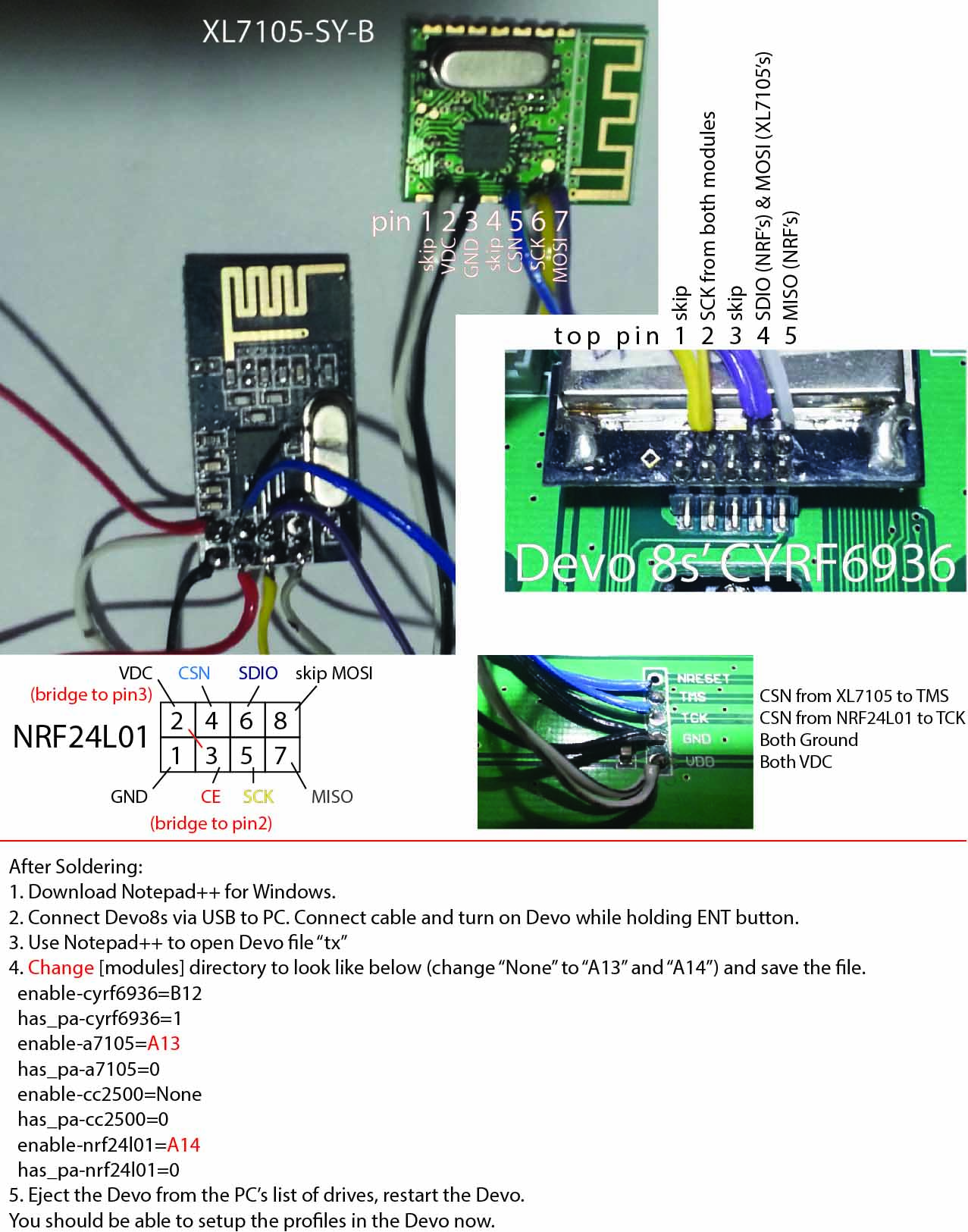
I made this 1 page brief.
This should save anyone several hours of research if they plan to install these particular modules.
Last edit: 16 Jul 2015 16:03 by ttakata73.
Time to create page: 0.684 seconds
