
Ultimate7e tutorial: Processor upgrade
- Cereal_Killer
-
- Offline

Less
More
01 Jun 2016 18:06 - 01 Jun 2016 18:07 #49768
by Cereal_Killer
Taranis X9E | DEVO 10 | Devo U7E | Taranis Q7
What I do in real life: rivergoequestrian.com/
Replied by Cereal_Killer on topic Ultimate7e tutorial: Processor upgrade
Um, what's "H8 silverware"?
Maybe it's a typo and you've got some sort of H8 acro firmware (and don't get me wrong, that'd be cool too) but I can't get past what on earth H8 silverware might be... If it's not a typo / autocorrect error I have to know lol.
Maybe it's a typo and you've got some sort of H8 acro firmware (and don't get me wrong, that'd be cool too) but I can't get past what on earth H8 silverware might be... If it's not a typo / autocorrect error I have to know lol.
Taranis X9E | DEVO 10 | Devo U7E | Taranis Q7
What I do in real life: rivergoequestrian.com/
Last edit: 01 Jun 2016 18:07 by Cereal_Killer.
- HappyHarry
-
- Offline

Less
More
- Posts: 1136
01 Jun 2016 18:25 #49771
by HappyHarry
Replied by HappyHarry on topic Ultimate7e tutorial: Processor upgrade
H8 acro and H101 acro/3d firmware is exactly what it is lol, and it's coder's username is silverxxx hence silverware 
you can find the thread that details the firmware here >> www.rcgroups.com/forums/showthread.php?t=2512604 and I can thoroughly reccomend it, it turns the h101 into an awesome 3d capable mini quad, and seeing as they are only $14 a piece this can't be beat. plus the boards can be used fir larger builds as well
you can find the thread that details the firmware here >> www.rcgroups.com/forums/showthread.php?t=2512604 and I can thoroughly reccomend it, it turns the h101 into an awesome 3d capable mini quad, and seeing as they are only $14 a piece this can't be beat. plus the boards can be used fir larger builds as well
- Fernandez
-
- Offline

Less
More
- Posts: 983
01 Jun 2016 21:44 #49785
by Fernandez
Replied by Fernandez on topic Ultimate7e tutorial: Processor upgrade
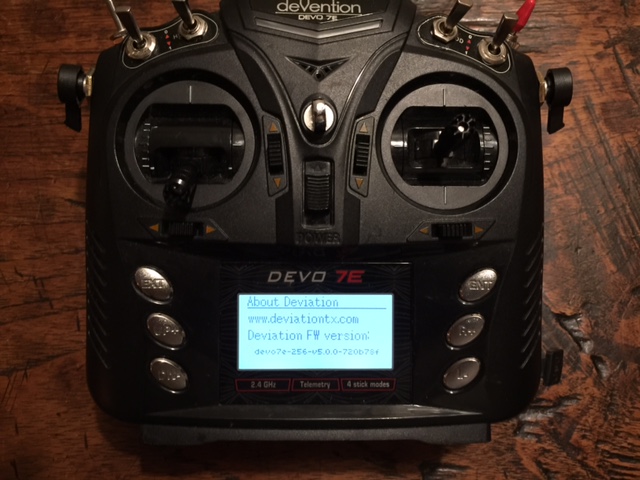
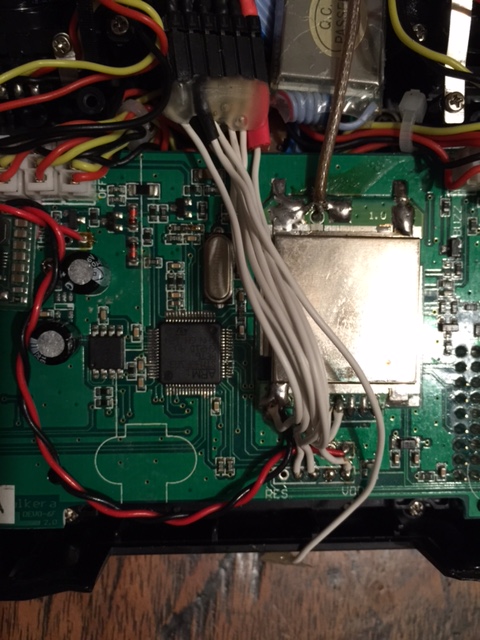
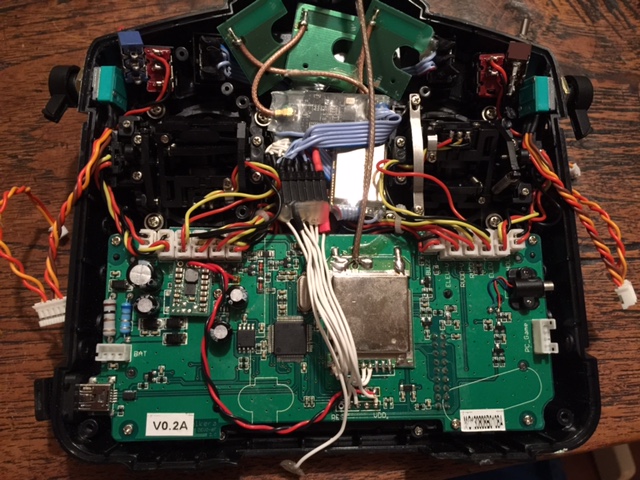
Another Ultimate 7e !
- Toxuin
-
- Offline

Less
More
- Posts: 10
01 Jun 2016 23:56 #49787
by Toxuin
Replied by Toxuin on topic Ultimate7e tutorial: Processor upgrade
What kind of anntennae do you use for non-stock rf modules? How's the range with it?
- HappyHarry
-
- Offline
Less
More
- Posts: 1136
02 Jun 2016 00:11 #49790
by HappyHarry
welcome to the brotherhood
Replied by HappyHarry on topic Ultimate7e tutorial: Processor upgrade
Fernandez wrote: Another Ultimate 7e !
welcome to the brotherhood
- Newman
-
- Offline

Less
More
- Posts: 47
02 Jun 2016 00:18 #49791
by Newman
Hopefully @Fernandez doesn't have to take the vow of silence
Replied by Newman on topic Ultimate7e tutorial: Processor upgrade
welcome to the brotherhood
Hopefully @Fernandez doesn't have to take the vow of silence
- phantom8
-
- Offline

Less
More
- Posts: 109
02 Jun 2016 07:17 - 02 Jun 2016 07:25 #49810
by phantom8
Replied by phantom8 on topic Ultimate7e tutorial: Processor upgrade
Modded another Devo 7e, but have problems with FMOD & HOLD switches. Everything else are working except these 2 switches. Does anyone know which processor pins are responsible for detecting the FMOD & HOLD switches.
PS. The 3x2 switches are working properly, just the FMOD & HOLD didn't work.
PS. The 3x2 switches are working properly, just the FMOD & HOLD didn't work.
Last edit: 02 Jun 2016 07:25 by phantom8.
- silpstream
-
Topic Author
- Offline
Less
More
- Posts: 244
02 Jun 2016 08:07 #49813
by silpstream
Replied by silpstream on topic Ultimate7e tutorial: Processor upgrade
Wow, I'm starting to lose count of the number of 256K mods out there. I'm guessing 18. 
@phantom8, the pins you want are PC10 (Pin 51) and PC11 (Pin 52).
Anyone else with the 2 3-way switch mod having the same problems? I'll check the code later after work, just in case.
@phantom8, the pins you want are PC10 (Pin 51) and PC11 (Pin 52).
Anyone else with the 2 3-way switch mod having the same problems? I'll check the code later after work, just in case.
- phantom8
-
- Offline
Less
More
- Posts: 109
02 Jun 2016 08:57 #49815
by phantom8
Thanks for the info! Somehow the connection for Pin 51 & 52 weren't good. Checked with multimeter. Resolder these 2 pins and everything is good. Your code is good, the 2 3-way switches are working fine.
Replied by phantom8 on topic Ultimate7e tutorial: Processor upgrade
silpstream wrote: @phantom8, the pins you want are PC10 (Pin 51) and PC11 (Pin 52).
Thanks for the info! Somehow the connection for Pin 51 & 52 weren't good. Checked with multimeter. Resolder these 2 pins and everything is good. Your code is good, the 2 3-way switches are working fine.
- Fernandez
-
- Offline
Less
More
- Posts: 983
02 Jun 2016 18:35 #49836
by Fernandez
Replied by Fernandez on topic Ultimate7e tutorial: Processor upgrade
The antenna's are J-pole type for 2.4ghz. I find they work perectly well.
the plastic stick antenna look big and good, but basically just a monopole antenna and the actually radiating element is very small.
all cellphone have embedded antenna....Also antenna pointing towards model is not ideal. J pole have slightly more gain and have a pretty good wideband VSWR. I bought these at DX.com. There is one better J-pole 2.4ghz design out there, but I couldn's find the them for sale.
they should put this antenna direct on the 4 in 1 module. DN007, I think is good design if mounted horizontally, for TX.
hackaday.com/2014/02/28/pcb-antenna-reference-designs/
the plastic stick antenna look big and good, but basically just a monopole antenna and the actually radiating element is very small.
all cellphone have embedded antenna....Also antenna pointing towards model is not ideal. J pole have slightly more gain and have a pretty good wideband VSWR. I bought these at DX.com. There is one better J-pole 2.4ghz design out there, but I couldn's find the them for sale.
they should put this antenna direct on the 4 in 1 module. DN007, I think is good design if mounted horizontally, for TX.
hackaday.com/2014/02/28/pcb-antenna-reference-designs/
- victzh
-
- Offline

Less
More
- Posts: 1386
02 Jun 2016 19:03 #49838
by victzh
Replied by victzh on topic Ultimate7e tutorial: Processor upgrade
I'll consider implementing this for my switch/flash board for 4-in-1 module.
- FluxedMatter
-
- Offline

Less
More
- Posts: 2
02 Jun 2016 21:29 #49841
by FluxedMatter
Replied by FluxedMatter on topic Ultimate7e tutorial: Processor upgrade
This is my first post and I want to say thank you to everyone who makes this happen. I have been reading this forum for about a year or so now, and I have really learned a lot so thank you to all of you and the list is so great that I can only mention a few like PB who started this, mwm, goebish, hexfet, HappyHarry, slipstream, Deal57, Cereal_Killer, and so many more that I’m sorry if I did not mention you. It doesn’t mean you are forgotten. I have modded several Devo 7e and a couple of Devo 6s all running deviation without issues. This topic intrigued me so I decided to give it a go. I bought the ST32F103RET6 mcu and the programmer for about $5 dollars each with fast shipping.
I read this whole thread several times before attempting the upgrade. I was trying to decide on how I was going to do it. I end up do what I thought would be the simplest way to do this. I decided to just get down and dirty so I went medieval and cut the chip out. Worked fairly well except for I was a little heavy handed in the beginning, and started out the wrong way. At first I was going to use a very fine set of cutter that i had but I ended up damaging the traces for pins 29 and 30. So I switched to a very sharp exacto knife, but if you do this make sure to use a brand new blade. It only takes a few gentle swipes on each side to cut through the pins and free the chip. I had no plans to reuse the old mcu so this was okay for me.
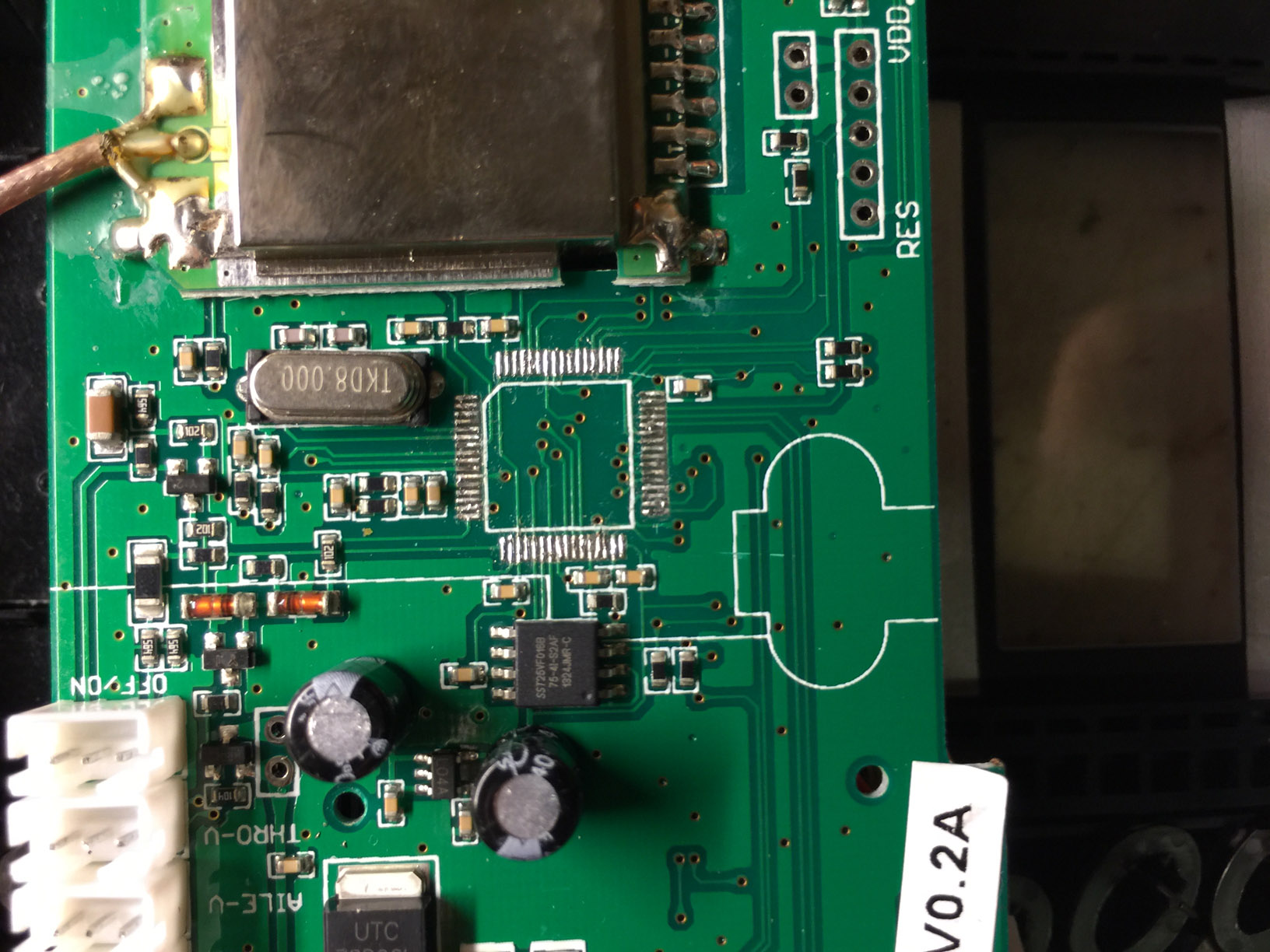
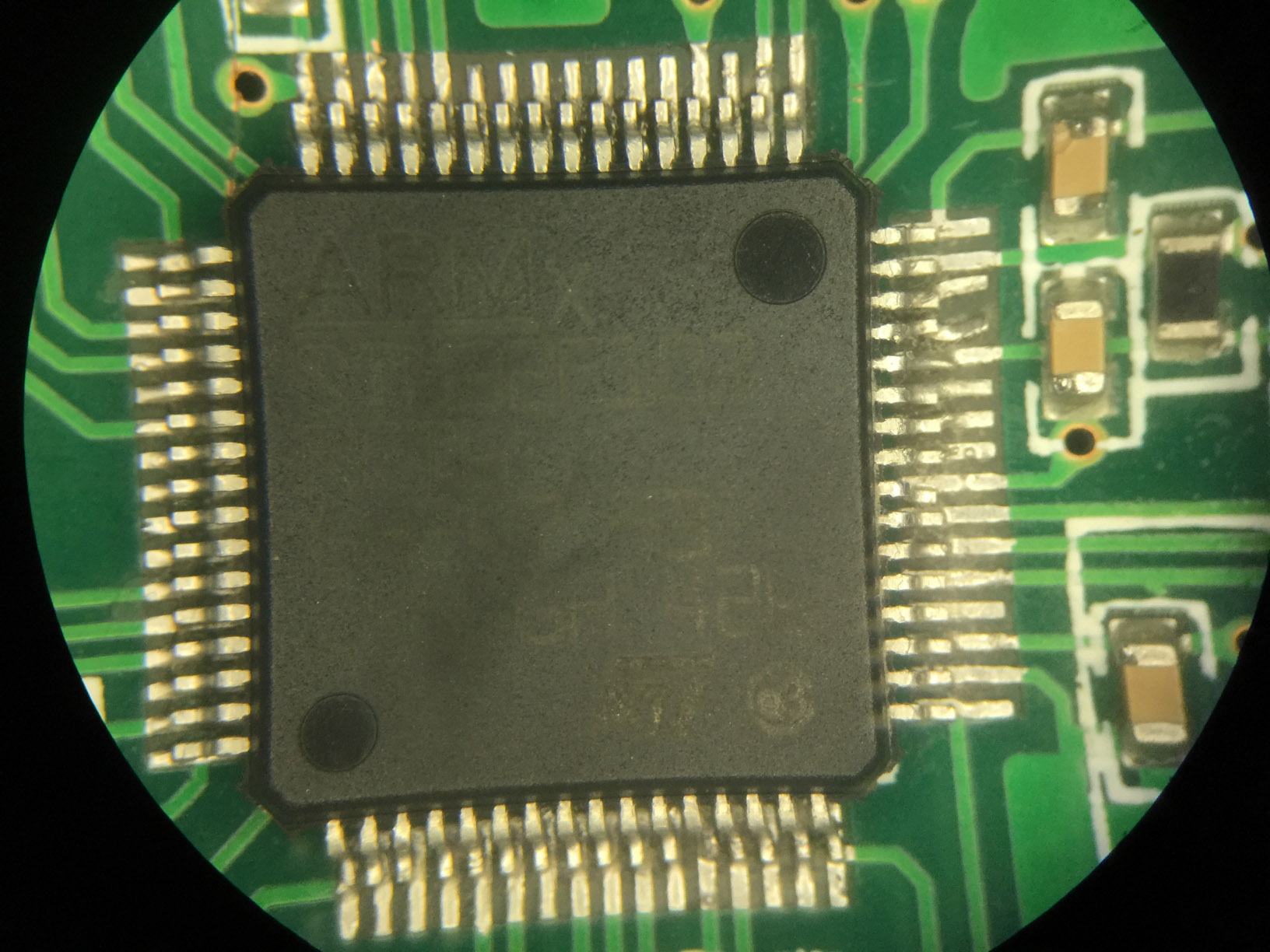
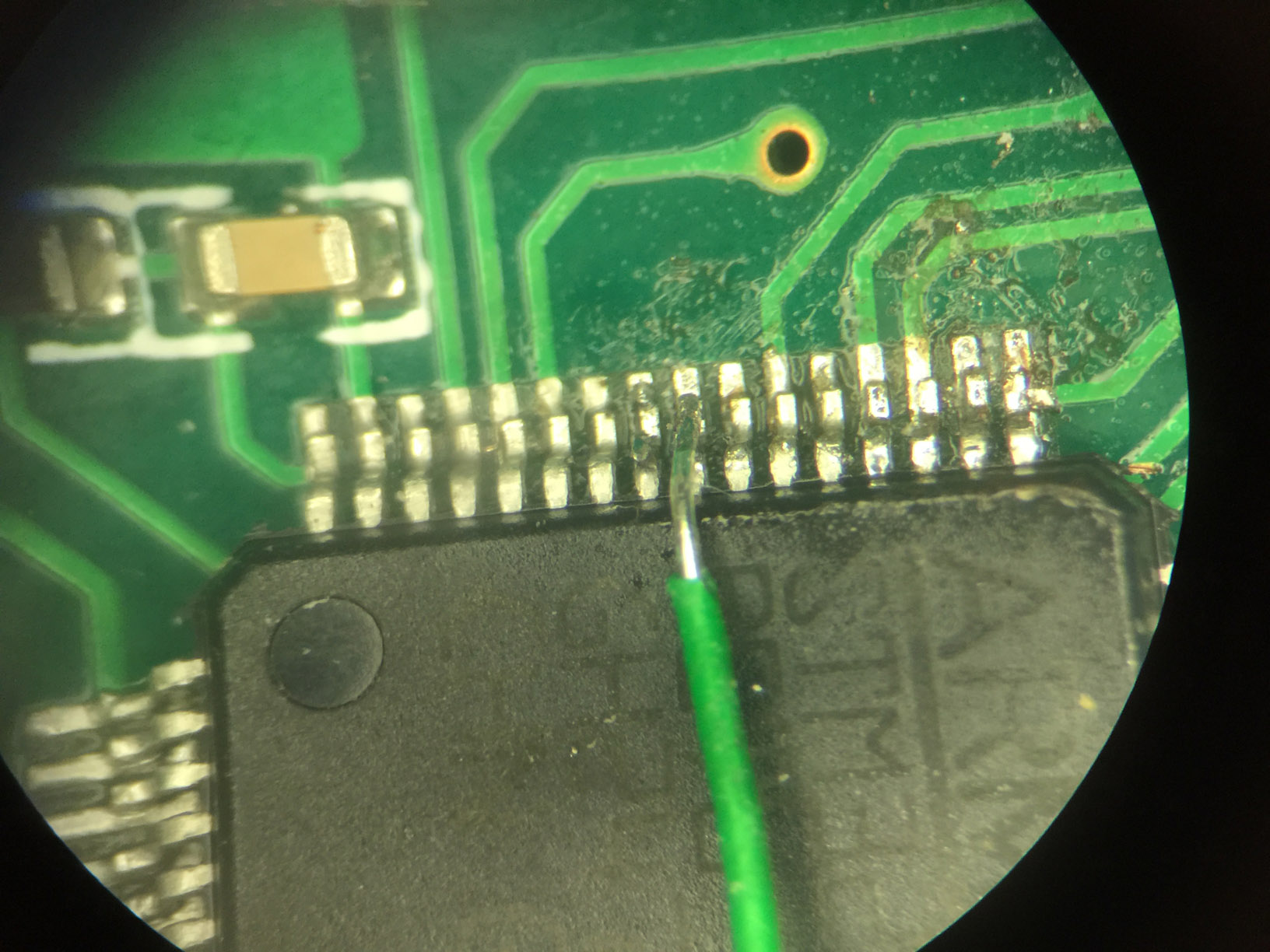
After having removed the mcu I then cleaned up the pads to prepare for the new chip, and at that time I was not sure if I could make the two pads for pins 29 and 30 work with the new chip. Pin 29 went to a via under the mcu so I removed the LCD display to see where came out at in case I needed to solder the pin to a different location. My plan all along was to hand solder in the new mcu on the board and that proved to be a little more time consuming to do than I had anticipated. Once I tacked the chip down I worked on pins 29 and 30, and I was lucky to get them solder to the traces even though they look a little funny. I proceed to solder the rest of the pins on the chip to the board. Another tip I would suggest is check your work with a microscope if you have one, or access to one. When I did I found that many of the pins were not soldered down. I had tested the chip the first time after soldering in the chip with a DMM, and it seem okay at the time, but I think I was apply enough pressure when taking the readings to make contact. It was only when I checked under a microscope that I saw many of the pins were not soldered down. And one side was so far off center that I had to slightly bend each pin over to reach the pads. Finally I fixed the problems and everything tested good. It did not turn out pretty but I was pretty sure it would work, or I least I was praying it would. You can see in the close up pictures of the mcu how badly off the pins are. Sorry if they are not so clear. I took them through one of the eyepieces of the microscope with my iphone.
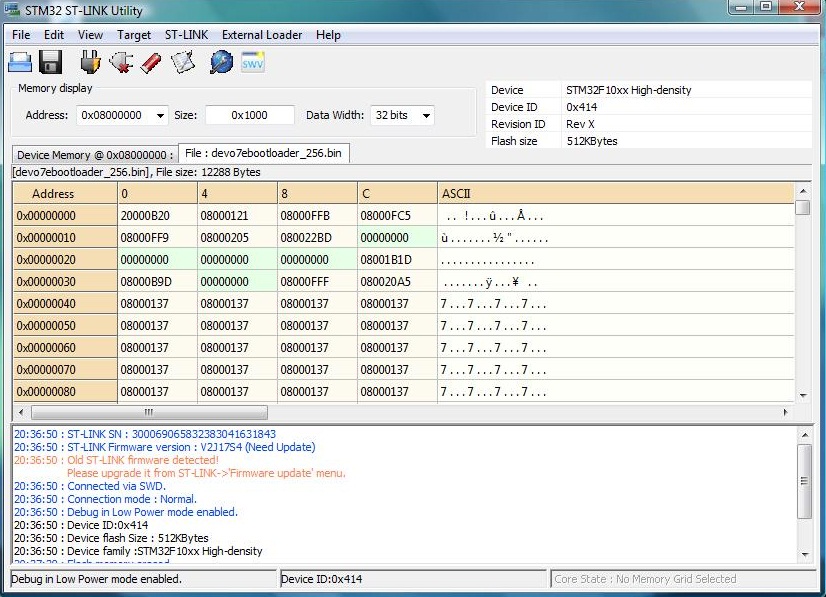
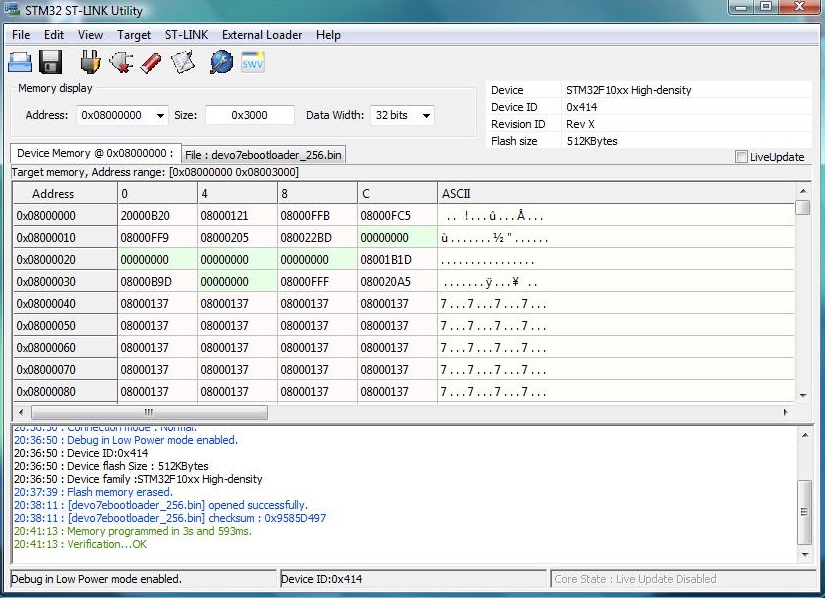
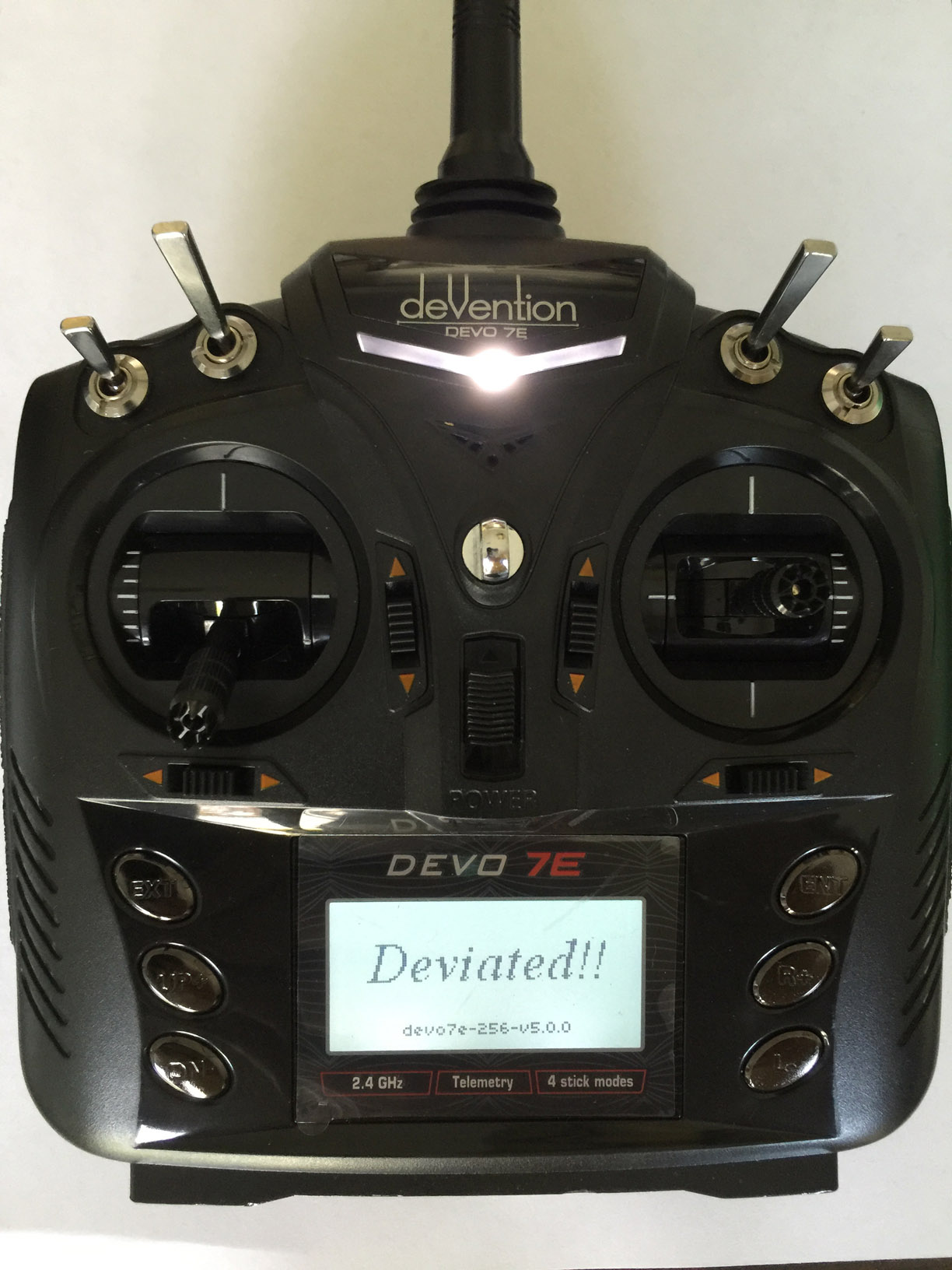
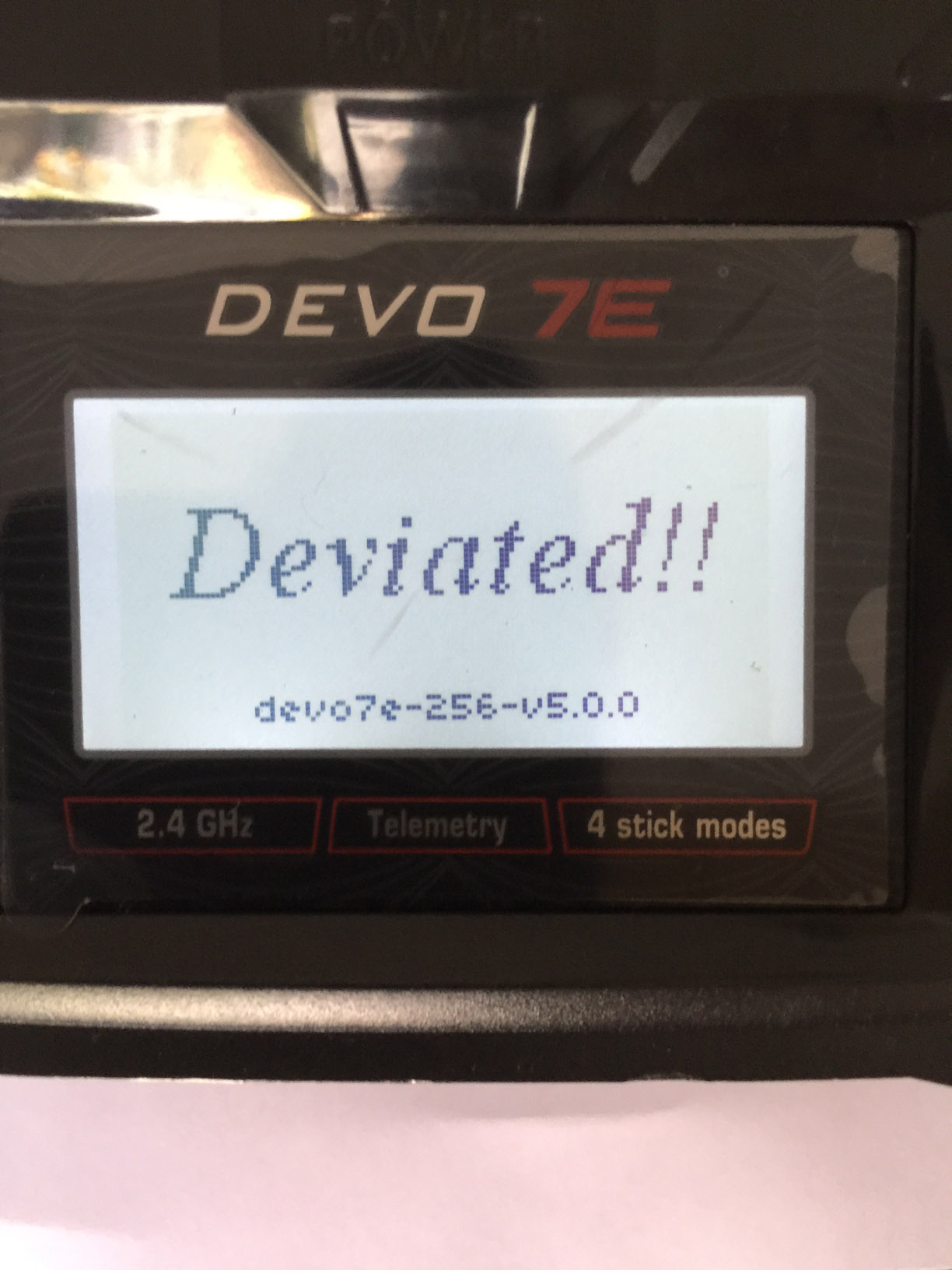
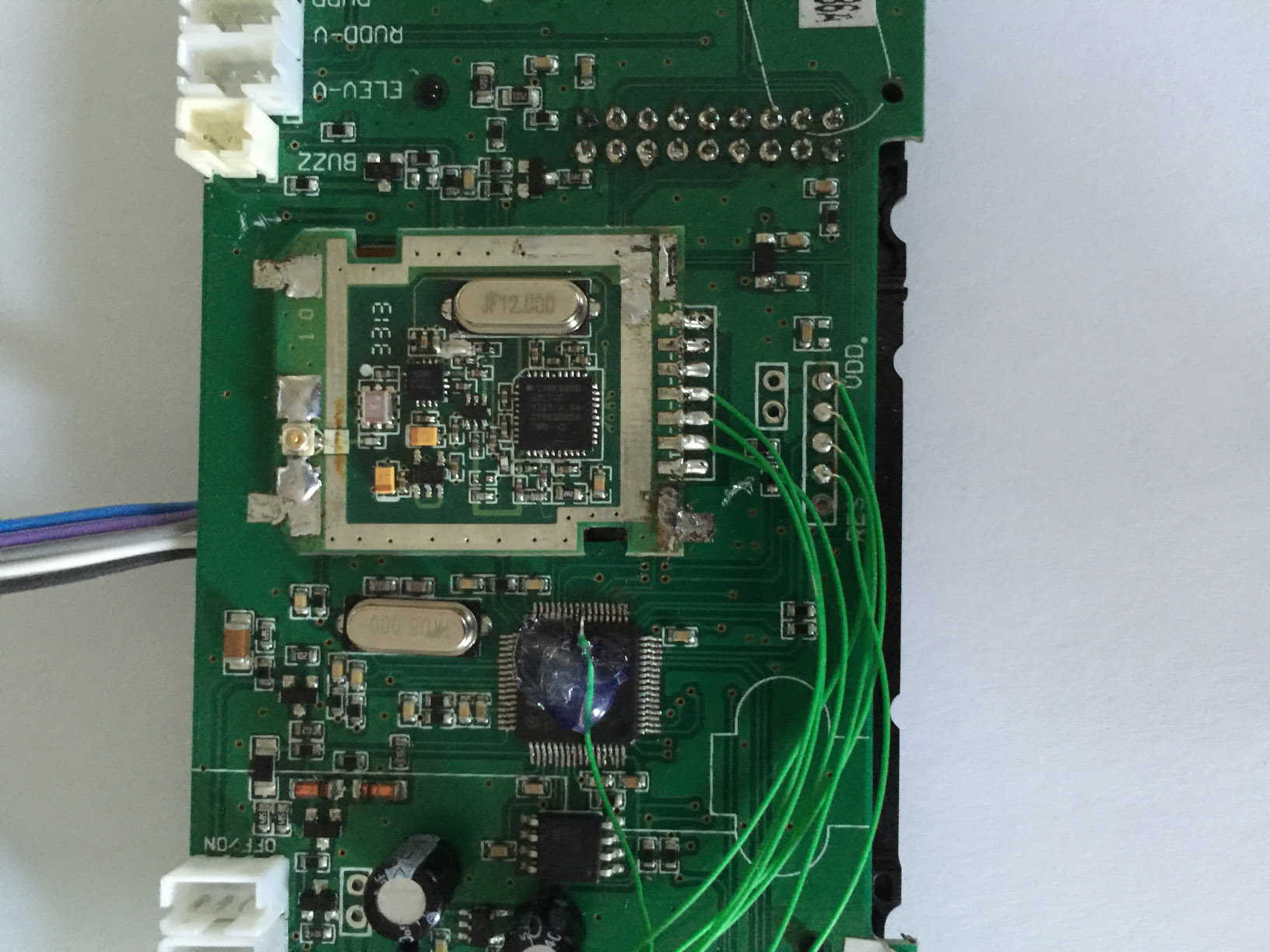
Next, I soldered on a header so I could hook up the programmer after which I installed it back temporarily to the case to connect the battery for the programming. To my surprise all went well and I was successful at getting the 256K boot loader installed on the chip. Woohoo! I was stoked the next thing to try was installing the deviation firmware. I went with HappyHarry’s version of deviation 5.0. You can tell by the pictures that I was successful. Along the way I did the range mod, LED mod, 3 in 1 module mod, 2x3-way switches mod, and installed an u.fl connector the stock CYRF module. Now for a bunch or pictures! Hope everyone likes them! And thanks again!
I read this whole thread several times before attempting the upgrade. I was trying to decide on how I was going to do it. I end up do what I thought would be the simplest way to do this. I decided to just get down and dirty so I went medieval and cut the chip out. Worked fairly well except for I was a little heavy handed in the beginning, and started out the wrong way. At first I was going to use a very fine set of cutter that i had but I ended up damaging the traces for pins 29 and 30. So I switched to a very sharp exacto knife, but if you do this make sure to use a brand new blade. It only takes a few gentle swipes on each side to cut through the pins and free the chip. I had no plans to reuse the old mcu so this was okay for me.
After having removed the mcu I then cleaned up the pads to prepare for the new chip, and at that time I was not sure if I could make the two pads for pins 29 and 30 work with the new chip. Pin 29 went to a via under the mcu so I removed the LCD display to see where came out at in case I needed to solder the pin to a different location. My plan all along was to hand solder in the new mcu on the board and that proved to be a little more time consuming to do than I had anticipated. Once I tacked the chip down I worked on pins 29 and 30, and I was lucky to get them solder to the traces even though they look a little funny. I proceed to solder the rest of the pins on the chip to the board. Another tip I would suggest is check your work with a microscope if you have one, or access to one. When I did I found that many of the pins were not soldered down. I had tested the chip the first time after soldering in the chip with a DMM, and it seem okay at the time, but I think I was apply enough pressure when taking the readings to make contact. It was only when I checked under a microscope that I saw many of the pins were not soldered down. And one side was so far off center that I had to slightly bend each pin over to reach the pads. Finally I fixed the problems and everything tested good. It did not turn out pretty but I was pretty sure it would work, or I least I was praying it would. You can see in the close up pictures of the mcu how badly off the pins are. Sorry if they are not so clear. I took them through one of the eyepieces of the microscope with my iphone.
Next, I soldered on a header so I could hook up the programmer after which I installed it back temporarily to the case to connect the battery for the programming. To my surprise all went well and I was successful at getting the 256K boot loader installed on the chip. Woohoo! I was stoked the next thing to try was installing the deviation firmware. I went with HappyHarry’s version of deviation 5.0. You can tell by the pictures that I was successful. Along the way I did the range mod, LED mod, 3 in 1 module mod, 2x3-way switches mod, and installed an u.fl connector the stock CYRF module. Now for a bunch or pictures! Hope everyone likes them! And thanks again!
- Toxuin
-
- Offline
Less
More
- Posts: 10
02 Jun 2016 23:32 #49843
by Toxuin
Replied by Toxuin on topic Ultimate7e tutorial: Processor upgrade
Did you make your own J-pole antenna or bought them somewhere?.. I heard some antenna designs are patented, but we all know this never stopped our Chinese friends from making business.
- dc59
-
- Offline

Less
More
- Posts: 799
03 Jun 2016 02:47 #49846
by dc59
I'm very interested in your board.
Replied by dc59 on topic Ultimate7e tutorial: Processor upgrade
victzh wrote: I'll consider implementing this for my switch/flash board for 4-in-1 module.
I'm very interested in your board.
- dc59
-
- Offline
Less
More
- Posts: 799
03 Jun 2016 03:01 #49847
by dc59
Replied by dc59 on topic Ultimate7e tutorial: Processor upgrade
@ FluxedMatter
It looks not that bad ~~
It looks not that bad ~~
- Fernandez
-
- Offline
Less
More
- Posts: 983
03 Jun 2016 07:40 #49850
by Fernandez
Replied by Fernandez on topic Ultimate7e tutorial: Processor upgrade
Bit off topic;
The AN007 antenna design is here; www.ti.com/lit/an/swru120b/swru120b.pdf
I think is good choice for horizontal mount and internal Tx antenna, however I do ot see them anywhere for sale.
The Antenna I used in my Ultimate devo 7e are these;
www.dx.com/p/repair-parts-replacement-in...i-32562#.V1EyjG9f2dI
I expect the are bit less good as the AN007 design as the have no coax feed match..
The AN007 antenna design is here; www.ti.com/lit/an/swru120b/swru120b.pdf
I think is good choice for horizontal mount and internal Tx antenna, however I do ot see them anywhere for sale.
The Antenna I used in my Ultimate devo 7e are these;
www.dx.com/p/repair-parts-replacement-in...i-32562#.V1EyjG9f2dI
I expect the are bit less good as the AN007 design as the have no coax feed match..
- HappyHarry
-
- Offline
Less
More
- Posts: 1136
03 Jun 2016 13:24 #49874
by HappyHarry
Replied by HappyHarry on topic Ultimate7e tutorial: Processor upgrade
welcome to the brotherhood FluxedMatter 
- silpstream
-
- Offline
Less
More
- Posts: 244
03 Jun 2016 17:00 #49883
by silpstream
I missed that... 19!!!
Replied by silpstream on topic Ultimate7e tutorial: Processor upgrade
HappyHarry wrote: welcome to the brotherhood FluxedMatter
I missed that... 19!!!
- FluxedMatter
-
- Offline
Less
More
- Posts: 2
03 Jun 2016 21:22 #49897
by FluxedMatter
Replied by FluxedMatter on topic Ultimate7e tutorial: Processor upgrade
Thanks guys! Glad to really be here finally after lurking about.  Thinking of adding the pots to my radio next.
Thinking of adding the pots to my radio next. - PhracturedBlue
-
- Offline

Less
More
- Posts: 4403
05 Jun 2016 13:03 #49944
by PhracturedBlue
Replied by PhracturedBlue on topic Ultimate7e tutorial: Processor upgrade
My concern for an internal antenna is all the other crap in the transmitter interacting with it and causing odd patterns. This would be especially true for any board that is meant to plug into the existing Devo socket, since the user wouldn't have the ability to move the module to get better transmission. Do you have a link for that J-Pole antenna on DX? I took a quick look and didn't come up with anything.Fernandez wrote: all cellphone have embedded antenna....Also antenna pointing towards model is not ideal. J pole have slightly more gain and have a pretty good wideband VSWR. I bought these at DX.com. There is one better J-pole 2.4ghz design out there, but I couldn's find the them for sale.
Time to create page: 0.365 seconds
